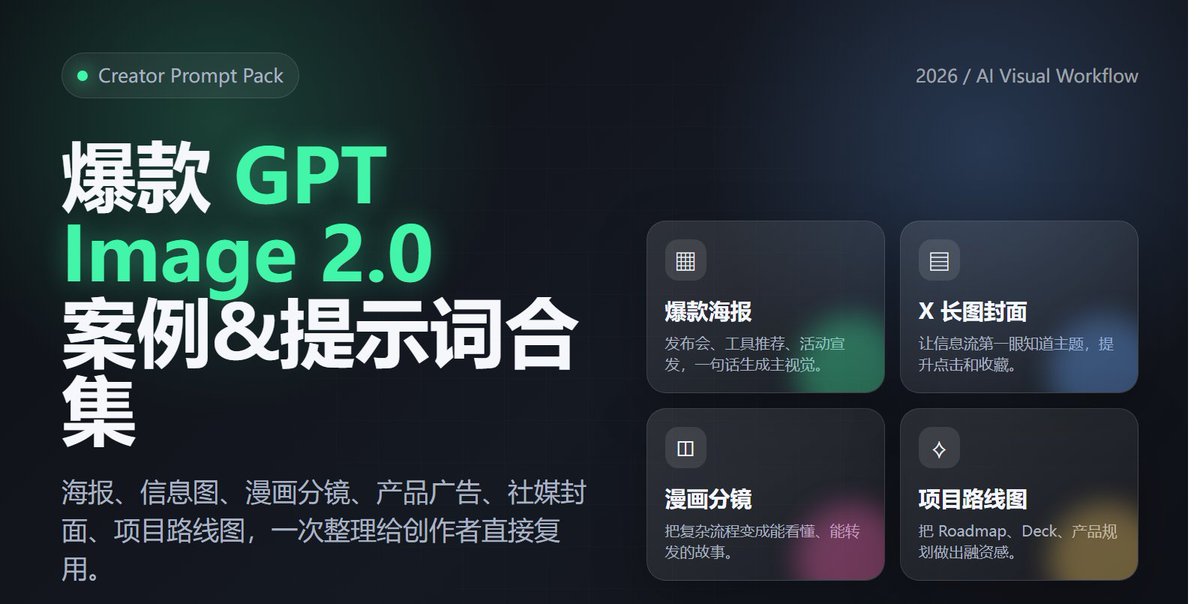
Poster zur Einführung professioneller Werkzeuge
Ein professioneller SaaS-Posteraufruf zur Ankündigung von Tools, der gut lesbaren Text und moderne Tech-Ästhetik betont.
Dies ist ein GPT Image 2 -Prompt für Grafik & Poster . Verwenden Sie den unten stehenden, kopierfertigen Prompt, um ähnliche Grafiken zu erstellen, und überprüfen Sie vor der Wiederverwendung Awesome GPT Image 2 Prompts -Quellenangaben sowie die kommerziellen Nutzungsrechte.
Benötigen Sie den vollständigen Prompt-Satz? Verwenden Sie den Grafik & Poster Weitere verwandte Beispiele finden Sie im Themen-Hub oder öffnen Sie die GPT Image 2 Prompt-Katalog für das vollständige Beispielverzeichnis, wiederverwendbare Strukturen und Quellenangaben.
Free 1K preview
Generate one preview image instantly, no sign-up required.
2055/4000
Eingabeaufforderung
Kopierfertige Eingabeaufforderung
1. Design a modern tech-style poster for an "AI Agent tool launch," vertical 4:5 aspect ratio, with a clear and eye-catching main title and a subtitle explaining product value. Use a black, white, and gray color palette with fluorescent green accents. Include abstract networks, code windows, and agent nodes. The overall look should resemble a high-end SaaS launch poster, and text must be accurate and readable. 2. Generate a cover image suitable for an X/Twitter long-form post titled "2026 AI Tool Trends," horizontal 16:9 aspect ratio, with a clean and sophisticated style. Include the title and 3 keywords: Agent / Workflow / Automation. The background should be a combination of desktop workflows, browsers, terminals, and data panels, with a layout like a tech media header. 3. Generate an advertisement for a Web3 wallet security tool. The center of the image shows a phone displaying the wallet interface, surrounded by on-chain addresses, risk alerts, shield icons, and transaction path visualizations. The style should be professional and trustworthy, with the Chinese title: "Making every on-chain operation safer." 4. Create a Chinese infographic titled "The 5 Layers of AI Agent Capabilities," including: understanding tasks, calling tools, reading data, executing operations, and reviewing/optimizing. Show this in a clear hierarchical structure, each layer with a small icon, white background, and tech-blue accents. 5. Generate a one-page 4-panel comic strip about a creator going from manually searching for info, writing copy, and making images to completing the workflow automatically with an AI Agent. The style should be lighthearted and humorous, with consistent characters and short, clear Chinese dialogue. The last panel should highlight "double the efficiency." 6. Generate a roadmap visual for an AI x Crypto project, including three phases: Q2, Q3, and Q4: MVP, Agent Marketplace, and Onchain Automation. The style should look like a product page in a funding deck—clean, credible, futuristic, and with clearly readable text.
Best for
- - Grafik & Poster visual exploration
- - Image generation and reference-image edits
- - Reusable briefs that keep source attribution visible
Change these parts
- - Subject, product, character, or scene
- - Aspect ratio, camera, lighting, and background
- - Brand, text, color, and output constraints
Recommended model and settings
- - Model: gpt-image-2
- - Input mode: Text zu Bild
- - Aspect ratio: source
- - Commercial status: review original source
How to use this prompt
- 1. Copy the prompt and preserve its structure for the first test.
- 2. Replace the subject, context, and publishing channel.
- 3. Change one camera, lighting, or style variable per iteration.
- 4. Inspect the output, source, text, and rights before reuse.
Limitations, source, and reuse cautions
- - Generated output is an editable draft, not factual, legal, or rights evidence.
- - Review the linked source, people, brands, logos, text, and third-party media before commercial use.
Importiert von Awesome GPT Image 2 Prompts . Quellenangabe erforderlich. Status der kommerziellen Nutzung: allowed ; Rechte an der Quelle vor kostenpflichtiger Nutzung prüfen.
Weitere Fälle in dieser Kategorie
Priorisiert nach Kategorie, Kompatibilität der Eingabemodi, Qualität und geringerem Risiko.






Hinweise zur Wiederverwendung und Quellenangabe
Verwenden Sie diese Eingabeaufforderung sicher, nachdem Sie den Fall in der Vorschau angezeigt haben.
- 1.Kopieren Sie die Eingabeaufforderung oder öffnen Sie sie direkt in Dovoo mit der Schaltfläche „Generieren“.
- 2.Passen Sie Variablen, Seitenverhältnis und Referenzbilder an Ihren Anwendungsfall an.
- 3.Vor der Veröffentlichung oder kostenpflichtigen Nutzung sollten Sie die Rechte an der Quelle, die Anforderungen an die Namensnennung sowie die Risiken für die Marke oder das Abbild prüfen.