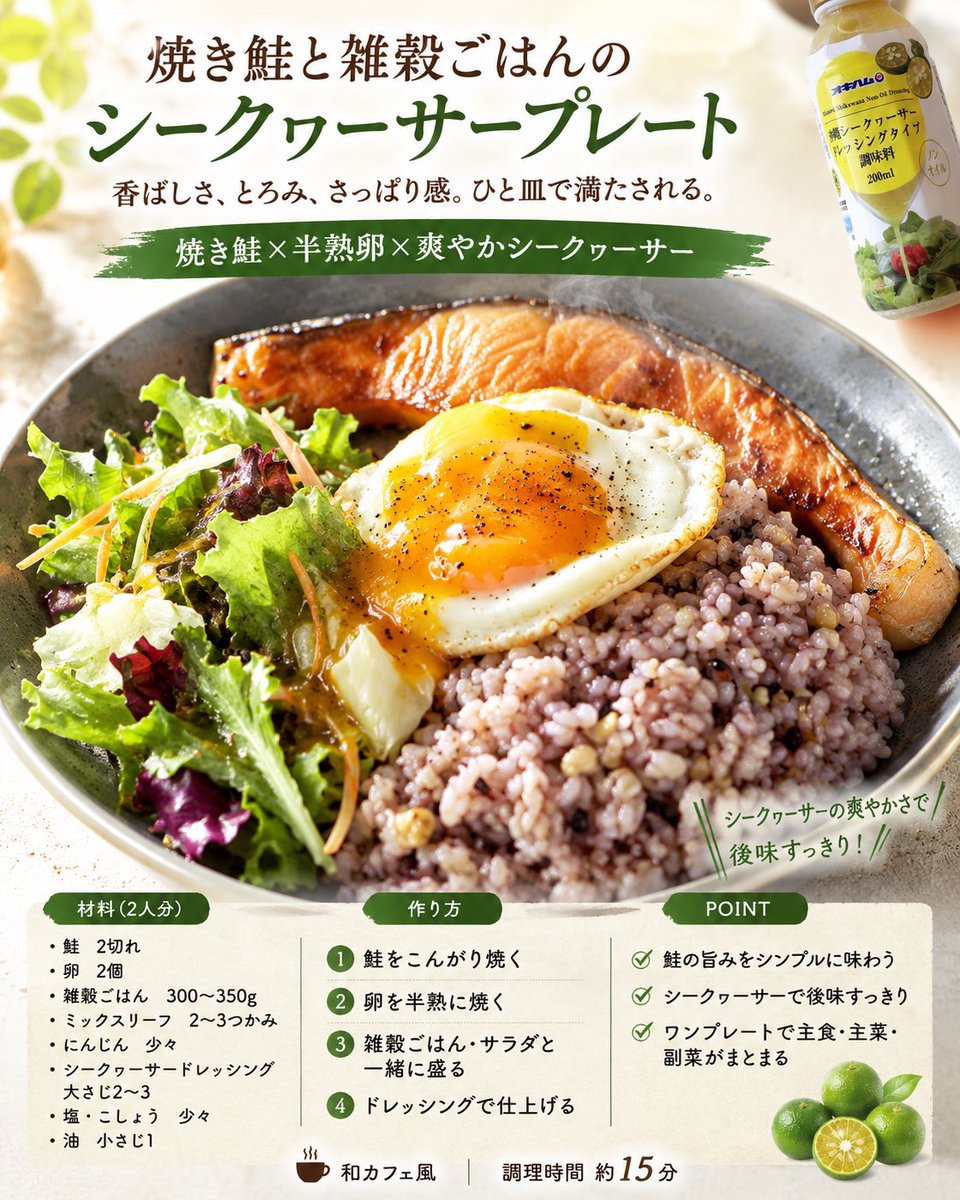
Professional Recipe Card Designer
Transforms real food photos into professional-grade recipe cards for magazines or SNS, complete with ingredients, steps, and stylish layouts.
Dies ist ein GPT Image 2 -Prompt für Speisen und Getränke . Verwenden Sie den unten stehenden, kopierfertigen Prompt, um ähnliche Grafiken zu erstellen, und überprüfen Sie vor der Wiederverwendung Awesome GPT Image 2 Prompts -Quellenangaben sowie die kommerziellen Nutzungsrechte.
Benötigen Sie den vollständigen Prompt-Satz? Verwenden Sie den Speisen und Getränke Weitere verwandte Beispiele finden Sie im Themen-Hub oder öffnen Sie die GPT Image 2 Prompt-Katalog für das vollständige Beispielverzeichnis, wiederverwendbare Strukturen und Quellenangaben.
Free 1K preview
Generate one preview image instantly, no sign-up required.
1710/4000
Eingabeaufforderung
Kopierfertige Eingabeaufforderung
Using the attached finished photo, please generate 4 recipe concept images with professional food designer specifications.

Conditions:
- {argument name="aspect ratio" default="vertical 4:5"}, {argument name="language" default="Japanese"}
- All 4 images should have the same dish as the theme.
- However, each of the 4 images should have a different design direction.
- Make the finished dish in the attached image the protagonist, and capture and utilize the type of dish, composition, tableware, plating, coloring, and food texture.
- Organize the everyday feel and cluttered backgrounds of the photo and reconstruct it into a bright, clean food photo.
- While preserving the quality of the actual dish made, achieve a level of completion similar to a food magazine, cafe menu, or SNS recipe card.
- For unspecified items, supplement them naturally from the attached image.
- If dish name, number of people, genre, ingredients, steps, POINT, and catchphrase are unspecified, propose them naturally from the image.
- Do not make ingredients not in the photo the protagonist.
- Make it a realistic recipe that is easy to reproduce at home.
- Adjust the heating process to be one-pan or as few steps as possible.

Composition:
- Top: Title + short sub-copy
- Center: Hero food photo
- Bottom or Side: "Ingredients (serves X)", "How to make", "POINT"

4 directions:
1. Food magazine feature page style
2. Cafe menu/natural recipe card style
3. SNS saveable/practical recipe card style
4. Food advertisement style with strong sizzle

Final goal:
Based on the attached image, create 4 high-quality recipe images that look like the actual dish was finished in 4 different directions by a professional food designer.
Eingabeaufforderungsvariablen
In der Eingabeaufforderung befinden sich bearbeitbare Argumentplatzhalter mit ihren Standardwerten.
Variable
aspect ratio
Standard
vertical 4:5
Variable
language
Standard
Japanese
Best for
- - Speisen und Getränke visual exploration
- - Image generation and reference-image edits
- - Reusable briefs that keep source attribution visible
Change these parts
- - Subject, product, character, or scene
- - Aspect ratio, camera, lighting, and background
- - Brand, text, color, and output constraints
Recommended model and settings
- - Model: gpt-image-2
- - Input mode: Text zu Bild
- - Aspect ratio: source
- - Commercial status: review original source
How to use this prompt
- 1. Copy the prompt and preserve its structure for the first test.
- 2. Replace the subject, context, and publishing channel.
- 3. Change one camera, lighting, or style variable per iteration.
- 4. Inspect the output, source, text, and rights before reuse.
Limitations, source, and reuse cautions
- - Generated output is an editable draft, not factual, legal, or rights evidence.
- - Review the linked source, people, brands, logos, text, and third-party media before commercial use.
Importiert von Awesome GPT Image 2 Prompts . Quellenangabe erforderlich. Status der kommerziellen Nutzung: allowed ; Rechte an der Quelle vor kostenpflichtiger Nutzung prüfen.
Weitere Fälle in dieser Kategorie
Priorisiert nach Kategorie, Kompatibilität der Eingabemodi, Qualität und geringerem Risiko.






Hinweise zur Wiederverwendung und Quellenangabe
Verwenden Sie diese Eingabeaufforderung sicher, nachdem Sie den Fall in der Vorschau angezeigt haben.
- 1.Kopieren Sie die Eingabeaufforderung oder öffnen Sie sie direkt in Dovoo mit der Schaltfläche „Generieren“.
- 2.Passen Sie Variablen, Seitenverhältnis und Referenzbilder an Ihren Anwendungsfall an.
- 3.Vor der Veröffentlichung oder kostenpflichtigen Nutzung sollten Sie die Rechte an der Quelle, die Anforderungen an die Namensnennung sowie die Risiken für die Marke oder das Abbild prüfen.