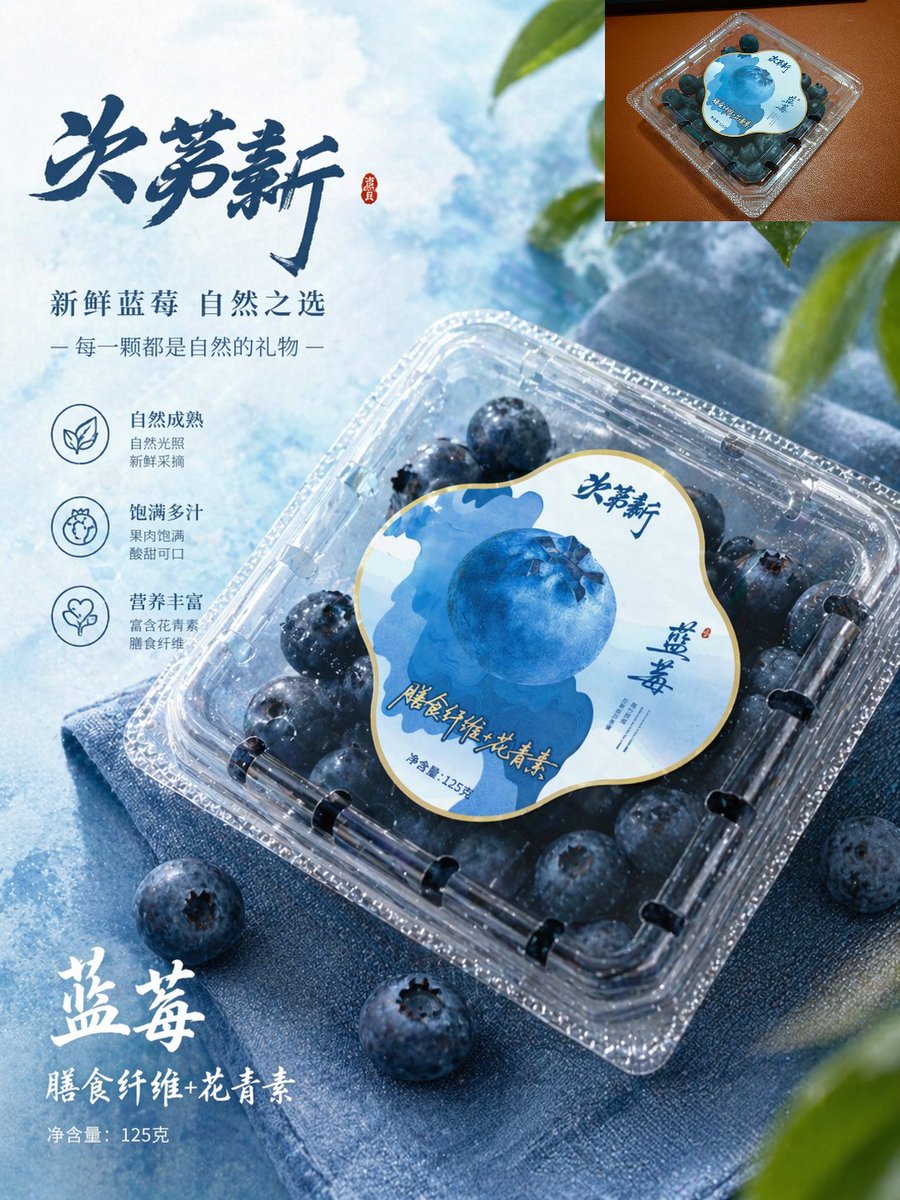
Premium-Produktposter für Blaubeeren
Diese Eingabeaufforderung generiert eine professionelle E-Commerce-Anzeige im chinesischen Stil für verpackte Blaubeeren, die sich für Supermarkt-Branding, Produktlisten und Werbeplakate eignet.
Dies ist ein GPT Image 2 -Prompt für Produkt & Vertrieb . Verwenden Sie den unten stehenden, kopierfertigen Prompt, um ähnliche Grafiken zu erstellen, und überprüfen Sie vor der Wiederverwendung Awesome GPT Image 2 Prompts -Quellenangaben sowie die kommerziellen Nutzungsrechte.
Free 1K preview
Generate one preview image instantly, no sign-up required.
Eingabeaufforderung
Kopierfertige Eingabeaufforderung
A high-end blueberry e-commerce poster in a simple Chinese product advertising style. The main body showcases a box of blueberries in a transparent plastic container, placed diagonally from the lower left to the right on folded blue fabric, viewed from a slightly overhead angle. The packaging should be realistic and consistent: a transparent square container with rounded corners, filled with dark blue blueberries, topped with a large, irregularly shaped circular label in white, light blue, and dark blue, featuring a large blueberry illustration in the center and an elegant Chinese font brand name. The blueberries inside the box should appear larger, fuller, and fresher, covered with fine water droplets, while maintaining the realistic arrangement of the blueberries. The background is a translucent ice-blue desktop with a soft cloud texture, illuminated by cool-toned daylight, with a few blueberries scattered around the packaging. Add a small amount of blurred green leaves along the upper right and lower right edges to create a fresh and natural feel. Add 1 small embedded image in the upper right corner, showing a top view of the original product packaging on a warm brown surface, as a reference thumbnail. Design Chinese promotional typography on the left side, including a large, dark blue calligraphic title {argument name="headline text" default="Juemingxin"}, followed by two lines of smaller text: {argument name="subheadline text" default="Fresh Blueberries, Nature's Choice"} and {argument name="tagline text" default="Each one is a gift from nature"}. Below, arrange 3 functional icons and short Chinese descriptions vertically: a leaf icon representing natural maturity, a fruit icon representing juicy fullness, and a heart icon representing rich nutrition. Near the lower left corner, add prominent white brush-style Chinese text {argument name="product name" default="Blueberries"}, a second line of text {argument name="benefit text" default="Dietary Fiber + Anthocyanins"}, and a small line of text “Net content 125g”. Use a cool blue tone, presenting a crisp commercial lighting effect, with shiny highlights on the plastic lid, embodying high-end supermarket packaging aesthetics, rich in detail, and perfectly integrating realistic product photography with exquisite graphic design.Eingabeaufforderungsvariablen
In der Eingabeaufforderung befinden sich bearbeitbare Argumentplatzhalter mit ihren Standardwerten.
Best for
- - Produkt & Vertrieb visual exploration
- - Image generation and reference-image edits
- - Reusable briefs that keep source attribution visible
Change these parts
- - Subject, product, character, or scene
- - Aspect ratio, camera, lighting, and background
- - Brand, text, color, and output constraints
Recommended model and settings
- - Model: gpt-image-2
- - Input mode: Text zu Bild
- - Aspect ratio: source
- - Commercial status: review original source
How to use this prompt
- 1. Copy the prompt and preserve its structure for the first test.
- 2. Replace the subject, context, and publishing channel.
- 3. Change one camera, lighting, or style variable per iteration.
- 4. Inspect the output, source, text, and rights before reuse.
Limitations, source, and reuse cautions
- - Generated output is an editable draft, not factual, legal, or rights evidence.
- - Review the linked source, people, brands, logos, text, and third-party media before commercial use.
Weitere Fälle in dieser Kategorie
Priorisiert nach Kategorie, Kompatibilität der Eingabemodi, Qualität und geringerem Risiko.






Hinweise zur Wiederverwendung und Quellenangabe
Verwenden Sie diese Eingabeaufforderung sicher, nachdem Sie den Fall in der Vorschau angezeigt haben.
- 1.Kopieren Sie die Eingabeaufforderung oder öffnen Sie sie direkt in Dovoo mit der Schaltfläche „Generieren“.
- 2.Passen Sie Variablen, Seitenverhältnis und Referenzbilder an Ihren Anwendungsfall an.
- 3.Vor der Veröffentlichung oder kostenpflichtigen Nutzung sollten Sie die Rechte an der Quelle, die Anforderungen an die Namensnennung sowie die Risiken für die Marke oder das Abbild prüfen.