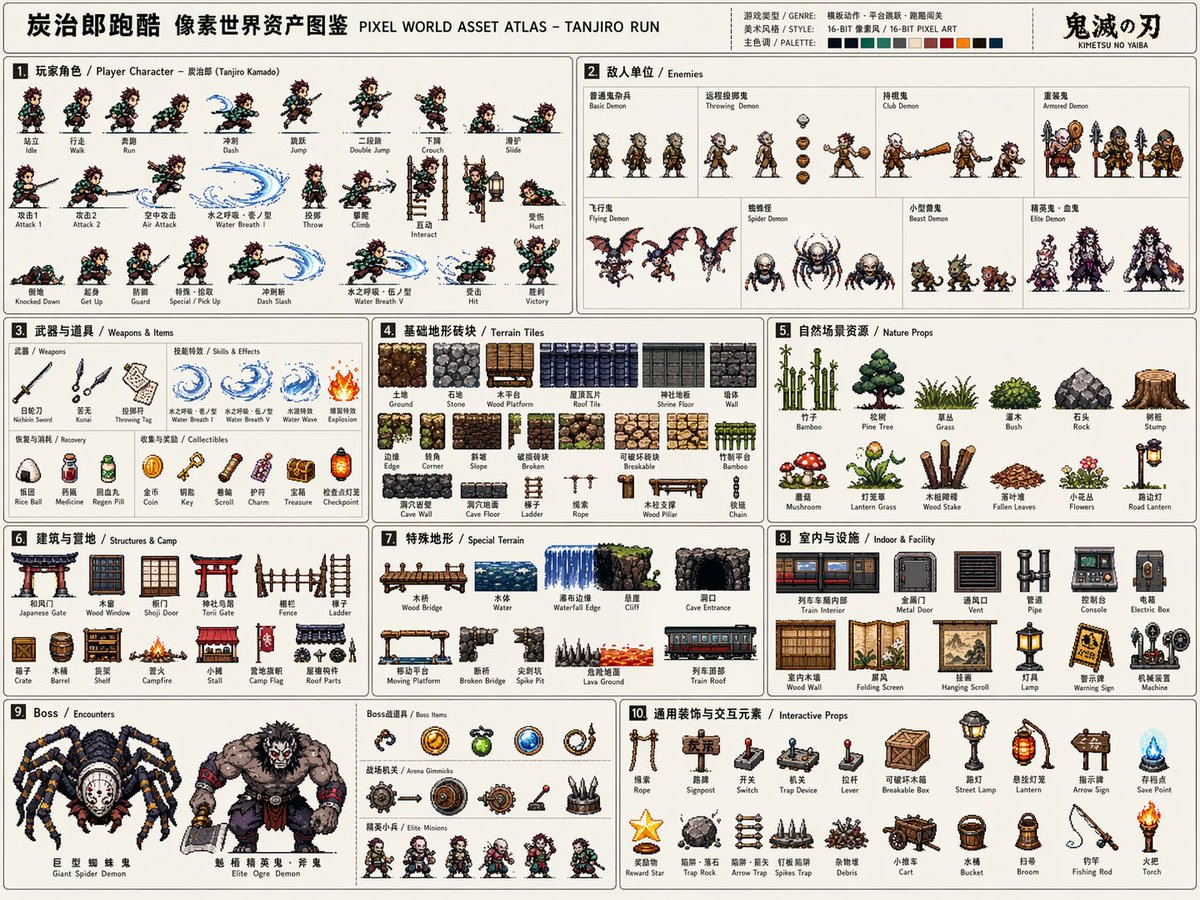
Vorlage für einen Pixel-Spiel-Asset-Atlas
Eine umfassende professionelle Vorlage zur Erstellung hochauflösender 16-Bit-Pixelgrafik-Asset-Sheets für die Spieleentwicklung, einschließlich Charakteren, Animationen und Umgebungen.
Dies ist ein GPT Image 2 -Prompt für Anime & Spiel . Verwenden Sie den unten stehenden, kopierfertigen Prompt, um ähnliche Grafiken zu erstellen, und überprüfen Sie vor der Wiederverwendung Awesome GPT Image 2 Prompts -Quellenangaben sowie die kommerziellen Nutzungsrechte.
Free 1K preview
Generate one preview image instantly, no sign-up required.
Eingabeaufforderung
Kopierfertige Eingabeaufforderung
Please create a high-completion, high-information-density "Pixel World Asset Atlas" suitable for serialized release based on [Game Theme: {argument name="game theme" default="Demon Slayer/Tanjiro"}].

This is not a regular pixel illustration or a single game scene, but a "2D pixel game asset overview map" for game development, art setting, level design, and visual proposals. The visual should look like a complete game material board, systematically organizing core characters, enemies, items, terrain, scenes, mechanisms, Bosses, and decorative elements required for a [Game Type: {argument name="game type" default="Side-scrolling action"}] into a single clear, professional, and reusable game asset atlas.

[Basic Settings]
Theme Worldview: [Game Theme]
Game Type: [Game Type]
Era Background: [Era Background]
Protagonist Identity: [Protagonist Identity]
Enemy Types: [Enemy Types]
Main Scenes: [Main Scene Environment]
Overall Style: [Style Direction, e.g., {argument name="style" default="16-bit retro arcade pixel style"}]
Main Color: [Main Color]
Secondary Color: [Secondary Color]
Accent Color: [Accent Color]
Aspect Ratio: [Aspect Ratio, Landscape 4:3]
If not filled, automatically match according to the optimal plan for the game theme.

[Overall Visual Requirements]
The visual uses a large landscape canvas with a light or low-interference background, looking like a game development asset sheet or an instruction-style resource catalog. All elements should be 2D pixel art sprites with uniform pixel density, clear black/dark outlines, limited color scales, and retro game textures. Do not generate realistic photography, 3D rendering, painterly illustration, or movie poster styles. Focus on being "systematically complete, clearly categorized, resource-rich, and high in developability."

[Layout Structure]
The map uses a modular grid layout with fine lines dividing different resource areas. Each area needs a numbered title and short category labels, with a reading path from left to right, top to bottom. The layout should have the orderliness of an instruction manual or game dev document. Information density must be high but not chaotic; elements within each module should be equidistantly arranged.

[Modules to Include]
1. Player Character Module: Show complete action frames including standing, walking/running, jumping, etc. frames arranged horizontally like a sprite sheet.
2. Enemy Unit Module: Design multiple enemies including common, ranged, heavy, and elite units.
3. Weapons & Items Module: Show melee, ranged, projectiles, effects, and pickups.
4. Basic Terrain Tile Module: Show ground, walls, platforms, corners, and different material blocks.
5. Natural/External Scene Resource Module: Show trees, grass, rocks, and obstacles.
6. Building/Base/Camp Resource Module: Show doors, windows, walls, ladders, and camp facilities.
7. Special Terrain Module: Show bridges, water bodies, cliffs, and cave openings.
8. Indoor/Underground/Facility Resource Module: Show pipes, consoles, metal doors, and equipment.
9. Boss / Encounter Resource Module: Show large Bosses, special vehicles, and giant mechanisms.
10. General Decoration & Interaction Elements Module: Show ladders, ropes, signs, switches, and mechanisms.

[Visual Detail Requirements]
All resources must maintain consistent pixel size logic and worldview consistency. Clear scale relationships. Action frames must show continuity; terrain tiles must be tileable; items and mechanisms must have functional recognizability; Boss elements should feel oppressive.
Eingabeaufforderungsvariablen
In der Eingabeaufforderung befinden sich bearbeitbare Argumentplatzhalter mit ihren Standardwerten.
Best for
- - Anime & Spiel visual exploration
- - Image generation and reference-image edits
- - Reusable briefs that keep source attribution visible
Change these parts
- - Subject, product, character, or scene
- - Aspect ratio, camera, lighting, and background
- - Brand, text, color, and output constraints
Recommended model and settings
- - Model: gpt-image-2
- - Input mode: Text zu Bild
- - Aspect ratio: source
- - Commercial status: review original source
How to use this prompt
- 1. Copy the prompt and preserve its structure for the first test.
- 2. Replace the subject, context, and publishing channel.
- 3. Change one camera, lighting, or style variable per iteration.
- 4. Inspect the output, source, text, and rights before reuse.
Limitations, source, and reuse cautions
- - Generated output is an editable draft, not factual, legal, or rights evidence.
- - Review the linked source, people, brands, logos, text, and third-party media before commercial use.
Weitere Fälle in dieser Kategorie
Priorisiert nach Kategorie, Kompatibilität der Eingabemodi, Qualität und geringerem Risiko.






Hinweise zur Wiederverwendung und Quellenangabe
Verwenden Sie diese Eingabeaufforderung sicher, nachdem Sie den Fall in der Vorschau angezeigt haben.
- 1.Kopieren Sie die Eingabeaufforderung oder öffnen Sie sie direkt in Dovoo mit der Schaltfläche „Generieren“.
- 2.Passen Sie Variablen, Seitenverhältnis und Referenzbilder an Ihren Anwendungsfall an.
- 3.Vor der Veröffentlichung oder kostenpflichtigen Nutzung sollten Sie die Rechte an der Quelle, die Anforderungen an die Namensnennung sowie die Risiken für die Marke oder das Abbild prüfen.