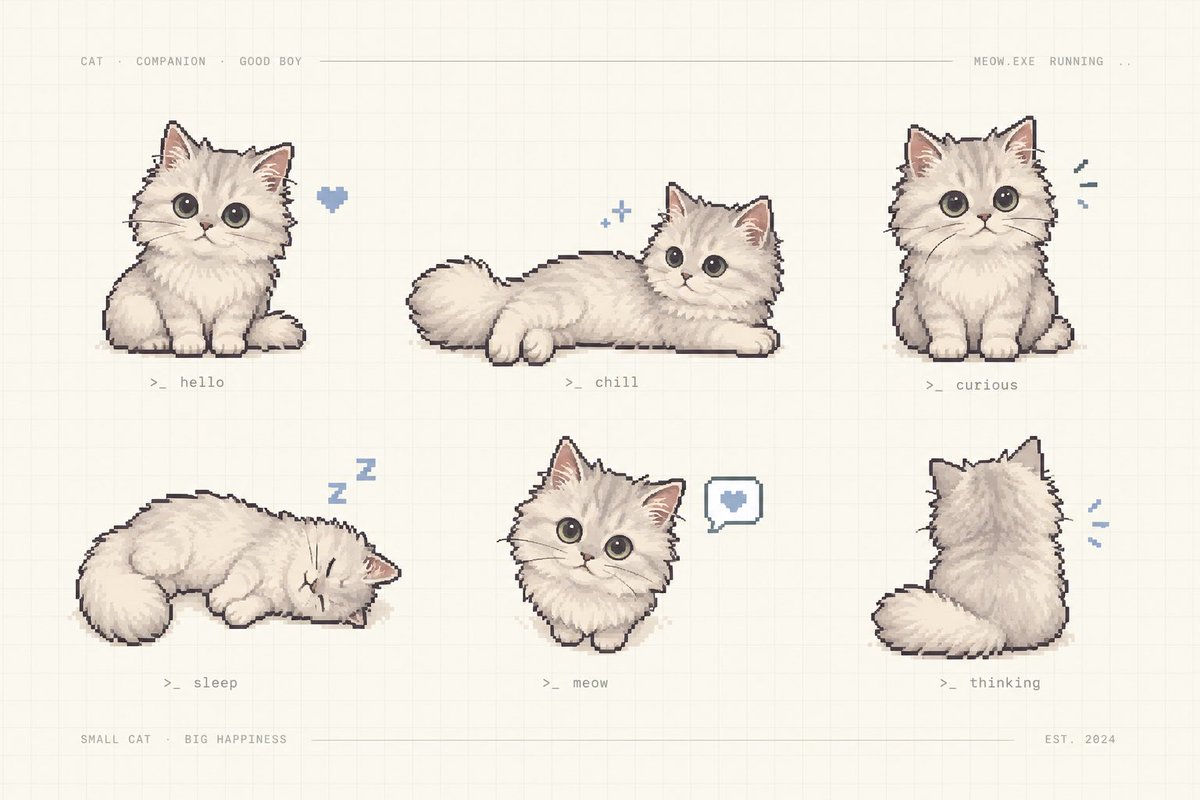
Pixel Art Kitten Companion Sheet
A cozy retro pixel-art sheet showing six labeled poses of a fluffy cream kitten companion for game assets or character design.
Dies ist ein GPT Image 2 -Prompt für Anime & Spiel . Verwenden Sie den unten stehenden, kopierfertigen Prompt, um ähnliche Grafiken zu erstellen, und überprüfen Sie vor der Wiederverwendung Awesome GPT Image 2 Prompts -Quellenangaben sowie die kommerziellen Nutzungsrechte.
Benötigen Sie den vollständigen Prompt-Satz? Verwenden Sie den Anime & Spiel Weitere verwandte Beispiele finden Sie im Themen-Hub oder öffnen Sie die GPT Image 2 Prompt-Katalog für das vollständige Beispielverzeichnis, wiederverwendbare Strukturen und Quellenangaben.
Free 1K preview
Generate one preview image instantly, no sign-up required.
2205/4000
Eingabeaufforderung
Kopierfertige Eingabeaufforderung
Goal: Create a charming pixel-art character sheet of {argument name="character name" default="a fluffy cream kitten"} as a cute virtual companion, arranged like a retro game asset preview.

Canvas: Horizontal 3:2 composition on a warm off-white paper background with a faint square grid, subtle beige texture, and thin pale divider lines near the top and bottom.

Layout: Show exactly 6 separate kitten sprites in a clean 3-column by 2-row grid with generous spacing. Add tiny monospaced gray interface text across the top: “CAT · COMPANION · GOOD BOY” on the left, a long thin horizontal line through the middle, and “MEOW.EXE RUNNING ..” on the right. Add bottom text: “SMALL CAT · BIG HAPPINESS” on the left, a thin line across the center, and “EST. 2024” on the right.

Subject details: The kitten is extremely fluffy, cream-white with soft beige shading, round oversized dark gray eyes, small pink nose, triangular ears with pink inner ears, tiny paws, plush tail, and a slightly dark pixel-outline. Use hand-painted pixel art with soft dithering and a cozy pastel palette.

Exactly 6 poses and labels:
1. Top left: sitting front-facing kitten, a small blue pixel heart floating to its right, label “>_ hello”.
2. Top center: kitten lying stretched horizontally with tail to the left and head to the right, two tiny blue sparkle icons above, label “>_ chill”.
3. Top right: sitting front-facing kitten looking curious, three small blue motion marks to its right, label “>_ curious”.
4. Bottom left: kitten curled up sleeping with eyes closed, blue “Z z” symbols above, label “>_ sleep”.
5. Bottom center: small front-facing kitten bust/sitting pose with a speech bubble containing a blue heart to its right, label “>_ meow”.
6. Bottom right: kitten viewed from behind, fluffy tail curled left, small blue motion marks to its right, label “>_ thinking”.

Visual style: Nostalgic cozy pixel art, soft hand-drawn shading, muted cream, gray, beige, pink, and powder-blue accents; all labels in tiny gray terminal-style monospaced text.

Constraints: Keep the image uncluttered, no photorealism, no extra kittens, no additional labels beyond the specified interface text and six pose labels, no watermark.
Eingabeaufforderungsvariablen
In der Eingabeaufforderung befinden sich bearbeitbare Argumentplatzhalter mit ihren Standardwerten.
Variable
character name
Standard
a fluffy cream kitten
Best for
- - Anime & Spiel visual exploration
- - Image generation and reference-image edits
- - Reusable briefs that keep source attribution visible
Change these parts
- - Subject, product, character, or scene
- - Aspect ratio, camera, lighting, and background
- - Brand, text, color, and output constraints
Recommended model and settings
- - Model: gpt-image-2
- - Input mode: Text zu Bild
- - Aspect ratio: source
- - Commercial status: review original source
How to use this prompt
- 1. Copy the prompt and preserve its structure for the first test.
- 2. Replace the subject, context, and publishing channel.
- 3. Change one camera, lighting, or style variable per iteration.
- 4. Inspect the output, source, text, and rights before reuse.
Limitations, source, and reuse cautions
- - Generated output is an editable draft, not factual, legal, or rights evidence.
- - Review the linked source, people, brands, logos, text, and third-party media before commercial use.
Importiert von Awesome GPT Image 2 Prompts . Quellenangabe erforderlich. Status der kommerziellen Nutzung: allowed ; Rechte an der Quelle vor kostenpflichtiger Nutzung prüfen.
Weitere Fälle in dieser Kategorie
Priorisiert nach Kategorie, Kompatibilität der Eingabemodi, Qualität und geringerem Risiko.






Hinweise zur Wiederverwendung und Quellenangabe
Verwenden Sie diese Eingabeaufforderung sicher, nachdem Sie den Fall in der Vorschau angezeigt haben.
- 1.Kopieren Sie die Eingabeaufforderung oder öffnen Sie sie direkt in Dovoo mit der Schaltfläche „Generieren“.
- 2.Passen Sie Variablen, Seitenverhältnis und Referenzbilder an Ihren Anwendungsfall an.
- 3.Vor der Veröffentlichung oder kostenpflichtigen Nutzung sollten Sie die Rechte an der Quelle, die Anforderungen an die Namensnennung sowie die Risiken für die Marke oder das Abbild prüfen.