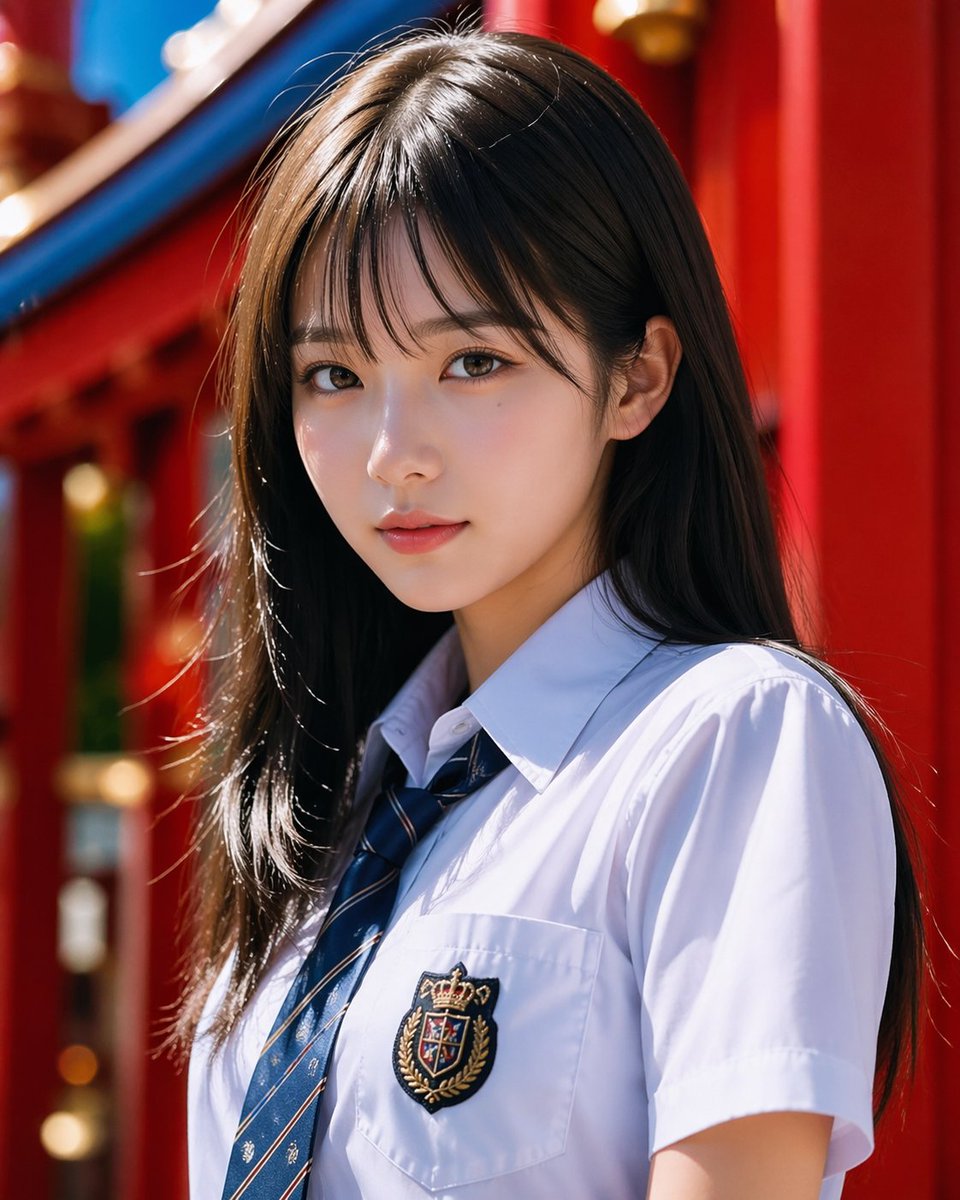
Fotorealistisches Porträt eines Schulmädchens vor einem Schrein
Diese Vorgabe erzeugt ein realistisches, modisches Porträt eines Mädchens in Schuluniform vor einer leuchtend roten Schreinarchitektur, geeignet für Beauty-Fotografie oder ausgefeilte Charakterdarstellungen.
Dies ist ein GPT Image 2 -Prompt für Porträt & Charakter . Verwenden Sie den unten stehenden, kopierfertigen Prompt, um ähnliche Grafiken zu erstellen, und überprüfen Sie vor der Wiederverwendung Awesome GPT Image 2 Prompts -Quellenangaben sowie die kommerziellen Nutzungsrechte.
Free 1K preview
Generate one preview image instantly, no sign-up required.
Eingabeaufforderung
Kopierfertige Eingabeaufforderung
A realistic-style half-length portrait, featuring a {argument name="subject" default="Japanese high school girl"} standing in bright natural sunlight, with a vertical composition. She has long, straight {argument name="hair color" default="dark brown"} hair that is shiny and lustrous, parted in the middle and slightly to the side, falling naturally over her shoulders. She is wearing a crisp white short-sleeved school uniform shirt with a navy blue striped tie, and a delicate embroidered badge on her left chest pocket, featuring a crown and crest. Have her stand at a slight angle, in a relaxed pose, with her head turned slightly to one side, creating a sense of sophisticated snapshot fashion. The background is set in a vibrant {argument name="background setting" default="Red shrine architecture"}, with blurred details of rich red pillars and curved blue roof elements. Utilize a shallow depth of field and soft bokeh to keep the subject in sharp focus. The lighting should be clean, high-contrast, and flattering, with bright highlights on the hair and shirt, showcasing realistic fabric folds and natural skin tones, presenting a refined and high-end portrait aesthetic similar to Japanese commercial photography.Eingabeaufforderungsvariablen
In der Eingabeaufforderung befinden sich bearbeitbare Argumentplatzhalter mit ihren Standardwerten.
Best for
- - Porträt & Charakter visual exploration
- - Image generation and reference-image edits
- - Reusable briefs that keep source attribution visible
Change these parts
- - Subject, product, character, or scene
- - Aspect ratio, camera, lighting, and background
- - Brand, text, color, and output constraints
Recommended model and settings
- - Model: gpt-image-2
- - Input mode: Text zu Bild
- - Aspect ratio: source
- - Commercial status: review original source
How to use this prompt
- 1. Copy the prompt and preserve its structure for the first test.
- 2. Replace the subject, context, and publishing channel.
- 3. Change one camera, lighting, or style variable per iteration.
- 4. Inspect the output, source, text, and rights before reuse.
Limitations, source, and reuse cautions
- - Generated output is an editable draft, not factual, legal, or rights evidence.
- - Review the linked source, people, brands, logos, text, and third-party media before commercial use.
Weitere Fälle in dieser Kategorie
Priorisiert nach Kategorie, Kompatibilität der Eingabemodi, Qualität und geringerem Risiko.






Hinweise zur Wiederverwendung und Quellenangabe
Verwenden Sie diese Eingabeaufforderung sicher, nachdem Sie den Fall in der Vorschau angezeigt haben.
- 1.Kopieren Sie die Eingabeaufforderung oder öffnen Sie sie direkt in Dovoo mit der Schaltfläche „Generieren“.
- 2.Passen Sie Variablen, Seitenverhältnis und Referenzbilder an Ihren Anwendungsfall an.
- 3.Vor der Veröffentlichung oder kostenpflichtigen Nutzung sollten Sie die Rechte an der Quelle, die Anforderungen an die Namensnennung sowie die Risiken für die Marke oder das Abbild prüfen.