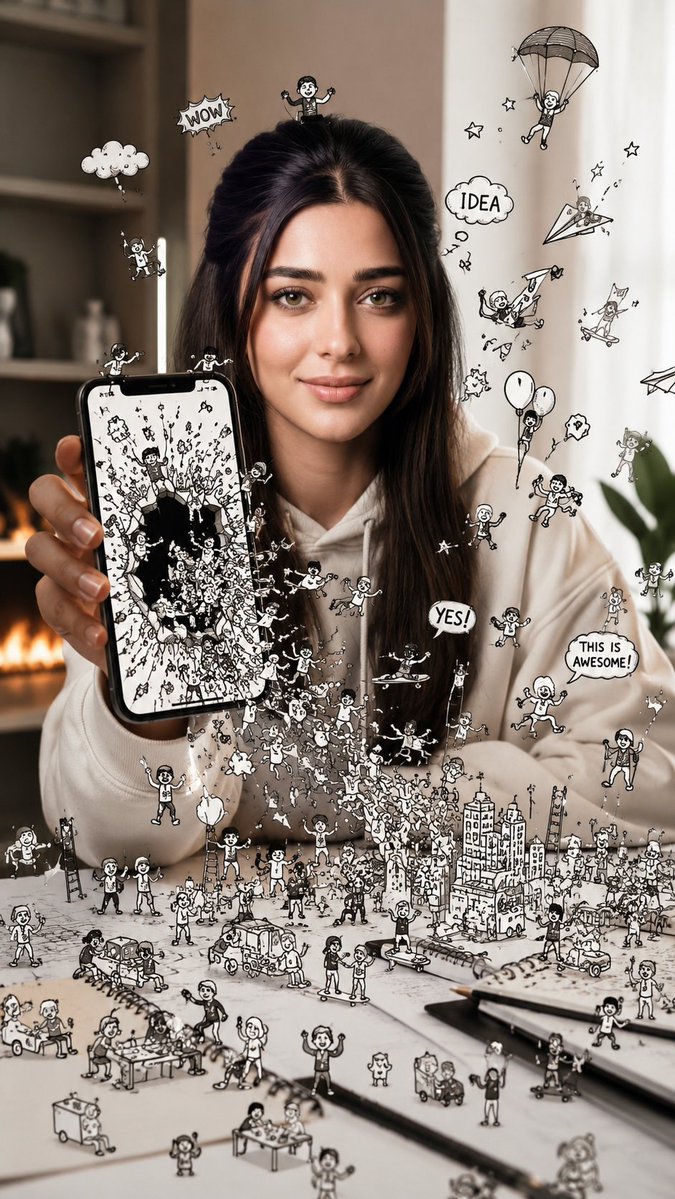
Shattered Phone Screen Doodle Portal
Generates a conceptual photo of a woman holding a phone that acts as a portal for doodle characters escaping into reality.
Dies ist ein GPT Image 2 -Prompt für Illustration & Kunst . Verwenden Sie den unten stehenden, kopierfertigen Prompt, um ähnliche Grafiken zu erstellen, und überprüfen Sie vor der Wiederverwendung Awesome GPT Image 2 Prompts -Quellenangaben sowie die kommerziellen Nutzungsrechte.
Benötigen Sie den vollständigen Prompt-Satz? Verwenden Sie den Illustration & Kunst Weitere verwandte Beispiele finden Sie im Themen-Hub oder öffnen Sie die GPT Image 2 Prompt-Katalog für das vollständige Beispielverzeichnis, wiederverwendbare Strukturen und Quellenangaben.
Free 1K preview
Generate one preview image instantly, no sign-up required.
2088/4000
Eingabeaufforderung
Kopierfertige Eingabeaufforderung
Use the attached image for facial reference. Preserve the exact facial identity, facial proportions, natural asymmetry, hairstyle, skin texture, expression, and unique facial characteristics with maximum accuracy. Do not beautify, redesign, or reinterpret the face.

Creative reality-meets-doodle composite photograph, 9:16 vertical aspect ratio, ultra-clean modern environment, cinematic studio lighting, premium editorial photography.

A young woman is holding a smartphone in front of her. The phone screen appears to have shattered open like a portal, creating a dramatic tear between the digital world and reality.

Hundreds of energetic black-ink doodle characters are escaping from inside the screen and flooding into the real environment. Tiny cartoon people climb over the phone edges, jump onto tables, swing from charging cables, ride paper airplanes, build miniature cities, chase each other across the floor, and interact playfully with real-world objects.

The screen itself glows with a vibrant illustrated universe filled with doodle clouds, flying creatures, floating hearts, comic speech bubbles, ladders, stars, rockets, and tiny hand-drawn buildings. Some doodle elements are halfway between the digital world and reality, creating a seamless transition effect.

The woman remains completely photorealistic, reacting with curiosity and amazement as the doodle world escapes from the device. The contrast between realistic photography and expressive black-ink line art creates a visually striking illusion.

Photorealistic human subject + hand-drawn doodle universe, impossible visual storytelling, ultra-sharp focus, luxury advertising quality, modern social-media aesthetic, clean negative space, premium commercial photography, whimsical fantasy atmosphere, highly detailed interactions, seamless reality-to-illustration blend, Pinterest-worthy artwork, viral creative concept, scroll-stopping masterpiece.

Mood: It feels as if years of imagination, creativity, and internet culture have become alive and are breaking free from the phone screen into the real world.
Best for
- - Illustration & Kunst visual exploration
- - Image generation and reference-image edits
- - Reusable briefs that keep source attribution visible
Change these parts
- - Subject, product, character, or scene
- - Aspect ratio, camera, lighting, and background
- - Brand, text, color, and output constraints
Recommended model and settings
- - Model: gpt-image-2
- - Input mode: Text zu Bild
- - Aspect ratio: source
- - Commercial status: review original source
How to use this prompt
- 1. Copy the prompt and preserve its structure for the first test.
- 2. Replace the subject, context, and publishing channel.
- 3. Change one camera, lighting, or style variable per iteration.
- 4. Inspect the output, source, text, and rights before reuse.
Limitations, source, and reuse cautions
- - Generated output is an editable draft, not factual, legal, or rights evidence.
- - Review the linked source, people, brands, logos, text, and third-party media before commercial use.
Importiert von Awesome GPT Image 2 Prompts . Quellenangabe erforderlich. Status der kommerziellen Nutzung: allowed ; Rechte an der Quelle vor kostenpflichtiger Nutzung prüfen.
Weitere Fälle in dieser Kategorie
Priorisiert nach Kategorie, Kompatibilität der Eingabemodi, Qualität und geringerem Risiko.






Hinweise zur Wiederverwendung und Quellenangabe
Verwenden Sie diese Eingabeaufforderung sicher, nachdem Sie den Fall in der Vorschau angezeigt haben.
- 1.Kopieren Sie die Eingabeaufforderung oder öffnen Sie sie direkt in Dovoo mit der Schaltfläche „Generieren“.
- 2.Passen Sie Variablen, Seitenverhältnis und Referenzbilder an Ihren Anwendungsfall an.
- 3.Vor der Veröffentlichung oder kostenpflichtigen Nutzung sollten Sie die Rechte an der Quelle, die Anforderungen an die Namensnennung sowie die Risiken für die Marke oder das Abbild prüfen.