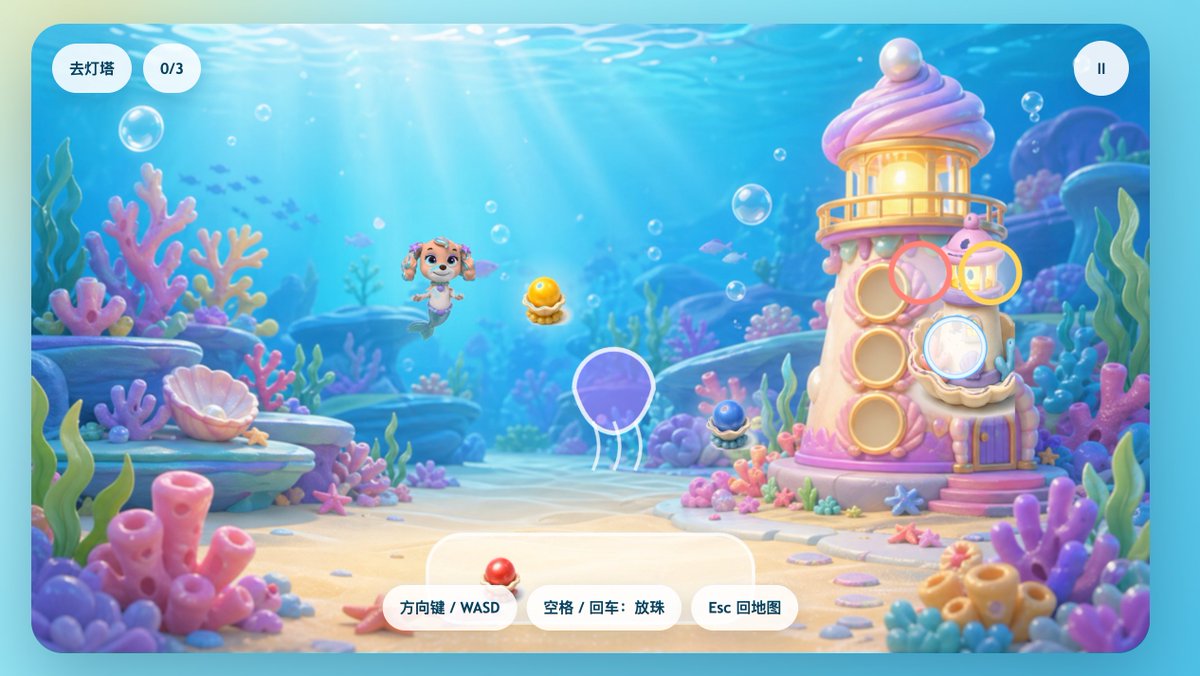
Benutzeroberfläche für ein Spiel mit pastellfarbenem Unterwasser-Meerjungfrauenwelpen
Ein fantasievoller Unterwasser-Spielbildschirm mit einem Meerjungfrauenwelpen, einem Korallenleuchtturm und verspielten chinesischen UI-Elementen, geeignet für Splashscreens oder Levelszenen von Kinder-Casual-Games.
Dies ist ein GPT Image 2 -Prompt für Anime & Spiel . Verwenden Sie den unten stehenden, kopierfertigen Prompt, um ähnliche Grafiken zu erstellen, und überprüfen Sie vor der Wiederverwendung Awesome GPT Image 2 Prompts -Quellenangaben sowie die kommerziellen Nutzungsrechte.
Benötigen Sie den vollständigen Prompt-Satz? Verwenden Sie den Anime & Spiel Weitere verwandte Beispiele finden Sie im Themen-Hub oder öffnen Sie die GPT Image 2 Prompt-Katalog für das vollständige Beispielverzeichnis, wiederverwendbare Strukturen und Quellenangaben.
Free 1K preview
Generate one preview image instantly, no sign-up required.
2287/4000
Eingabeaufforderung
Kopierfertige Eingabeaufforderung
A charming side-view underwater casual game start screen, rendered in a soft 3D cartoon style, designed like a refined children's web game interface. The scene depicts a bright seabed, with sunlight streaming through clear blue water, accompanied by floating bubbles, distant silhouettes of small fish, and a dreamy coral reef environment filled with rounded pink, purple, blue, and mint green corals, seagrass, shells, rocks, and sand. In the center-left of the image, a mermaid puppy character inspired by rescue dog cartoons floats happily underwater, with a dog face, sparkling large eyes, drooping ears, a small crown-shaped ornament on her head, and a fish tail instead of hind legs, facing forward with a cheerful expression. To the right stands a quirky candy-colored coral lighthouse, shaped like a pink and white shell tower, with a glowing lantern room on top, a pearl embedded in the roof, round shell windows, a small balcony, a purple door, and coral details at the base. Game UI elements are directly overlaid on the scene: two rounded white capsule buttons in the upper left corner, the first reading “Go to Lighthouse,” the second displaying “0/3”; and a circular white pause button with a pause icon in the upper right corner. Near the lighthouse, display 4 floating semi-transparent colored target rings around interaction points: a pink ring near the upper-middle window, a yellow ring near the upper-right lantern area, a light blue ring covering the lower-right shell window, and a ring with a white outline around a purple jellyfish in the lower-left center. 3 collectible shell pearl items are visible in the scene: a glowing golden pearl in an open shell in the center, a dark blue small pearl shell at the base of the lighthouse, and a red pearl shell placed on the UI panel at the bottom center. At the bottom center, place 3 rounded white operation prompt buttons, with the text: “Arrow Keys / WASD,” “Space / Enter: Drop Pearls,” and “Esc to Map.” Add a large semi-transparent rounded white panel behind the bottom operation buttons. The overall image should evoke a happy, safe, colorful, and magical feeling, with a high degree of refinement, soft depth of field, soft lighting, glossy toy texture, and a mobile or web game aesthetic suitable for children.
Best for
- - Anime & Spiel visual exploration
- - Image generation and reference-image edits
- - Reusable briefs that keep source attribution visible
Change these parts
- - Subject, product, character, or scene
- - Aspect ratio, camera, lighting, and background
- - Brand, text, color, and output constraints
Recommended model and settings
- - Model: gpt-image-2
- - Input mode: Text zu Bild
- - Aspect ratio: source
- - Commercial status: review original source
How to use this prompt
- 1. Copy the prompt and preserve its structure for the first test.
- 2. Replace the subject, context, and publishing channel.
- 3. Change one camera, lighting, or style variable per iteration.
- 4. Inspect the output, source, text, and rights before reuse.
Limitations, source, and reuse cautions
- - Generated output is an editable draft, not factual, legal, or rights evidence.
- - Review the linked source, people, brands, logos, text, and third-party media before commercial use.
Importiert von Awesome GPT Image 2 Prompts . Quellenangabe erforderlich. Status der kommerziellen Nutzung: allowed ; Rechte an der Quelle vor kostenpflichtiger Nutzung prüfen.
Weitere Fälle in dieser Kategorie
Priorisiert nach Kategorie, Kompatibilität der Eingabemodi, Qualität und geringerem Risiko.






Hinweise zur Wiederverwendung und Quellenangabe
Verwenden Sie diese Eingabeaufforderung sicher, nachdem Sie den Fall in der Vorschau angezeigt haben.
- 1.Kopieren Sie die Eingabeaufforderung oder öffnen Sie sie direkt in Dovoo mit der Schaltfläche „Generieren“.
- 2.Passen Sie Variablen, Seitenverhältnis und Referenzbilder an Ihren Anwendungsfall an.
- 3.Vor der Veröffentlichung oder kostenpflichtigen Nutzung sollten Sie die Rechte an der Quelle, die Anforderungen an die Namensnennung sowie die Risiken für die Marke oder das Abbild prüfen.