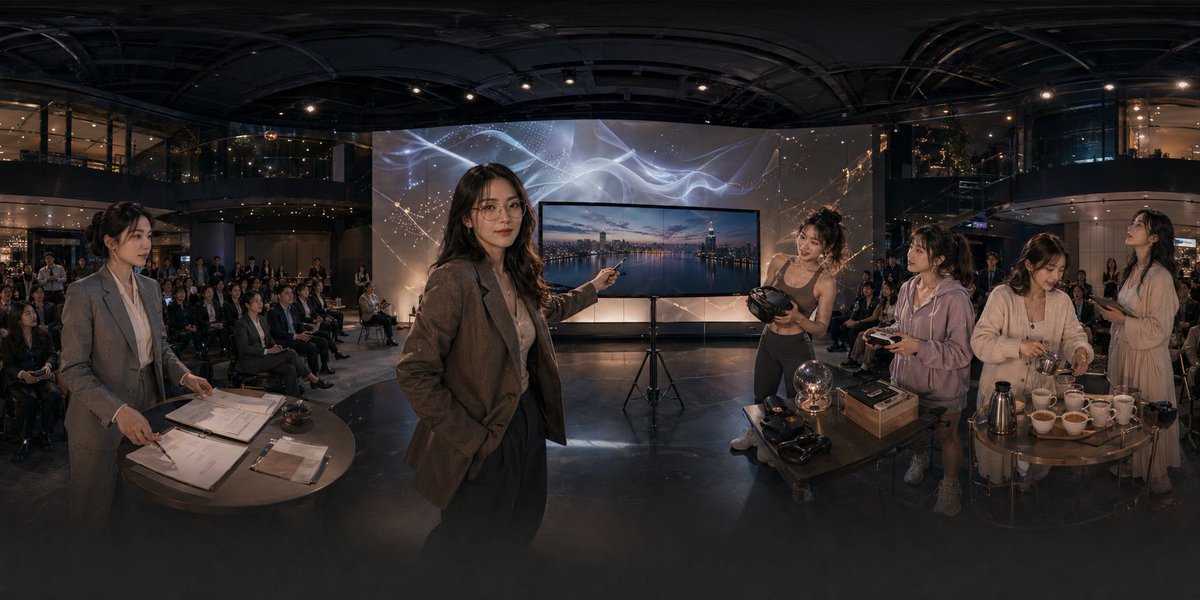
Panorama-Tech-Event-Atrium-Szene
Diese Funktion erzeugt eine filmreife, ultrabreite Unternehmenspräsentationsszene in einem modernen Atrium, die sich gut zur Veranschaulichung einer Technologieeinführung, eines immersiven Demo-Events oder einer Startup-Präsentation eignet.
Dies ist ein GPT Image 2 -Prompt für Innenarchitektur . Verwenden Sie den unten stehenden, kopierfertigen Prompt, um ähnliche Grafiken zu erstellen, und überprüfen Sie vor der Wiederverwendung Awesome GPT Image 2 Prompts -Quellenangaben sowie die kommerziellen Nutzungsrechte.
Benötigen Sie den vollständigen Prompt-Satz? Verwenden Sie den Innenarchitektur Weitere verwandte Beispiele finden Sie im Themen-Hub oder öffnen Sie die GPT Image 2 Prompt-Katalog für das vollständige Beispielverzeichnis, wiederverwendbare Strukturen und Quellenangaben.
Free 1K preview
Generate one preview image instantly, no sign-up required.
1799/4000
Eingabeaufforderung
Kopierfertige Eingabeaufforderung
A cinematic ultra-wide panoramic scene inside a modern multi-story event atrium at night, photographed like a 360-degree conference showcase with dramatic warm low-key lighting and glossy dark architectural surfaces. In the center foreground, a professional woman in a brown blazer and dark trousers stands confidently and points toward a large flat-screen display on a tripod; the screen shows a twilight city skyline over water. Behind the display is a tall illuminated backdrop with abstract flowing white light ribbons and faint constellation-like gold sparkles. The venue is filled with a seated audience arranged in rows across the background, watching the presentation. On the left foreground, 1 woman in a gray business suit stands beside a round table covered with paperwork, clipboards, a pen, and a small service bell, as if handling registration or event administration. On the right foreground, there are 4 women gathered around two small round tables demonstrating products and hospitality items: 1 athletic woman in a fitted top holds a VR headset, 1 casually dressed woman in a light hoodie holds a controller, 1 woman in a cream cardigan works with cups and utensils, and 1 woman in a light dress stands nearby holding a phone or small object. The right-side tables contain exactly 11 visible items of note: 1 glowing glass orb lamp, 2 VR headsets, 1 rectangular product box, 1 metallic thermos or coffee pot, and 6 white teacups arranged in a row. The scene should feel like an upscale tech lifestyle launch, blending business presentation, immersive gadgets, and cafe service in one space. Use realistic human proportions, documentary-style staging, polished corporate event photography, subtle reflections on the floor, deep depth, and a seamless extra-wide panorama composition.
Best for
- - Innenarchitektur visual exploration
- - Image generation and reference-image edits
- - Reusable briefs that keep source attribution visible
Change these parts
- - Subject, product, character, or scene
- - Aspect ratio, camera, lighting, and background
- - Brand, text, color, and output constraints
Recommended model and settings
- - Model: gpt-image-2
- - Input mode: Text zu Bild
- - Aspect ratio: source
- - Commercial status: review original source
How to use this prompt
- 1. Copy the prompt and preserve its structure for the first test.
- 2. Replace the subject, context, and publishing channel.
- 3. Change one camera, lighting, or style variable per iteration.
- 4. Inspect the output, source, text, and rights before reuse.
Limitations, source, and reuse cautions
- - Generated output is an editable draft, not factual, legal, or rights evidence.
- - Review the linked source, people, brands, logos, text, and third-party media before commercial use.
Importiert von Awesome GPT Image 2 Prompts . Quellenangabe erforderlich. Status der kommerziellen Nutzung: allowed ; Rechte an der Quelle vor kostenpflichtiger Nutzung prüfen.
Weitere Fälle in dieser Kategorie
Priorisiert nach Kategorie, Kompatibilität der Eingabemodi, Qualität und geringerem Risiko.






Hinweise zur Wiederverwendung und Quellenangabe
Verwenden Sie diese Eingabeaufforderung sicher, nachdem Sie den Fall in der Vorschau angezeigt haben.
- 1.Kopieren Sie die Eingabeaufforderung oder öffnen Sie sie direkt in Dovoo mit der Schaltfläche „Generieren“.
- 2.Passen Sie Variablen, Seitenverhältnis und Referenzbilder an Ihren Anwendungsfall an.
- 3.Vor der Veröffentlichung oder kostenpflichtigen Nutzung sollten Sie die Rechte an der Quelle, die Anforderungen an die Namensnennung sowie die Risiken für die Marke oder das Abbild prüfen.