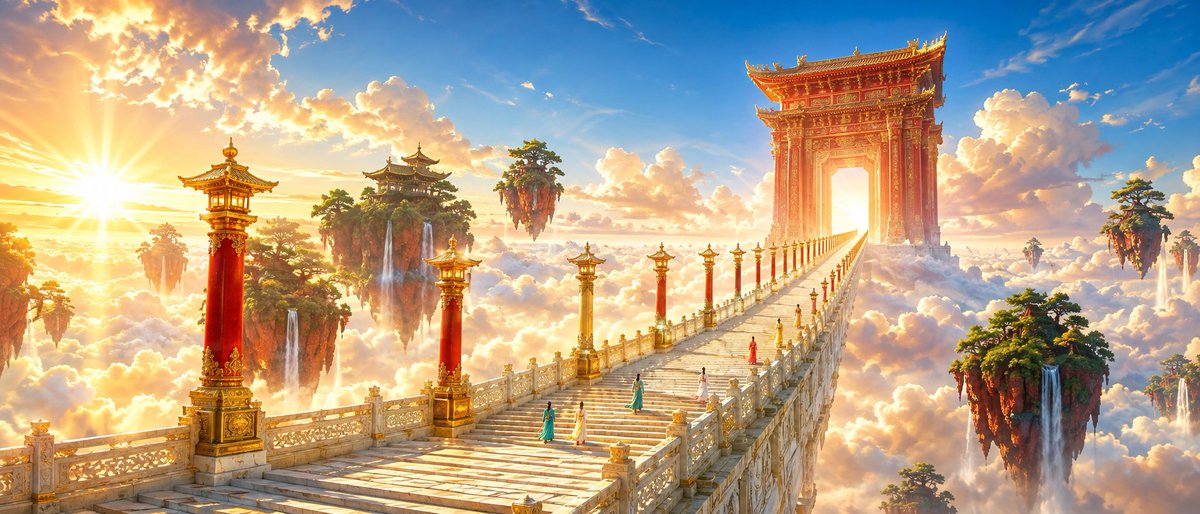
Oriental Xianxia Cinematic Scene
A detailed prompt for generating a magnificent oriental fantasy scene with a jade staircase rising through the clouds using GPT Image 2.
Dies ist ein GPT Image 2 -Prompt für Landschaft & Natur . Verwenden Sie den unten stehenden, kopierfertigen Prompt, um ähnliche Grafiken zu erstellen, und überprüfen Sie vor der Wiederverwendung Awesome GPT Image 2 Prompts -Quellenangaben sowie die kommerziellen Nutzungsrechte.
Benötigen Sie den vollständigen Prompt-Satz? Verwenden Sie den Landschaft & Natur Weitere verwandte Beispiele finden Sie im Themen-Hub oder öffnen Sie die GPT Image 2 Prompt-Katalog für das vollständige Beispielverzeichnis, wiederverwendbare Strukturen und Quellenangaben.
Free 1K preview
Generate one preview image instantly, no sign-up required.
1831/4000
Eingabeaufforderung
Kopierfertige Eingabeaufforderung
A bright and gorgeous {argument name="theme" default="oriental fantasy"} movie scene, cinematic ultra-wide shot. Strict one-point perspective, a grand celestial staircase paved with light-gold jade, crossing through a sea of clouds from the lower-left corner and sharply shrinking toward a vanishing point at the right third of the frame. Flanking the stairs are tall lamp posts in alternating {argument name="lamp post colors" default="vermilion and gilding"}, with their spacing and size decreasing according to depth. In the distance stands a massive Danxia-colored carved heavenly gate, with a bright sky shining through. Beside the stairs float several red mountain islands covered in emerald pine forests, with slender waterfalls falling into the golden-white sea of clouds. {argument name="traveler count" default="Five"} young travelers dressed in teal, ivory, and coral red long robes are ascending the stairs, all seen from behind and very small in scale, serving only as size references. The sky shows a rich gradient of azure and apricot gold, with large white clouds illuminated with warm gold edges by the setting sun. Low-angle sunlight passes through the gate from the left, creating clear backlighting silhouettes, crepuscular rays, and restrained starbursts. Shadows are transparent blue-purple, avoiding gray tones. A high-brightness color scheme of azure, apricot gold, cinnabar red, emerald green, and ivory white, featuring high saturation, luminous colors, rich but elegant chroma, and clean warm-cool separation. Architectural details are precise, jade has natural textures, and gilding is used only for edge emphasis. Cinematic film still, monumental scale, tiny human figures, strong aerial perspective, refined fantasy realism, no muddy grading, no gloomy colors, no excessive fog, no text, no watermark.Eingabeaufforderungsvariablen
In der Eingabeaufforderung befinden sich bearbeitbare Argumentplatzhalter mit ihren Standardwerten.
Variable
theme
Standard
oriental fantasy
Variable
lamp post colors
Standard
vermilion and gilding
Variable
traveler count
Standard
Five
Best for
- - Landschaft & Natur visual exploration
- - Image generation and reference-image edits
- - Reusable briefs that keep source attribution visible
Change these parts
- - Subject, product, character, or scene
- - Aspect ratio, camera, lighting, and background
- - Brand, text, color, and output constraints
Recommended model and settings
- - Model: gpt-image-2
- - Input mode: Text zu Bild
- - Aspect ratio: source
- - Commercial status: review original source
How to use this prompt
- 1. Copy the prompt and preserve its structure for the first test.
- 2. Replace the subject, context, and publishing channel.
- 3. Change one camera, lighting, or style variable per iteration.
- 4. Inspect the output, source, text, and rights before reuse.
Limitations, source, and reuse cautions
- - Generated output is an editable draft, not factual, legal, or rights evidence.
- - Review the linked source, people, brands, logos, text, and third-party media before commercial use.
Importiert von Awesome GPT Image 2 Prompts . Quellenangabe erforderlich. Status der kommerziellen Nutzung: allowed ; Rechte an der Quelle vor kostenpflichtiger Nutzung prüfen.
Weitere Fälle in dieser Kategorie
Priorisiert nach Kategorie, Kompatibilität der Eingabemodi, Qualität und geringerem Risiko.






Hinweise zur Wiederverwendung und Quellenangabe
Verwenden Sie diese Eingabeaufforderung sicher, nachdem Sie den Fall in der Vorschau angezeigt haben.
- 1.Kopieren Sie die Eingabeaufforderung oder öffnen Sie sie direkt in Dovoo mit der Schaltfläche „Generieren“.
- 2.Passen Sie Variablen, Seitenverhältnis und Referenzbilder an Ihren Anwendungsfall an.
- 3.Vor der Veröffentlichung oder kostenpflichtigen Nutzung sollten Sie die Rechte an der Quelle, die Anforderungen an die Namensnennung sowie die Risiken für die Marke oder das Abbild prüfen.