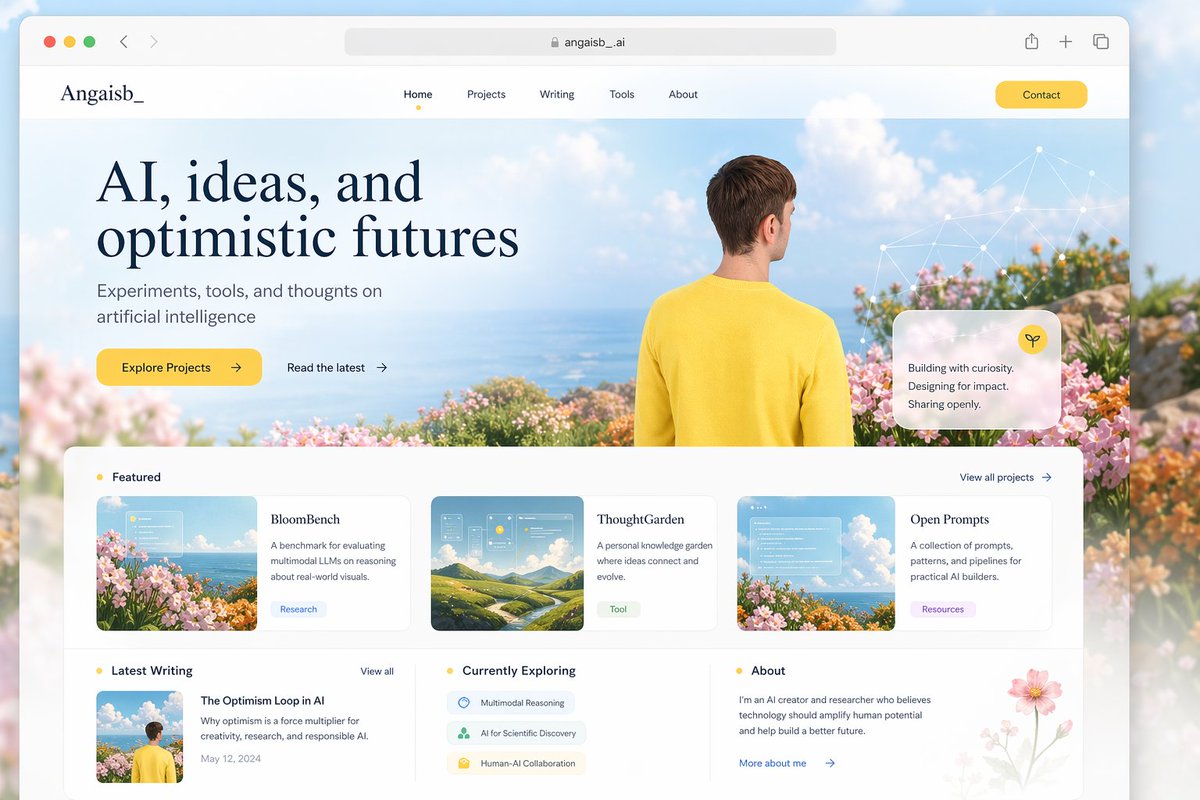
Optimistische KI-Portfolio-Landingpage
Ein ansprechend gestalteter Homepage-Entwurf für ein persönliches KI-Portfolio zur Präsentation von Projekten, Texten und Forschungsthemen in einem ansprechenden redaktionellen Webdesign.
Dies ist ein GPT Image 2 -Prompt für Grafik & Poster . Verwenden Sie den unten stehenden, kopierfertigen Prompt, um ähnliche Grafiken zu erstellen, und überprüfen Sie vor der Wiederverwendung Awesome GPT Image 2 Prompts -Quellenangaben sowie die kommerziellen Nutzungsrechte.
Free 1K preview
Generate one preview image instantly, no sign-up required.
Eingabeaufforderung
Kopierfertige Eingabeaufforderung
{
  "type": "editorial portfolio website landing page mockup",
  "style": "clean modern web design, airy premium aesthetic, soft editorial typography, pastel coastal palette, subtle glassmorphism, high-end startup portfolio feel",
  "canvas": {
    "aspect_ratio": "3:2",
    "background": "soft blue sky outside the browser frame"
  },
  "browser": {
    "type": "desktop browser window mockup",
    "top_bar": {
      "traffic_lights": 3,
      "address_text": "angaisb._ai",
      "right_icons": 3
    },
    "corner_radius": "large",
    "shadow": "soft floating shadow"
  },
  "brand": {
    "logo_text": "Angaisb_"
  },
  "header": {
    "nav_count": 5,
    "nav_items": [
      "Home",
      "Projects",
      "Writing",
      "Tools",
      "About"
    ],
    "active_item": "Home",
    "cta_button": {
      "text": "{argument name=\"button text\" default=\"Contact\"}",
      "style": "rounded yellow pill"
    }
  },
  "hero": {
    "layout": "split editorial hero with text on left and image scene on right blending across full width",
    "background_scene": "sunny coastal overlook with blue ocean horizon, fluffy white clouds, pink and orange flowers in the foreground, soft dreamy atmosphere",
    "headline": "{argument name=\"headline text\" default=\"AI, ideas, and optimistic futures\"}",
    "subheadline": "{argument name=\"subheadline text\" default=\"Experiments, tools, and thoughts on artificial intelligence\"}",
    "primary_cta": {
      "text": "Explore Projects",
      "style": "yellow rounded button with arrow"
    },
    "secondary_cta": {
      "text": "Read the latest",
      "style": "text link with arrow"
    },
    "human_figure": {
      "count": 1,
      "description": "young man seen from behind, short brown hair, wearing a bright yellow sweater, centered-right in the hero, looking toward the ocean"
    },
    "overlay_card": {
      "count": 1,
      "style": "translucent frosted glass rounded card",
      "icon": "small yellow circular icon",
      "text_lines": [
        "Building with curiosity.",
        "Designing for impact.",
        "Sharing openly."
      ]
    },
    "network_graphic": {
      "count": 1,
      "description": "delicate white node-and-line constellation graphic in the upper-right sky"
    }
  },
  "main_sections": [
    {
      "title": "Featured",
      "position": "upper content area",
      "count": 3,
      "labels": [
        "BloomBench",
        "ThoughtGarden",
        "Open Prompts"
      ],
      "cards": [
        {
          "title": "BloomBench",
          "tag": "Research",
          "description": "A benchmark for evaluating multimodal LLMs on reasoning about real-world visuals.",
          "thumbnail": "flowers by the sea with light UI overlay"
        },
        {
          "title": "ThoughtGarden",
          "tag": "Tools",
          "description": "A personal knowledge garden where ideas connect and evolve.",
          "thumbnail": "rolling green hills under blue sky with translucent interface panels"
        },
        {
          "title": "Open Prompts",
          "tag": "Resources",
          "description": "A collection of prompts, patterns, and pipelines for practical AI builders.",
          "thumbnail": "flowers and sky with translucent interface panels"
        }
      ],
      "top_right_link": "View all projects"
    },
    {
      "title": "Latest Writing",
      "position": "bottom left",
      "count": 1,
      "labels": [
        "The Optimism Loop in AI"
      ],
      "card": {
        "title": "The Optimism Loop in AI",
        "description": "Why optimism is a force multiplier for creativity, research, and responsible AI.",
        "date": "May 12, 2024",
        "thumbnail": "rear-view person in yellow sweater standing among flowers"
      },
      "top_right_link": "View all"
    },
    {
      "title": "Currently Exploring",
      "position": "bottom center",
      "count": 3,
      "labels": [
        "Multimodal Reasoning",
        "AI for Scientific Discovery",
        "Human-AI Collaboration"
      ],
      "style": "three soft rounded topic pills with small icons"
    },
    {
      "title": "About",
      "position": "bottom right",
      "count": 1,
      "labels": [
        "More about me"
      ],
      "text": "I’m an AI creator and researcher who believes technology should amplify human potential and help build a better future.",
      "decoration": "delicate pink flower illustration in the lower-right corner"
    }
  ],
  "visual_details": {
    "cards": "white rounded cards with thin light-gray borders and soft shadows",
    "spacing": "generous whitespace and balanced grid",
    "typography": "large elegant serif display headline paired with clean sans-serif UI text",
    "colors": {
      "primary_text": "deep navy",
      "accent": "warm yellow",
      "background": "white and pale sky blue",
      "secondary_accents": "soft pink, green, and lavender"
    }
  }
}
Eingabeaufforderungsvariablen
In der Eingabeaufforderung befinden sich bearbeitbare Argumentplatzhalter mit ihren Standardwerten.
Best for
- - Grafik & Poster visual exploration
- - Image generation and reference-image edits
- - Reusable briefs that keep source attribution visible
Change these parts
- - Subject, product, character, or scene
- - Aspect ratio, camera, lighting, and background
- - Brand, text, color, and output constraints
Recommended model and settings
- - Model: gpt-image-2
- - Input mode: Text zu Bild
- - Aspect ratio: source
- - Commercial status: review original source
How to use this prompt
- 1. Copy the prompt and preserve its structure for the first test.
- 2. Replace the subject, context, and publishing channel.
- 3. Change one camera, lighting, or style variable per iteration.
- 4. Inspect the output, source, text, and rights before reuse.
Limitations, source, and reuse cautions
- - Generated output is an editable draft, not factual, legal, or rights evidence.
- - Review the linked source, people, brands, logos, text, and third-party media before commercial use.
Weitere Fälle in dieser Kategorie
Priorisiert nach Kategorie, Kompatibilität der Eingabemodi, Qualität und geringerem Risiko.






Hinweise zur Wiederverwendung und Quellenangabe
Verwenden Sie diese Eingabeaufforderung sicher, nachdem Sie den Fall in der Vorschau angezeigt haben.
- 1.Kopieren Sie die Eingabeaufforderung oder öffnen Sie sie direkt in Dovoo mit der Schaltfläche „Generieren“.
- 2.Passen Sie Variablen, Seitenverhältnis und Referenzbilder an Ihren Anwendungsfall an.
- 3.Vor der Veröffentlichung oder kostenpflichtigen Nutzung sollten Sie die Rechte an der Quelle, die Anforderungen an die Namensnennung sowie die Risiken für die Marke oder das Abbild prüfen.