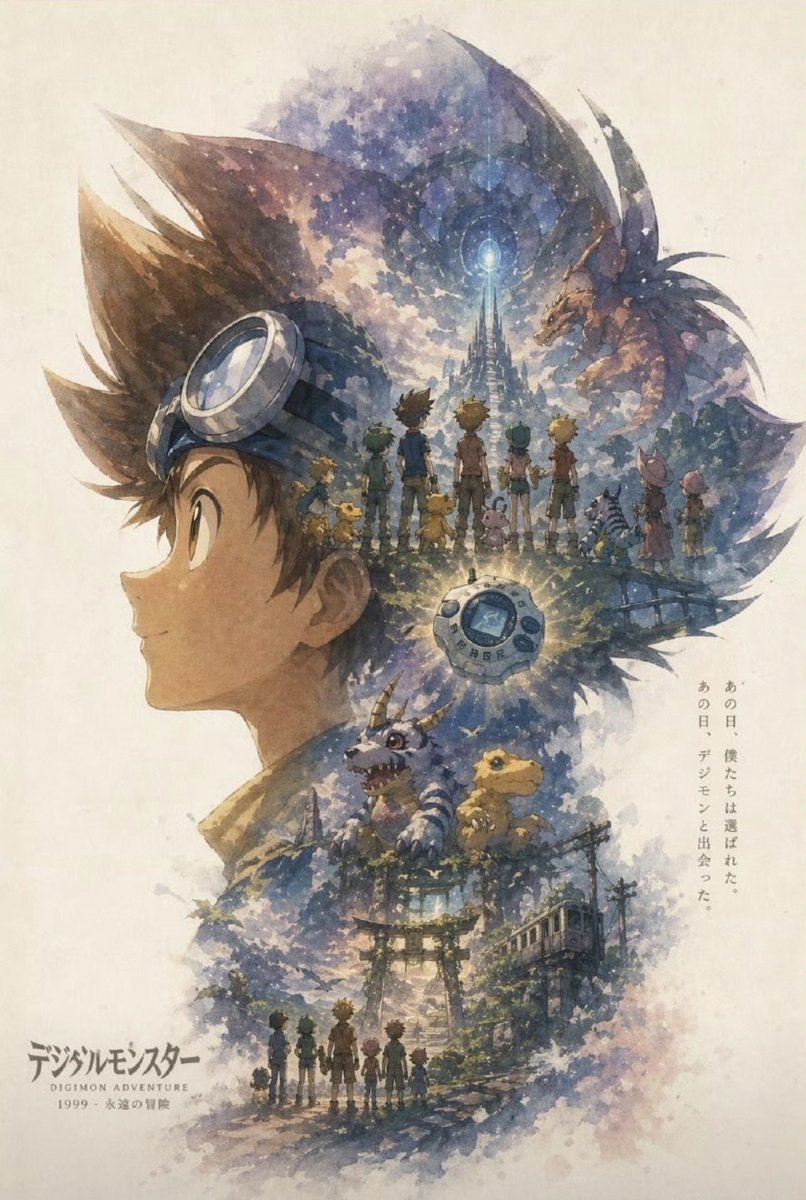
Nostalgisches Aquarell-Anime-Abenteuer-Poster
Diese Eingabeaufforderung erzeugt ein malerisches Retro-Anime-Gedenkposter mit einem Doppelbelichtungs-Kinderprofil, fantasievollen Montageszenen und eleganter japanischer Typografie für Franchise-Hommage-Kunst oder Sammlerdrucke.
Dies ist ein GPT Image 2 -Prompt für Grafik & Poster . Verwenden Sie den unten stehenden, kopierfertigen Prompt, um ähnliche Grafiken zu erstellen, und überprüfen Sie vor der Wiederverwendung Awesome GPT Image 2 Prompts -Quellenangaben sowie die kommerziellen Nutzungsrechte.
Benötigen Sie den vollständigen Prompt-Satz? Verwenden Sie den Grafik & Poster Weitere verwandte Beispiele finden Sie im Themen-Hub oder öffnen Sie die GPT Image 2 Prompt-Katalog für das vollständige Beispielverzeichnis, wiederverwendbare Strukturen und Quellenangaben.
Free 1K preview
Generate one preview image instantly, no sign-up required.
1854/4000
Eingabeaufforderung
Kopierfertige Eingabeaufforderung
A nostalgic watercolor anime poster on textured off-white paper, composed as a vertical double-exposure illustration inspired by late-1990s adventure anime. The main silhouette is the left-side profile of a young boy wearing large swim goggles pushed up on his head, his face turned to the right, with the silhouette filled by a dreamlike montage of memories and fantasy scenes. Inside the upper center of the silhouette, show 8 children from behind standing together on a ridge and looking toward a glowing, distant crystalline tower beneath a circular celestial portal in a cloudy blue-violet sky; include 7 small creature companions among them. On the upper right inside the silhouette, place a large dragon-like monster emerging from the clouds. Near the center, add a glowing round handheld digital device with a small screen, radiating light. In the middle-lower area, depict 2 iconic small dinosaur-like creatures sitting above an old shrine approach, one purple horned creature and one small yellow reptilian creature. In the lower area, show a mossy torii gate, overgrown stone steps, utility poles, and a small rural train on the right, all wrapped in mist and foliage. At the very bottom, include the 8 children again as tiny silhouettes walking away together along a path, reinforcing the theme of friendship and remembrance. Use soft ink-and-watercolor washes, muted blues, indigo, lavender, sepia, and warm golden highlights, with splattered pigment edges and painterly cloud textures. Keep the composition airy and elegant, with a refined modern poster-design sensibility and almost no generic AI gloss. Add vertical Japanese text on the right side reading あの日、僕たちは選ばれた。あの日、デジモンと出会った。 and place a Japanese title logo at the lower left reading デジモンアドベンチャー, with a small English subtitle “DIGIMON ADVENTURE” and the date line “1999 - 永遠の冒険”.
Best for
- - Grafik & Poster visual exploration
- - Image generation and reference-image edits
- - Reusable briefs that keep source attribution visible
Change these parts
- - Subject, product, character, or scene
- - Aspect ratio, camera, lighting, and background
- - Brand, text, color, and output constraints
Recommended model and settings
- - Model: gpt-image-2
- - Input mode: Text zu Bild
- - Aspect ratio: source
- - Commercial status: review original source
How to use this prompt
- 1. Copy the prompt and preserve its structure for the first test.
- 2. Replace the subject, context, and publishing channel.
- 3. Change one camera, lighting, or style variable per iteration.
- 4. Inspect the output, source, text, and rights before reuse.
Limitations, source, and reuse cautions
- - Generated output is an editable draft, not factual, legal, or rights evidence.
- - Review the linked source, people, brands, logos, text, and third-party media before commercial use.
Importiert von Awesome GPT Image 2 Prompts . Quellenangabe erforderlich. Status der kommerziellen Nutzung: allowed ; Rechte an der Quelle vor kostenpflichtiger Nutzung prüfen.
Weitere Fälle in dieser Kategorie
Priorisiert nach Kategorie, Kompatibilität der Eingabemodi, Qualität und geringerem Risiko.






Hinweise zur Wiederverwendung und Quellenangabe
Verwenden Sie diese Eingabeaufforderung sicher, nachdem Sie den Fall in der Vorschau angezeigt haben.
- 1.Kopieren Sie die Eingabeaufforderung oder öffnen Sie sie direkt in Dovoo mit der Schaltfläche „Generieren“.
- 2.Passen Sie Variablen, Seitenverhältnis und Referenzbilder an Ihren Anwendungsfall an.
- 3.Vor der Veröffentlichung oder kostenpflichtigen Nutzung sollten Sie die Rechte an der Quelle, die Anforderungen an die Namensnennung sowie die Risiken für die Marke oder das Abbild prüfen.