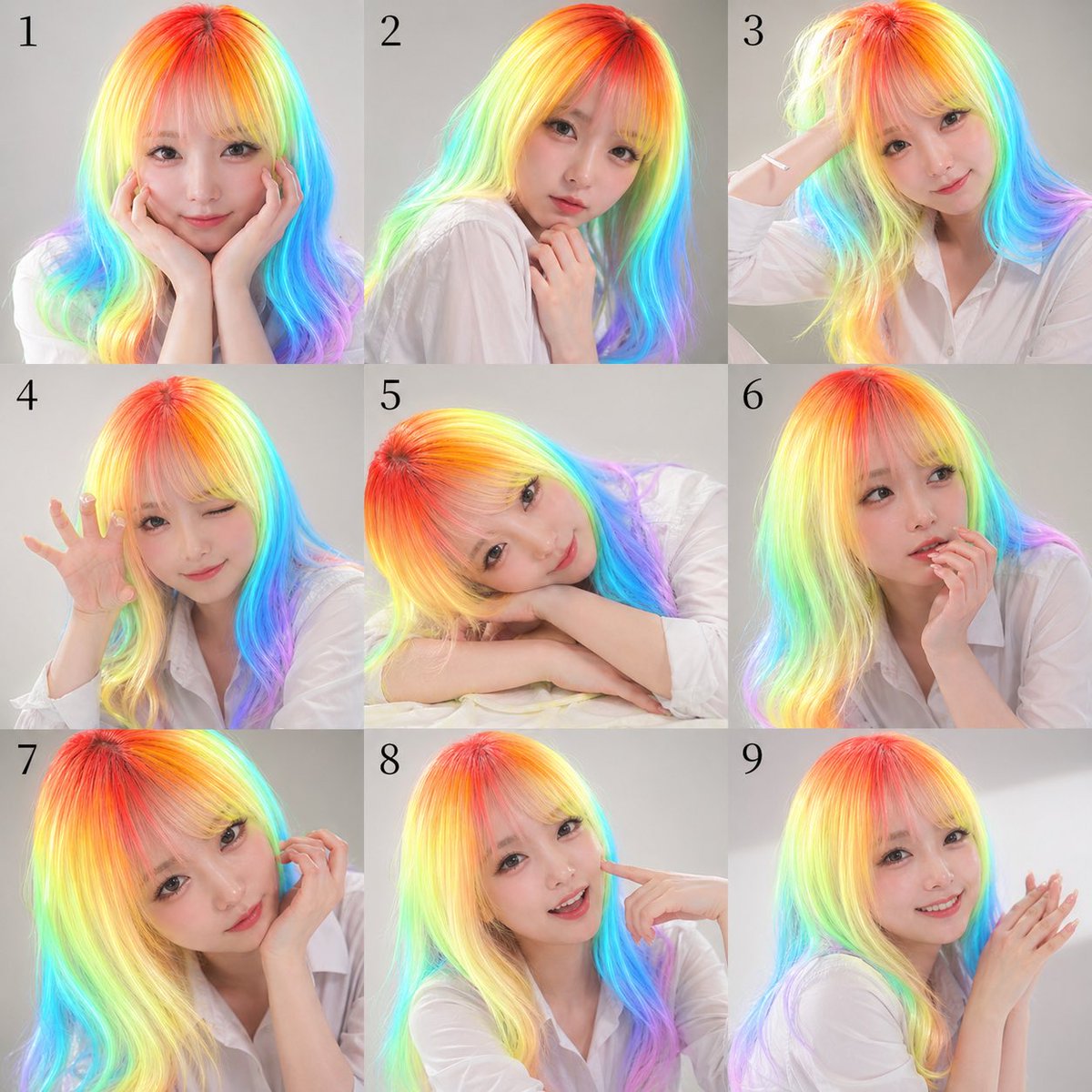
Neunteiliges Regenbogenhaar-Porträtblatt
Diese Funktion generiert ein Kontaktblatt mit 9 Studio-Porträts einer Person in verschiedenen Posen, das sich für Werbematerial, Ausdruckstafeln oder stilisierte Erinnerungsporträts eignet.
Dies ist ein GPT Image 2 -Prompt für Porträt & Charakter . Verwenden Sie den unten stehenden, kopierfertigen Prompt, um ähnliche Grafiken zu erstellen, und überprüfen Sie vor der Wiederverwendung Awesome GPT Image 2 Prompts -Quellenangaben sowie die kommerziellen Nutzungsrechte.
Free 1K preview
Generate one preview image instantly, no sign-up required.
Eingabeaufforderung
Kopierfertige Eingabeaufforderung
A 3x3 contact-sheet style studio portrait collage with exactly 9 square panels arranged in a clean grid, each panel numbered in black serif numerals from 1 to 9 near the upper left corner. The same woman appears in every panel against a soft light gray seamless studio background, wearing a loose white button-up shirt with natural folds and a casual editorial look. She has long, smooth, slightly wavy hair rendered in vivid neon rainbow gradients, with hot red and orange at the crown transitioning through yellow, lime, cyan, blue, and violet toward the lengths and ends, creating a luminous iridescent effect. The face in every panel is obscured by a centered square mosaic blur block in skin-tone colors, covering the full face area while leaving hair, neck, hands, and clothing visible. Use soft, even beauty lighting, polished commercial photography, high detail, realistic skin and fabric, and a modern promotional headshot aesthetic. The 9 poses are: panel 1, facing front with both hands cupping the cheeks; panel 2, turned slightly left in three-quarter view with one hand lightly touching the neck/collarbone; panel 3, angled right with one arm raised and hand touching the back of the head; panel 4, leaning forward slightly with one hand lifted beside the face, fingers spread in a playful claw-like gesture; panel 5, resting head sideways on folded arms on a white surface, relaxed and dreamy; panel 6, front-facing with one hand supporting the chin or cheek in a thoughtful pose; panel 7, close crop from the left side with one hand lifted near the ear or hair; panel 8, front-facing with one index finger pointing to the cheek; panel 9, right three-quarter view with both hands together near the face as if softly clapping or posing delicately. Keep framing varied but consistent, mostly bust or half-body crops, with the rainbow hair as the central visual feature. Make it look like a nine-variation publicity photo sheet for {argument name="subject type" default="a young woman"}, wearing a {argument name="outfit" default="white button-up shirt"}, with {argument name="hair color" default="neon rainbow gradient hair"}, on a {argument name="background color" default="light gray studio background"}, in a {argument name="photo style" default="clean commercial beauty portrait"} style.Eingabeaufforderungsvariablen
In der Eingabeaufforderung befinden sich bearbeitbare Argumentplatzhalter mit ihren Standardwerten.
Best for
- - Porträt & Charakter visual exploration
- - Image generation and reference-image edits
- - Reusable briefs that keep source attribution visible
Change these parts
- - Subject, product, character, or scene
- - Aspect ratio, camera, lighting, and background
- - Brand, text, color, and output constraints
Recommended model and settings
- - Model: gpt-image-2
- - Input mode: Text zu Bild
- - Aspect ratio: source
- - Commercial status: review original source
How to use this prompt
- 1. Copy the prompt and preserve its structure for the first test.
- 2. Replace the subject, context, and publishing channel.
- 3. Change one camera, lighting, or style variable per iteration.
- 4. Inspect the output, source, text, and rights before reuse.
Limitations, source, and reuse cautions
- - Generated output is an editable draft, not factual, legal, or rights evidence.
- - Review the linked source, people, brands, logos, text, and third-party media before commercial use.
Weitere Fälle in dieser Kategorie
Priorisiert nach Kategorie, Kompatibilität der Eingabemodi, Qualität und geringerem Risiko.






Hinweise zur Wiederverwendung und Quellenangabe
Verwenden Sie diese Eingabeaufforderung sicher, nachdem Sie den Fall in der Vorschau angezeigt haben.
- 1.Kopieren Sie die Eingabeaufforderung oder öffnen Sie sie direkt in Dovoo mit der Schaltfläche „Generieren“.
- 2.Passen Sie Variablen, Seitenverhältnis und Referenzbilder an Ihren Anwendungsfall an.
- 3.Vor der Veröffentlichung oder kostenpflichtigen Nutzung sollten Sie die Rechte an der Quelle, die Anforderungen an die Namensnennung sowie die Risiken für die Marke oder das Abbild prüfen.