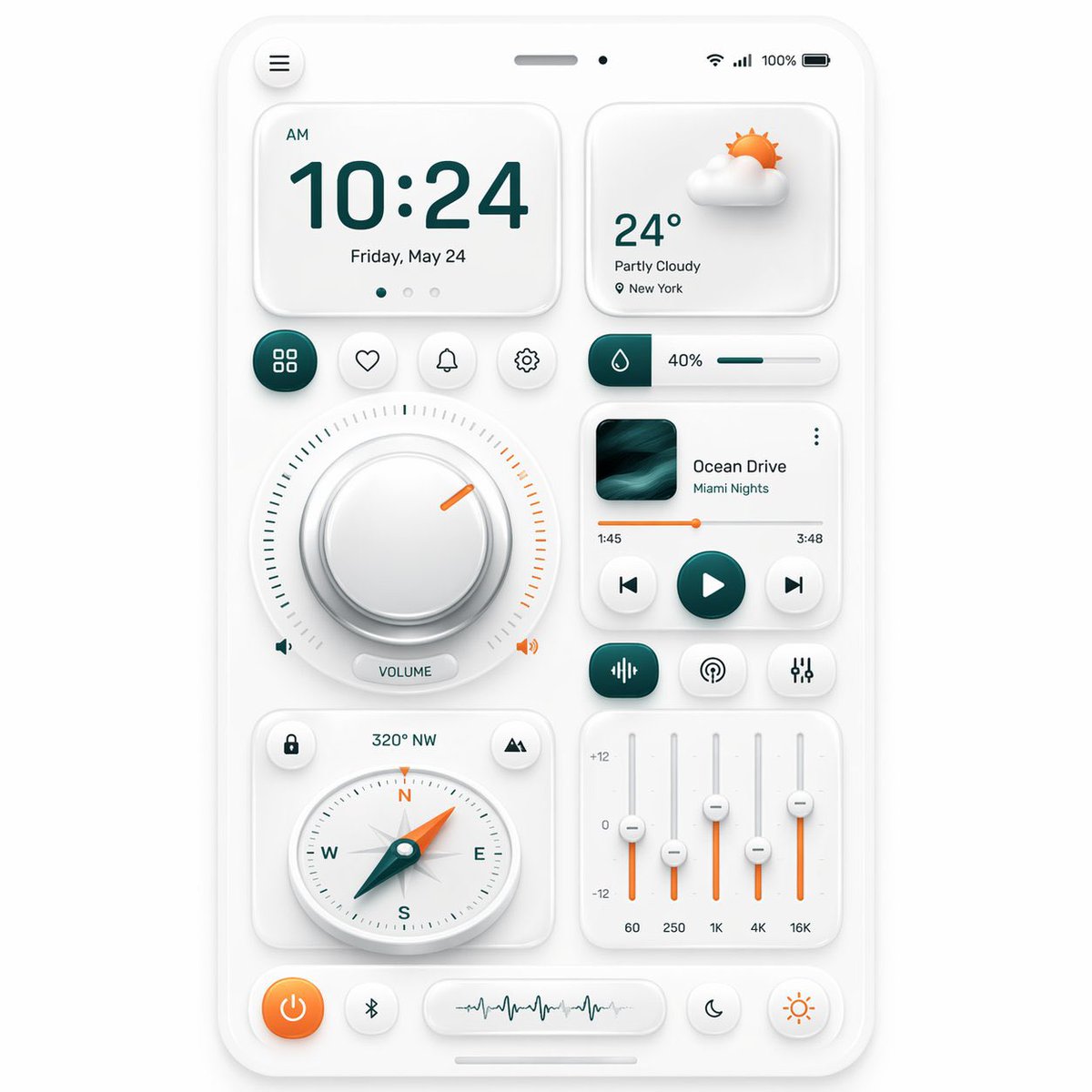
Neumorphe mobile Dashboard-Benutzeroberfläche
Diese Eingabeaufforderung generiert ein elegantes, Smartphone-ähnliches, neumorphes Steuerungs-Dashboard mit mehreren Widgets, ideal für UI-Konzeptgrafiken, Designinspirationen und App-Mockup-Präsentationen.
Dies ist ein GPT Image 2 -Prompt für Andere Inspiration . Verwenden Sie den unten stehenden, kopierfertigen Prompt, um ähnliche Grafiken zu erstellen, und überprüfen Sie vor der Wiederverwendung Awesome GPT Image 2 Prompts -Quellenangaben sowie die kommerziellen Nutzungsrechte.
Benötigen Sie den vollständigen Prompt-Satz? Verwenden Sie den Andere Inspiration Weitere verwandte Beispiele finden Sie im Themen-Hub oder öffnen Sie die GPT Image 2 Prompt-Katalog für das vollständige Beispielverzeichnis, wiederverwendbare Strukturen und Quellenangaben.
Free 1K preview
Generate one preview image instantly, no sign-up required.
3961/4000
Eingabeaufforderung
Kopierfertige Eingabeaufforderung
{
  "type": "neumorphic mobile dashboard UI showcase",
  "style": {
    "theme": "clean soft neumorphism",
    "background": "light warm gray",
    "primary color": "deep teal",
    "accent color": "orange",
    "material": "matte white plastic cards with subtle inner and outer shadows, rounded corners, soft highlights",
    "rendering": "high-resolution polished 3D UI mockup, front view, centered composition"
  },
  "device": {
    "kind": "smartphone screen mockup",
    "frame": "thin white rounded bezel",
    "status bar": {
      "count": 5,
      "items": [
        "hamburger menu button at top left",
        "speaker slot at top center",
        "small front camera dot",
        "wireless signal icons at top right",
        "100% battery indicator"
      ]
    }
  },
  "layout": {
    "sections": [
      {
        "title": "clock card",
        "position": "top left",
        "count": 4,
        "labels": [
          "AM",
          "10:24",
          "Friday, May 24",
          "3 page indicator dots"
        ]
      },
      {
        "title": "weather card",
        "position": "top right",
        "count": 4,
        "labels": [
          "partly cloudy 3D sun-and-cloud icon",
          "24°",
          "Partly Cloudy",
          "New York"
        ]
      },
      {
        "title": "shortcut buttons row",
        "position": "upper middle left",
        "count": 4,
        "labels": [
          "grid/apps",
          "heart/favorite",
          "bell/notifications",
          "settings"
        ]
      },
      {
        "title": "humidity slider",
        "position": "upper middle right",
        "count": 3,
        "labels": [
          "droplet icon block",
          "40%",
          "horizontal progress bar"
        ]
      },
      {
        "title": "volume dial module",
        "position": "center left",
        "count": 5,
        "labels": [
          "large circular knob",
          "surrounding tick marks",
          "orange indicator notch",
          "left speaker icon",
          "VOLUME pill label and right speaker icon"
        ]
      },
      {
        "title": "music player card",
        "position": "center right",
        "count": 8,
        "labels": [
          "album artwork",
          "Ocean Drive",
          "Miami Nights",
          "three-dot menu",
          "1:45",
          "3:48",
          "orange progress bar",
          "previous play next controls"
        ]
      },
      {
        "title": "audio control row",
        "position": "below music player",
        "count": 3,
        "labels": [
          "equalizer/wave icon button",
          "broadcast/podcast icon button",
          "sliders/settings icon button"
        ]
      },
      {
        "title": "compass card",
        "position": "lower left",
        "count": 5,
        "labels": [
          "lock icon button",
          "320° NW",
          "mountain/location icon button",
          "round compass dial with N E S W",
          "teal needle with orange tip"
        ]
      },
      {
        "title": "equalizer card",
        "position": "lower right",
        "count": 8,
        "labels": [
          "+12",
          "0",
          "-12",
          "60",
          "250",
          "1K",
          "4K",
          "16K"
        ]
      },
      {
        "title": "bottom dock",
        "position": "bottom",
        "count": 4,
        "labels": [
          "orange power button",
          "Bluetooth button",
          "waveform display capsule",
          "two circular mode buttons: moon and sun"
        ]
      }
    ],
    "centerpiece": "a balanced grid of neumorphic widgets arranged on one smartphone dashboard"
  },
  "composition": {
    "spacing": "even margins and generous padding",
    "perspective": "straight-on",
    "shadow behavior": "very soft ambient shadows for a tactile embossed look",
    "iconography": "minimal line icons with teal and orange highlights"
  }
}
Best for
- - Andere Inspiration visual exploration
- - Image generation and reference-image edits
- - Reusable briefs that keep source attribution visible
Change these parts
- - Subject, product, character, or scene
- - Aspect ratio, camera, lighting, and background
- - Brand, text, color, and output constraints
Recommended model and settings
- - Model: gpt-image-2
- - Input mode: Text zu Bild
- - Aspect ratio: source
- - Commercial status: review original source
How to use this prompt
- 1. Copy the prompt and preserve its structure for the first test.
- 2. Replace the subject, context, and publishing channel.
- 3. Change one camera, lighting, or style variable per iteration.
- 4. Inspect the output, source, text, and rights before reuse.
Limitations, source, and reuse cautions
- - Generated output is an editable draft, not factual, legal, or rights evidence.
- - Review the linked source, people, brands, logos, text, and third-party media before commercial use.
Importiert von Awesome GPT Image 2 Prompts . Quellenangabe erforderlich. Status der kommerziellen Nutzung: allowed ; Rechte an der Quelle vor kostenpflichtiger Nutzung prüfen.
Weitere Fälle in dieser Kategorie
Priorisiert nach Kategorie, Kompatibilität der Eingabemodi, Qualität und geringerem Risiko.






Hinweise zur Wiederverwendung und Quellenangabe
Verwenden Sie diese Eingabeaufforderung sicher, nachdem Sie den Fall in der Vorschau angezeigt haben.
- 1.Kopieren Sie die Eingabeaufforderung oder öffnen Sie sie direkt in Dovoo mit der Schaltfläche „Generieren“.
- 2.Passen Sie Variablen, Seitenverhältnis und Referenzbilder an Ihren Anwendungsfall an.
- 3.Vor der Veröffentlichung oder kostenpflichtigen Nutzung sollten Sie die Rechte an der Quelle, die Anforderungen an die Namensnennung sowie die Risiken für die Marke oder das Abbild prüfen.