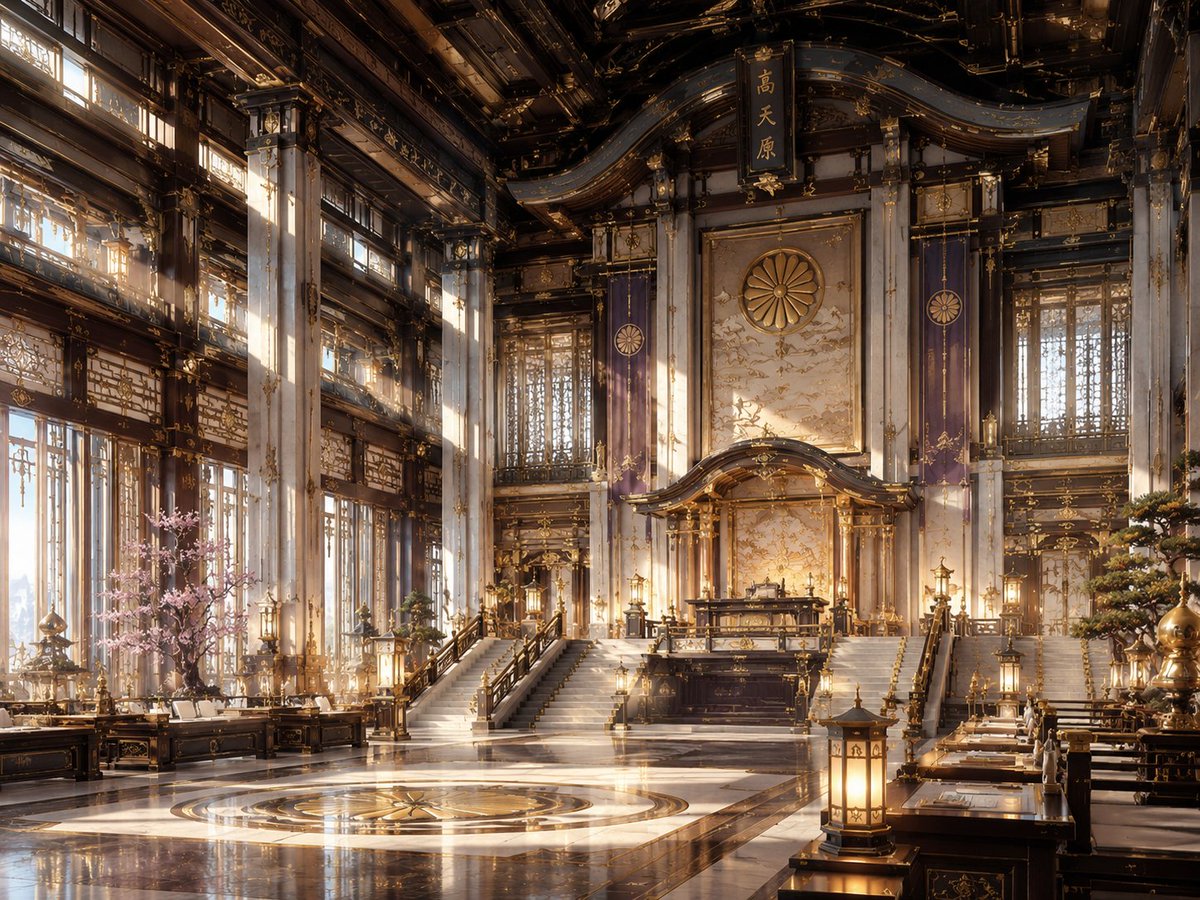
NeoNippon Imperial Throne Hall
A detailed prompt for generating a cinematic fictional NeoNippon imperial palace interior with Japanese-inspired gilded architecture and warm volumetric light.
Dies ist ein GPT Image 2 -Prompt für Innenarchitektur . Verwenden Sie den unten stehenden, kopierfertigen Prompt, um ähnliche Grafiken zu erstellen, und überprüfen Sie vor der Wiederverwendung Awesome GPT Image 2 Prompts -Quellenangaben sowie die kommerziellen Nutzungsrechte.
Benötigen Sie den vollständigen Prompt-Satz? Verwenden Sie den Innenarchitektur Weitere verwandte Beispiele finden Sie im Themen-Hub oder öffnen Sie die GPT Image 2 Prompt-Katalog für das vollständige Beispielverzeichnis, wiederverwendbare Strukturen und Quellenangaben.
Free 1K preview
Generate one preview image instantly, no sign-up required.
1869/4000
Eingabeaufforderung
Kopierfertige Eingabeaufforderung
Create a grand cinematic interior scene in a fictional aesthetic called {argument name="aesthetic name" default="NeoNippon"}: a vast imperial throne hall blending traditional Japanese shrine and palace architecture with futuristic luxury. The composition is a wide-angle 4:3 view from floor level, symmetrical and majestic, centered on an elevated ceremonial dais with a dark lacquer-and-gold altar or throne platform reached by two broad staircases. Behind it is a tall ornate wall panel with a large golden chrysanthemum crest, flanked by two vertical purple banners bearing circular imperial emblems; above the crest hangs a vertical black plaque with gold Japanese kanji. The hall has towering white marble columns with gold filigree, dark carved wooden beams, curved layered rooflines, intricate gilded lattice windows, hanging lanterns, polished black-and-white marble floors, and a circular gold medallion inlaid in the foreground floor. Count the main visible focal elements as: 1 central raised dais, 2 broad staircases, 1 large chrysanthemum crest, 2 purple banners, 1 hanging kanji plaque, 1 circular floor medallion, 1 pink cherry blossom tree on the left, 1 manicured pine or bonsai-like tree on the right, and multiple warm lanterns arranged symmetrically along desks, rails, and columns. Add long low lacquered tables and benches along both sides like a ceremonial council chamber, decorated with gold ornaments and papers. Use warm sunrise light streaming through tall windows on the left, visible dust motes and soft volumetric rays, glowing gold highlights, reflections on the glossy floor, and a palette of dark ebony wood, ivory marble, antique gold, royal purple, and soft sakura pink. Render as ultra-detailed architectural concept art, photorealistic yet slightly fantastical, no people, no modern signage, no watermark, no readable English text.Eingabeaufforderungsvariablen
In der Eingabeaufforderung befinden sich bearbeitbare Argumentplatzhalter mit ihren Standardwerten.
Variable
aesthetic name
Standard
NeoNippon
Best for
- - Innenarchitektur visual exploration
- - Image generation and reference-image edits
- - Reusable briefs that keep source attribution visible
Change these parts
- - Subject, product, character, or scene
- - Aspect ratio, camera, lighting, and background
- - Brand, text, color, and output constraints
Recommended model and settings
- - Model: gpt-image-2
- - Input mode: Text zu Bild
- - Aspect ratio: source
- - Commercial status: review original source
How to use this prompt
- 1. Copy the prompt and preserve its structure for the first test.
- 2. Replace the subject, context, and publishing channel.
- 3. Change one camera, lighting, or style variable per iteration.
- 4. Inspect the output, source, text, and rights before reuse.
Limitations, source, and reuse cautions
- - Generated output is an editable draft, not factual, legal, or rights evidence.
- - Review the linked source, people, brands, logos, text, and third-party media before commercial use.
Importiert von Awesome GPT Image 2 Prompts . Quellenangabe erforderlich. Status der kommerziellen Nutzung: allowed ; Rechte an der Quelle vor kostenpflichtiger Nutzung prüfen.
Weitere Fälle in dieser Kategorie
Priorisiert nach Kategorie, Kompatibilität der Eingabemodi, Qualität und geringerem Risiko.






Hinweise zur Wiederverwendung und Quellenangabe
Verwenden Sie diese Eingabeaufforderung sicher, nachdem Sie den Fall in der Vorschau angezeigt haben.
- 1.Kopieren Sie die Eingabeaufforderung oder öffnen Sie sie direkt in Dovoo mit der Schaltfläche „Generieren“.
- 2.Passen Sie Variablen, Seitenverhältnis und Referenzbilder an Ihren Anwendungsfall an.
- 3.Vor der Veröffentlichung oder kostenpflichtigen Nutzung sollten Sie die Rechte an der Quelle, die Anforderungen an die Namensnennung sowie die Risiken für die Marke oder das Abbild prüfen.