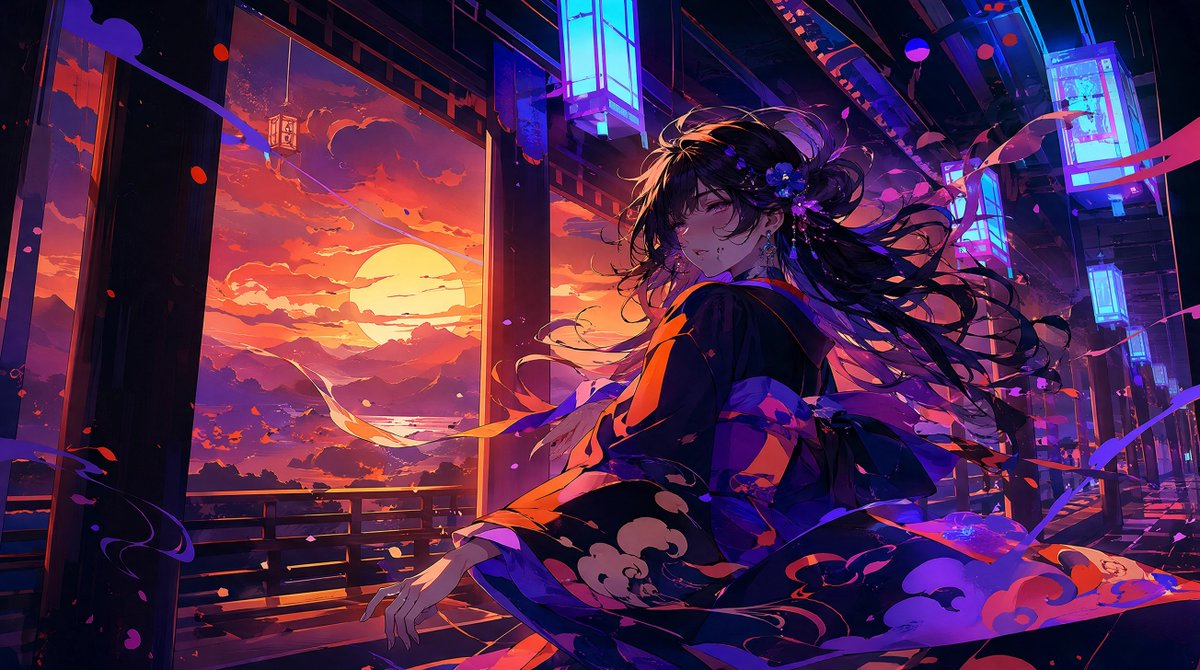
Neon Sunset Kimono Girl
A cinematic anime key visual of a kimono-clad girl in a neon-lit Japanese corridor overlooking a dramatic sunset landscape.
Dies ist ein GPT Image 2 -Prompt für Anime & Spiel . Verwenden Sie den unten stehenden, kopierfertigen Prompt, um ähnliche Grafiken zu erstellen, und überprüfen Sie vor der Wiederverwendung Awesome GPT Image 2 Prompts -Quellenangaben sowie die kommerziellen Nutzungsrechte.
Benötigen Sie den vollständigen Prompt-Satz? Verwenden Sie den Anime & Spiel Weitere verwandte Beispiele finden Sie im Themen-Hub oder öffnen Sie die GPT Image 2 Prompt-Katalog für das vollständige Beispielverzeichnis, wiederverwendbare Strukturen und Quellenangaben.
Free 1K preview
Generate one preview image instantly, no sign-up required.
1619/4000
Eingabeaufforderung
Kopierfertige Eingabeaufforderung
Create a cinematic anime illustration of {argument name="character name" default="a young Japanese woman"} in an open-air traditional corridor at sunset, turning back over her shoulder with a gentle sleepy smile as if saying good night. She wears an elegant dark navy-black kimono with vivid orange lining and stylized cloud patterns, tied with a large obi bow, with long flowing {argument name="hair color" default="black"} hair swept dramatically by the wind and decorated with small blue-purple flowers. The scene is a fusion of traditional Japanese architecture and neon cyberpunk lighting: wooden pillars and railings frame a wide view of a huge orange sun setting behind layered mountains, clouds, and a reflective river or bay, while glowing cyan-blue rectangular lantern signs hang overhead along the corridor. Use a wide 16:9 composition, dynamic diagonal perspective, the character positioned slightly right of center, her kimono sleeves and ribbons spreading across the foreground. Fill the air with exactly three visible types of windblown decorative elements: pink flower petals, red-orange leaf-like fragments, and long purple ribbon streamers. Lighting should be highly dramatic with warm sunset orange from the left and cool electric blue-magenta neon from above and right, creating glossy highlights, deep shadows, rim light on hair strands, and saturated color contrast. Style: ultra-detailed Japanese anime key visual, painterly digital art, sharp linework mixed with atmospheric brush texture, high contrast, luminous glow, romantic nocturne mood, no text, no watermark, no modern signage lettering.Eingabeaufforderungsvariablen
In der Eingabeaufforderung befinden sich bearbeitbare Argumentplatzhalter mit ihren Standardwerten.
Variable
character name
Standard
a young Japanese woman
Variable
hair color
Standard
black
Best for
- - Anime & Spiel visual exploration
- - Image generation and reference-image edits
- - Reusable briefs that keep source attribution visible
Change these parts
- - Subject, product, character, or scene
- - Aspect ratio, camera, lighting, and background
- - Brand, text, color, and output constraints
Recommended model and settings
- - Model: gpt-image-2
- - Input mode: Text zu Bild
- - Aspect ratio: source
- - Commercial status: review original source
How to use this prompt
- 1. Copy the prompt and preserve its structure for the first test.
- 2. Replace the subject, context, and publishing channel.
- 3. Change one camera, lighting, or style variable per iteration.
- 4. Inspect the output, source, text, and rights before reuse.
Limitations, source, and reuse cautions
- - Generated output is an editable draft, not factual, legal, or rights evidence.
- - Review the linked source, people, brands, logos, text, and third-party media before commercial use.
Importiert von Awesome GPT Image 2 Prompts . Quellenangabe erforderlich. Status der kommerziellen Nutzung: allowed ; Rechte an der Quelle vor kostenpflichtiger Nutzung prüfen.
Weitere Fälle in dieser Kategorie
Priorisiert nach Kategorie, Kompatibilität der Eingabemodi, Qualität und geringerem Risiko.






Hinweise zur Wiederverwendung und Quellenangabe
Verwenden Sie diese Eingabeaufforderung sicher, nachdem Sie den Fall in der Vorschau angezeigt haben.
- 1.Kopieren Sie die Eingabeaufforderung oder öffnen Sie sie direkt in Dovoo mit der Schaltfläche „Generieren“.
- 2.Passen Sie Variablen, Seitenverhältnis und Referenzbilder an Ihren Anwendungsfall an.
- 3.Vor der Veröffentlichung oder kostenpflichtigen Nutzung sollten Sie die Rechte an der Quelle, die Anforderungen an die Namensnennung sowie die Risiken für die Marke oder das Abbild prüfen.