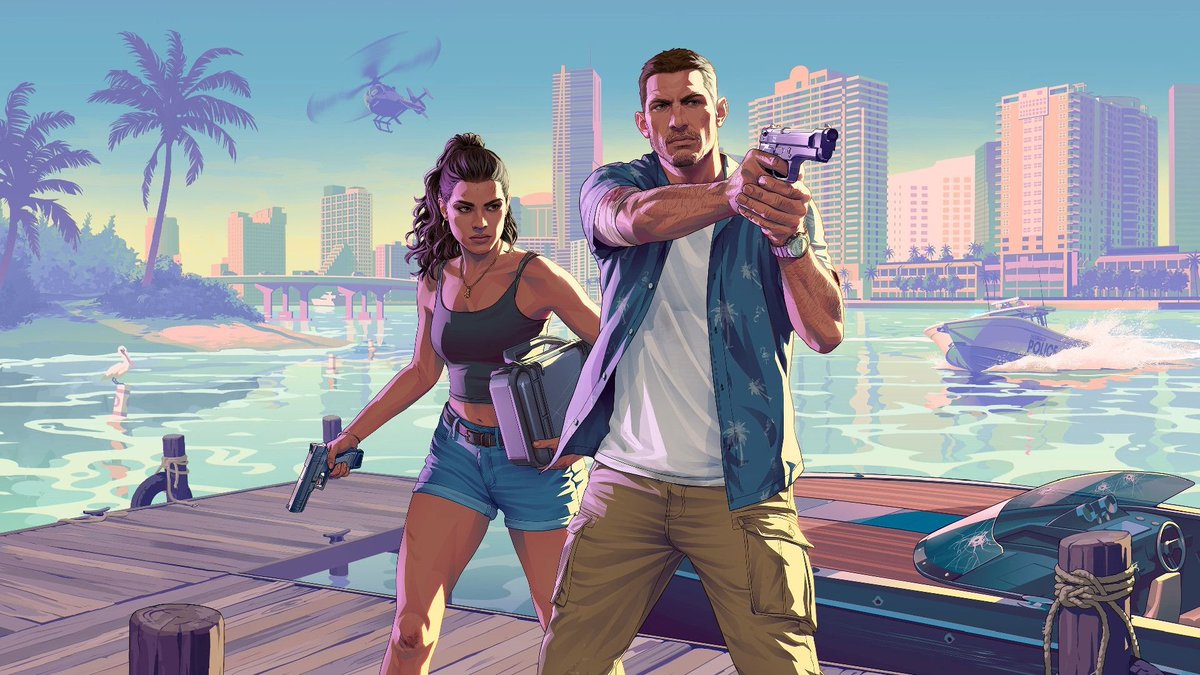
Neon Crime Game Cover at the Marina
Diese Eingabeaufforderung erzeugt eine stilisierte Actionspiel-Posterszene mit zwei bewaffneten Protagonisten auf einem Dock vor einer pastellfarbenen tropischen Stadtkulisse, ideal für GTA-inspirierte Key Art oder filmische Werbebilder.
Dies ist ein GPT Image 2 -Prompt für Anime & Spiel . Verwenden Sie den unten stehenden, kopierfertigen Prompt, um ähnliche Grafiken zu erstellen, und überprüfen Sie vor der Wiederverwendung Awesome GPT Image 2 Prompts -Quellenangaben sowie die kommerziellen Nutzungsrechte.
Benötigen Sie den vollständigen Prompt-Satz? Verwenden Sie den Anime & Spiel Weitere verwandte Beispiele finden Sie im Themen-Hub oder öffnen Sie die GPT Image 2 Prompt-Katalog für das vollständige Beispielverzeichnis, wiederverwendbare Strukturen und Quellenangaben.
Free 1K preview
Generate one preview image instantly, no sign-up required.
1635/4000
Eingabeaufforderung
Kopierfertige Eingabeaufforderung
A stylized cinematic illustration inspired by a neon-soaked Florida crime-game cover scene at sunset, showing two armed protagonists standing heroically on a wooden marina dock in the foreground, facing the viewer. The scene has a polished modern video game key-art look with pastel vaporwave colors, warm pink and peach highlights, turquoise water, and a clear blue sky. On the right, a tall athletic young man in a white t-shirt, open short-sleeve blue tropical print shirt, tan cargo pants, and a wristwatch stands in a dominant forward pose with both hands aiming a silver semi-automatic pistol toward the camera. On the left, a curvy young woman with long dark curly hair tied half-up wears a black crop top, denim shorts, layered gold necklaces, and a crossbody bag at her hip, holding a handgun pointed downward in a relaxed but ready pose. Both characters are centered and framed like iconic action-game cover art. Behind them is a bright waterfront city skyline with high-rise hotels and apartment towers, a low bridge crossing the water, several palm trees on the left, and glossy reflections across the bay. Include 1 helicopter in the upper left sky, 1 police speedboat racing across the water on the right with a white wake, 1 sleek black speedboat docked in the lower right foreground with visible bullet cracks in the windshield, and 1 white seabird standing in the shallow water near the left side. Strong late-afternoon sunlight, long shadows, saturated retro Miami palette, crisp cel-shaded digital painting style, dramatic action-poster composition, ultra-clean lines, highly detailed environment, wide 16:9 framing.
Best for
- - Anime & Spiel visual exploration
- - Image generation and reference-image edits
- - Reusable briefs that keep source attribution visible
Change these parts
- - Subject, product, character, or scene
- - Aspect ratio, camera, lighting, and background
- - Brand, text, color, and output constraints
Recommended model and settings
- - Model: gpt-image-2
- - Input mode: Text zu Bild
- - Aspect ratio: source
- - Commercial status: review original source
How to use this prompt
- 1. Copy the prompt and preserve its structure for the first test.
- 2. Replace the subject, context, and publishing channel.
- 3. Change one camera, lighting, or style variable per iteration.
- 4. Inspect the output, source, text, and rights before reuse.
Limitations, source, and reuse cautions
- - Generated output is an editable draft, not factual, legal, or rights evidence.
- - Review the linked source, people, brands, logos, text, and third-party media before commercial use.
Importiert von Awesome GPT Image 2 Prompts . Quellenangabe erforderlich. Status der kommerziellen Nutzung: allowed ; Rechte an der Quelle vor kostenpflichtiger Nutzung prüfen.
Weitere Fälle in dieser Kategorie
Priorisiert nach Kategorie, Kompatibilität der Eingabemodi, Qualität und geringerem Risiko.






Hinweise zur Wiederverwendung und Quellenangabe
Verwenden Sie diese Eingabeaufforderung sicher, nachdem Sie den Fall in der Vorschau angezeigt haben.
- 1.Kopieren Sie die Eingabeaufforderung oder öffnen Sie sie direkt in Dovoo mit der Schaltfläche „Generieren“.
- 2.Passen Sie Variablen, Seitenverhältnis und Referenzbilder an Ihren Anwendungsfall an.
- 3.Vor der Veröffentlichung oder kostenpflichtigen Nutzung sollten Sie die Rechte an der Quelle, die Anforderungen an die Namensnennung sowie die Risiken für die Marke oder das Abbild prüfen.