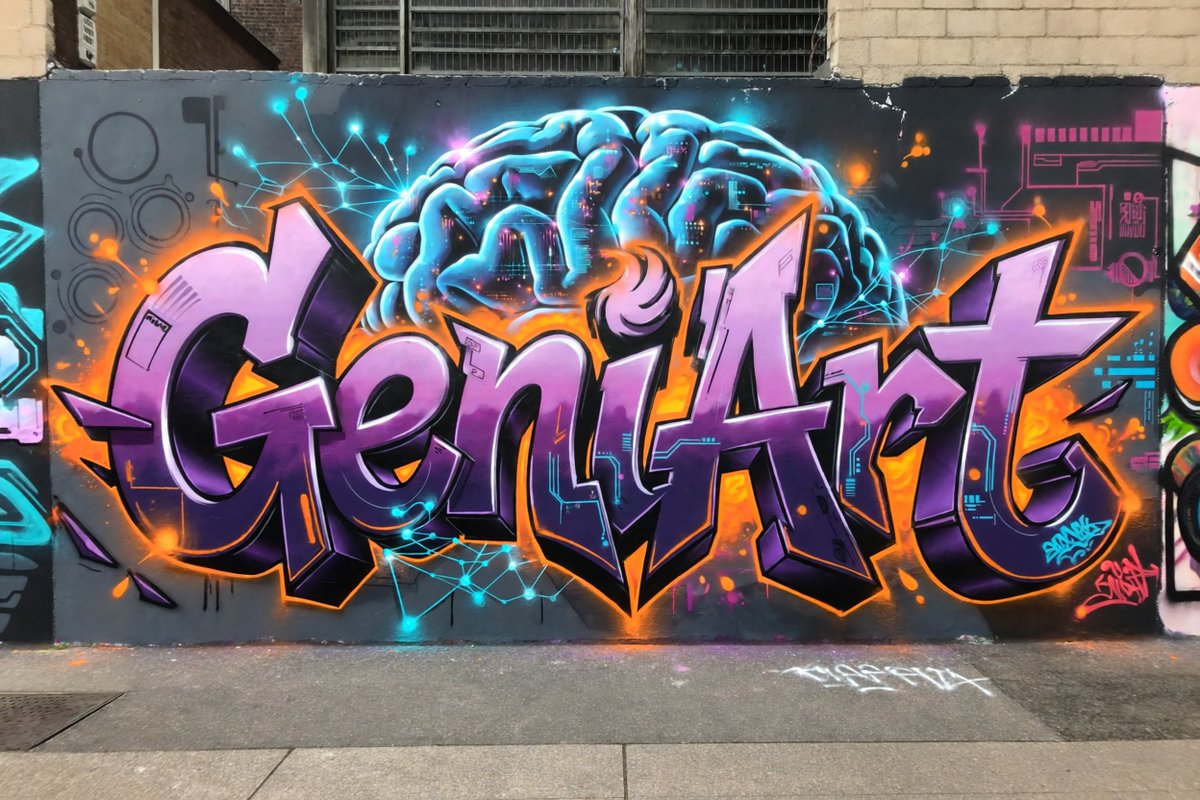
Neon Brain Graffiti Mural
A photorealistic prompt for generating a cyberpunk-inspired graffiti mural with purple lettering and a glowing neural brain on an urban wall.
Dies ist ein GPT Image 2 -Prompt für Illustration & Kunst . Verwenden Sie den unten stehenden, kopierfertigen Prompt, um ähnliche Grafiken zu erstellen, und überprüfen Sie vor der Wiederverwendung Awesome GPT Image 2 Prompts -Quellenangaben sowie die kommerziellen Nutzungsrechte.
Benötigen Sie den vollständigen Prompt-Satz? Verwenden Sie den Illustration & Kunst Weitere verwandte Beispiele finden Sie im Themen-Hub oder öffnen Sie die GPT Image 2 Prompt-Katalog für das vollständige Beispielverzeichnis, wiederverwendbare Strukturen und Quellenangaben.
Free 1K preview
Generate one preview image instantly, no sign-up required.
1411/4000
Eingabeaufforderung
Kopierfertige Eingabeaufforderung
Create a photorealistic urban street photograph of a large graffiti mural on a dark gray city wall. The mural features the word {argument name="graffiti word" default="GeniArt"} in huge wildstyle bubble lettering, centered and spanning nearly the full width of the wall. Use glossy lavender-to-deep-purple letter fills, thick black 3D shadows, bright white highlights, and a vivid orange outer glow with orange paint splashes. Behind the lettering, paint a glowing futuristic brain in electric cyan and blue at the top center, with visible folds, neon rim lighting, and tiny magenta and orange digital details inside it. Add cyan neural-network lines and glowing nodes radiating around the brain and across the wall, plus subtle circuit-board graphics in cyan and magenta on both sides. Include exactly 2 small graffiti signatures: one cyan tag near the lower right of the main letters and one pink tag at the far lower right. The scene should look like real spray paint on a slightly worn exterior wall, with brick buildings and barred industrial windows visible above, a sidewalk and curb in the foreground, minor drips, overspray, chips, and street grime. Style: high-detail realistic graffiti photography, wide horizontal composition, straight-on perspective, natural daylight, saturated neon colors, crisp focus, no people, no vehicles, no extra words besides the main graffiti word and the two small tags.Eingabeaufforderungsvariablen
In der Eingabeaufforderung befinden sich bearbeitbare Argumentplatzhalter mit ihren Standardwerten.
Variable
graffiti word
Standard
GeniArt
Best for
- - Illustration & Kunst visual exploration
- - Image generation and reference-image edits
- - Reusable briefs that keep source attribution visible
Change these parts
- - Subject, product, character, or scene
- - Aspect ratio, camera, lighting, and background
- - Brand, text, color, and output constraints
Recommended model and settings
- - Model: gpt-image-2
- - Input mode: Text zu Bild
- - Aspect ratio: source
- - Commercial status: review original source
How to use this prompt
- 1. Copy the prompt and preserve its structure for the first test.
- 2. Replace the subject, context, and publishing channel.
- 3. Change one camera, lighting, or style variable per iteration.
- 4. Inspect the output, source, text, and rights before reuse.
Limitations, source, and reuse cautions
- - Generated output is an editable draft, not factual, legal, or rights evidence.
- - Review the linked source, people, brands, logos, text, and third-party media before commercial use.
Importiert von Awesome GPT Image 2 Prompts . Quellenangabe erforderlich. Status der kommerziellen Nutzung: allowed ; Rechte an der Quelle vor kostenpflichtiger Nutzung prüfen.
Weitere Fälle in dieser Kategorie
Priorisiert nach Kategorie, Kompatibilität der Eingabemodi, Qualität und geringerem Risiko.

Cute Focus Desk Flat Lay and Kawaii Illustration
Text zu Bild

Street Selfie with Cat in Matching Cap
Text zu Bild

Gray Denim Lace-Up Top Prompt for GPT Image 2
Text zu Bild

Tuxedo Cat Photo and Line Art Diptych
Text zu Bild

Orange Rooftop Fashion Photo Prompt
Text zu Bild

GPT Image 2 Real-Life Character Street Snap
Text zu Bild
Hinweise zur Wiederverwendung und Quellenangabe
Verwenden Sie diese Eingabeaufforderung sicher, nachdem Sie den Fall in der Vorschau angezeigt haben.
- 1.Kopieren Sie die Eingabeaufforderung oder öffnen Sie sie direkt in Dovoo mit der Schaltfläche „Generieren“.
- 2.Passen Sie Variablen, Seitenverhältnis und Referenzbilder an Ihren Anwendungsfall an.
- 3.Vor der Veröffentlichung oder kostenpflichtigen Nutzung sollten Sie die Rechte an der Quelle, die Anforderungen an die Namensnennung sowie die Risiken für die Marke oder das Abbild prüfen.