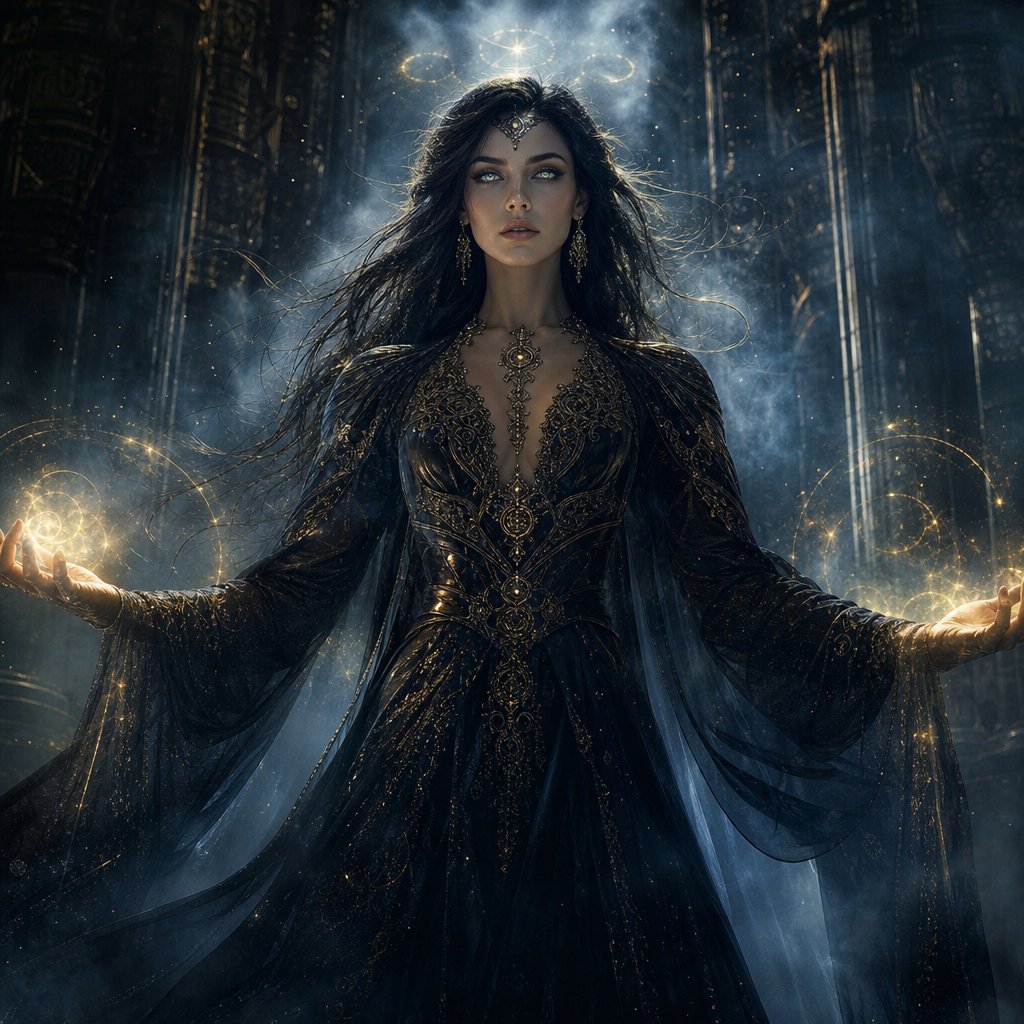
Mystic Woman Extraordinary Cinematic Portrait
A premium cinematic fantasy prompt for creating an ultra-realistic portrait of a mysterious woman in an enchanted, mist-filled landscape.
Dies ist ein GPT Image 2 -Prompt für Porträt & Charakter . Verwenden Sie den unten stehenden, kopierfertigen Prompt, um ähnliche Grafiken zu erstellen, und überprüfen Sie vor der Wiederverwendung Awesome GPT Image 2 Prompts -Quellenangaben sowie die kommerziellen Nutzungsrechte.
Benötigen Sie den vollständigen Prompt-Satz? Verwenden Sie den Porträt & Charakter Weitere verwandte Beispiele finden Sie im Themen-Hub oder öffnen Sie die GPT Image 2 Prompt-Katalog für das vollständige Beispielverzeichnis, wiederverwendbare Strukturen und Quellenangaben.
Free 1K preview
Generate one preview image instantly, no sign-up required.
1641/4000
Eingabeaufforderung
Kopierfertige Eingabeaufforderung
Create an extraordinary ultra-realistic cinematic portrait of a {argument name="subject" default="mysterious woman"} with an otherworldly mystical presence. She stands in an {argument name="setting" default="ancient enchanted landscape"} surrounded by drifting silver mist, floating glowing particles, subtle celestial symbols, and enormous shadowy stone structures disappearing into the darkness. Her expression is calm, powerful, and enigmatic, with piercing luminous eyes and long flowing hair gently moving in an unseen wind.

She wears an {argument name="outfit" default="elegant dark mystical gown"} with intricate ancient-inspired patterns, delicate metallic details, and translucent flowing fabric that catches the surrounding light. A faint supernatural aura surrounds her body, with subtle golden-blue energy swirling around her hands.

Use dramatic volumetric lighting, deep shadows, cinematic contrast, realistic skin texture, highly detailed eyes, individual hair strands, atmospheric fog, realistic fabric, shallow depth of field, and sophisticated fantasy cinematography. Make her look powerful rather than frightening, like an ancient guardian who has just awakened after centuries.

Composition: woman dominating the frame, slightly low camera angle, close-to-medium shot, symmetrical cinematic framing, powerful silhouette, dramatic background depth.

Color palette: midnight black, deep blue, silver, subtle antique gold.

Style: ultra-realistic, premium cinematic fantasy, photorealistic, 8K detail, movie-poster quality, sophisticated visual effects, natural anatomy, realistic lighting, no text, no watermark, no logos.
Eingabeaufforderungsvariablen
In der Eingabeaufforderung befinden sich bearbeitbare Argumentplatzhalter mit ihren Standardwerten.
Variable
subject
Standard
mysterious woman
Variable
setting
Standard
ancient enchanted landscape
Variable
outfit
Standard
elegant dark mystical gown
Best for
- - Porträt & Charakter visual exploration
- - Image generation and reference-image edits
- - Reusable briefs that keep source attribution visible
Change these parts
- - Subject, product, character, or scene
- - Aspect ratio, camera, lighting, and background
- - Brand, text, color, and output constraints
Recommended model and settings
- - Model: gpt-image-2
- - Input mode: Text zu Bild
- - Aspect ratio: source
- - Commercial status: review original source
How to use this prompt
- 1. Copy the prompt and preserve its structure for the first test.
- 2. Replace the subject, context, and publishing channel.
- 3. Change one camera, lighting, or style variable per iteration.
- 4. Inspect the output, source, text, and rights before reuse.
Limitations, source, and reuse cautions
- - Generated output is an editable draft, not factual, legal, or rights evidence.
- - Review the linked source, people, brands, logos, text, and third-party media before commercial use.
Importiert von Awesome GPT Image 2 Prompts . Quellenangabe erforderlich. Status der kommerziellen Nutzung: allowed ; Rechte an der Quelle vor kostenpflichtiger Nutzung prüfen.
Weitere Fälle in dieser Kategorie
Priorisiert nach Kategorie, Kompatibilität der Eingabemodi, Qualität und geringerem Risiko.



Hinweise zur Wiederverwendung und Quellenangabe
Verwenden Sie diese Eingabeaufforderung sicher, nachdem Sie den Fall in der Vorschau angezeigt haben.
- 1.Kopieren Sie die Eingabeaufforderung oder öffnen Sie sie direkt in Dovoo mit der Schaltfläche „Generieren“.
- 2.Passen Sie Variablen, Seitenverhältnis und Referenzbilder an Ihren Anwendungsfall an.
- 3.Vor der Veröffentlichung oder kostenpflichtigen Nutzung sollten Sie die Rechte an der Quelle, die Anforderungen an die Namensnennung sowie die Risiken für die Marke oder das Abbild prüfen.