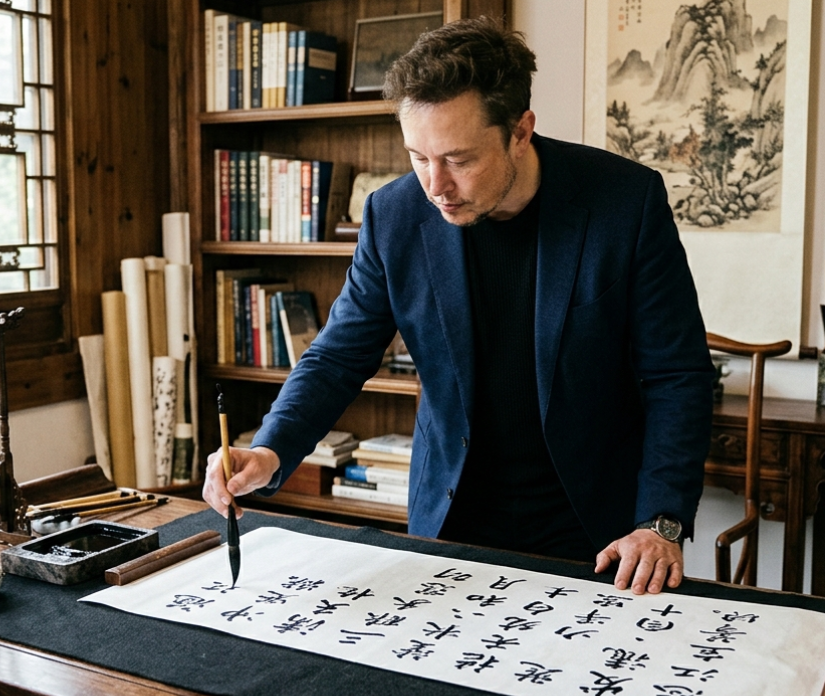
Musk schreibt chinesische Kalligrafie
Ein realistisches Kulturporträt einer bekannten Persönlichkeit bei der Ausübung chinesischer Pinselkalligrafie in einem traditionellen Arbeitszimmer, geeignet für redaktionelle Zwecke, soziale Medien oder die Erstellung von Konzeptbildern.
Dies ist ein GPT Image 2 -Prompt für Porträt & Charakter . Verwenden Sie den unten stehenden, kopierfertigen Prompt, um ähnliche Grafiken zu erstellen, und überprüfen Sie vor der Wiederverwendung Awesome GPT Image 2 Prompts -Quellenangaben sowie die kommerziellen Nutzungsrechte.
Free 1K preview
Generate one preview image instantly, no sign-up required.
Eingabeaufforderung
Kopierfertige Eingabeaufforderung
A realistic editorial-style photograph of {argument name="public figure" default="Elon Musk"} standing at a scholar’s writing desk in a traditional Chinese study, leaning forward and writing Chinese calligraphy with a brush on a long horizontal white scroll. He wears a dark navy blazer over a black shirt, with a wristwatch visible, and his expression is focused and serious. The room is warm and elegant, with wooden bookshelves filled with books in the background, several rolled scrolls standing upright near the shelf, a carved wooden chair, a traditional lattice window on the left letting in soft natural daylight, and a hanging ink landscape painting on the wall. On the desk are 4 distinct calligraphy tools and materials: 1 rectangular black ink stone with ink, 1 brush rest area, 1 long wooden paperweight, and 1 large sheet or scroll of paper covered with bold black Chinese characters from the poem {argument name="calligraphy text" default="《Full River Red》"}. The composition is a medium full-body indoor shot from the front-left angle, with the brush touching the paper, shallow depth of field, rich wood tones, subtle cinematic contrast, documentary realism, high detail, authentic Chinese literati atmosphere, and carefully rendered ink brush lettering.Eingabeaufforderungsvariablen
In der Eingabeaufforderung befinden sich bearbeitbare Argumentplatzhalter mit ihren Standardwerten.
Best for
- - Porträt & Charakter visual exploration
- - Image generation and reference-image edits
- - Reusable briefs that keep source attribution visible
Change these parts
- - Subject, product, character, or scene
- - Aspect ratio, camera, lighting, and background
- - Brand, text, color, and output constraints
Recommended model and settings
- - Model: gpt-image-2
- - Input mode: Text zu Bild
- - Aspect ratio: source
- - Commercial status: review original source
How to use this prompt
- 1. Copy the prompt and preserve its structure for the first test.
- 2. Replace the subject, context, and publishing channel.
- 3. Change one camera, lighting, or style variable per iteration.
- 4. Inspect the output, source, text, and rights before reuse.
Limitations, source, and reuse cautions
- - Generated output is an editable draft, not factual, legal, or rights evidence.
- - Review the linked source, people, brands, logos, text, and third-party media before commercial use.
Weitere Fälle in dieser Kategorie
Priorisiert nach Kategorie, Kompatibilität der Eingabemodi, Qualität und geringerem Risiko.






Hinweise zur Wiederverwendung und Quellenangabe
Verwenden Sie diese Eingabeaufforderung sicher, nachdem Sie den Fall in der Vorschau angezeigt haben.
- 1.Kopieren Sie die Eingabeaufforderung oder öffnen Sie sie direkt in Dovoo mit der Schaltfläche „Generieren“.
- 2.Passen Sie Variablen, Seitenverhältnis und Referenzbilder an Ihren Anwendungsfall an.
- 3.Vor der Veröffentlichung oder kostenpflichtigen Nutzung sollten Sie die Rechte an der Quelle, die Anforderungen an die Namensnennung sowie die Risiken für die Marke oder das Abbild prüfen.