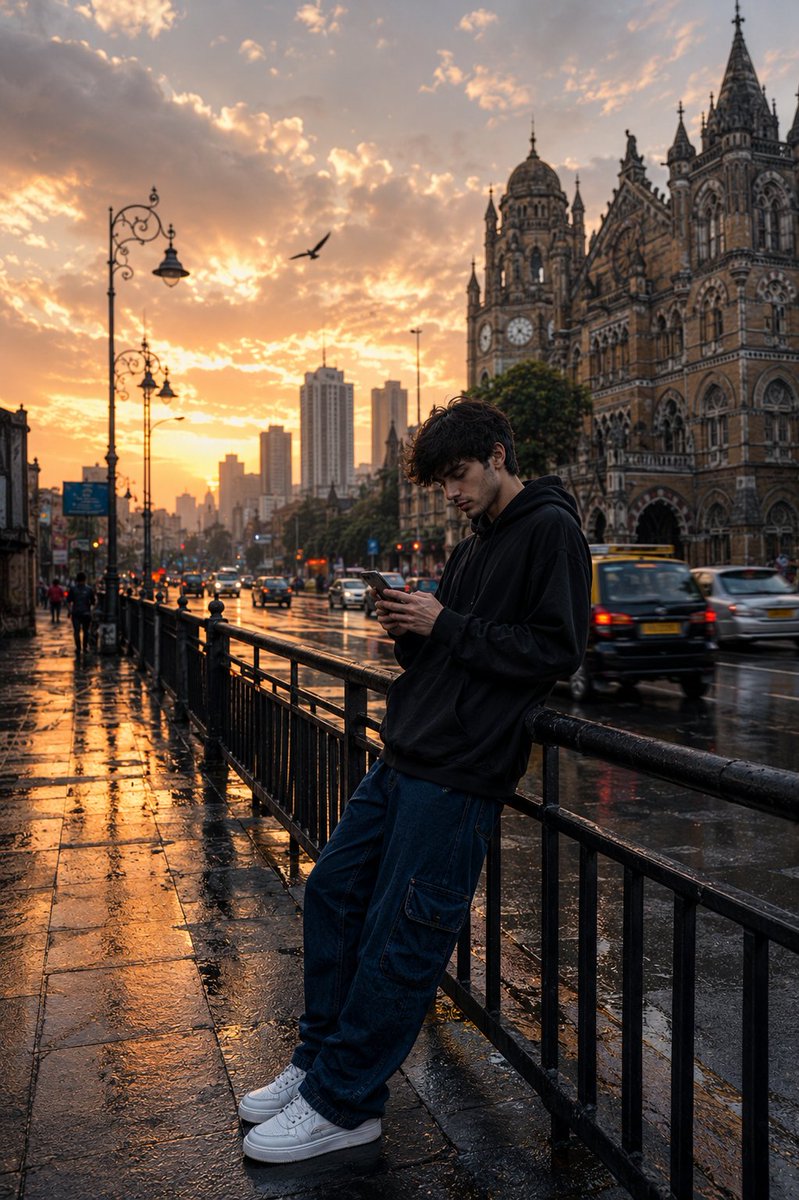
Mumbai – Straßenfotografie im Regen
Ultrarealistische, filmische Straßenfotografie in Mumbai während der goldenen Stunde, die gotische Architektur mit modernem urbanem Flair verbindet.
Dies ist ein GPT Image 2 -Prompt für Landschaft & Natur . Verwenden Sie den unten stehenden, kopierfertigen Prompt, um ähnliche Grafiken zu erstellen, und überprüfen Sie vor der Wiederverwendung Awesome GPT Image 2 Prompts -Quellenangaben sowie die kommerziellen Nutzungsrechte.
Benötigen Sie den vollständigen Prompt-Satz? Verwenden Sie den Landschaft & Natur Weitere verwandte Beispiele finden Sie im Themen-Hub oder öffnen Sie die GPT Image 2 Prompt-Katalog für das vollständige Beispielverzeichnis, wiederverwendbare Strukturen und Quellenangaben.
Free 1K preview
Generate one preview image instantly, no sign-up required.
1622/4000
Eingabeaufforderung
Kopierfertige Eingabeaufforderung
Ultra-realistic cinematic street photography of a {argument name="subject" default="young man"} standing alone on a rainy urban sidewalk during golden hour sunset in {argument name="location" default="Mumbai, India"}. He is leaning casually against a black metal roadside railing while looking down at his smartphone, wearing an oversized black hoodie, loose dark blue cargo jeans, and clean white sneakers. Messy textured black hair moving slightly in the wind. Moody introspective vibe.

Wide-angle composition with dramatic depth and strong leading lines from the wet pavement and railings. Reflective rain-soaked street surface glowing with warm sunset light. Vintage street lamps lining the sidewalk. {argument name="landmark" default="Historic Gothic architecture inspired by Chhatrapati Shivaji Maharaj Terminus"} visible on the right side, detailed stone textures and clock tower. Modern skyscrapers fading into atmospheric haze in the distant background, creating a blend of old and new Mumbai cityscape.

Soft cinematic clouds filling the sky with warm orange, peach, and golden tones. A flying bird silhouette crossing the sky. Light traffic with black-and-yellow taxis and blurred cars moving through the street. Realistic puddle reflections, subtle motion blur, volumetric lighting, atmospheric perspective, ultra-detailed textures, natural shadows, realistic skin tones.

Shot on Sony A7R IV, 35mm lens, f/1.8, shallow depth of field, HDR photography, photorealistic, cinematic color grading, warm highlights with cool shadows, highly detailed urban realism, editorial photography style, 8K ultra resolution.
Eingabeaufforderungsvariablen
In der Eingabeaufforderung befinden sich bearbeitbare Argumentplatzhalter mit ihren Standardwerten.
Variable
subject
Standard
young man
Variable
location
Standard
Mumbai, India
Variable
landmark
Standard
Historic Gothic architecture inspired by Chhatrapati Shivaji Maharaj Terminus
Best for
- - Landschaft & Natur visual exploration
- - Image generation and reference-image edits
- - Reusable briefs that keep source attribution visible
Change these parts
- - Subject, product, character, or scene
- - Aspect ratio, camera, lighting, and background
- - Brand, text, color, and output constraints
Recommended model and settings
- - Model: gpt-image-2
- - Input mode: Text zu Bild
- - Aspect ratio: source
- - Commercial status: review original source
How to use this prompt
- 1. Copy the prompt and preserve its structure for the first test.
- 2. Replace the subject, context, and publishing channel.
- 3. Change one camera, lighting, or style variable per iteration.
- 4. Inspect the output, source, text, and rights before reuse.
Limitations, source, and reuse cautions
- - Generated output is an editable draft, not factual, legal, or rights evidence.
- - Review the linked source, people, brands, logos, text, and third-party media before commercial use.
Importiert von Awesome GPT Image 2 Prompts . Quellenangabe erforderlich. Status der kommerziellen Nutzung: allowed ; Rechte an der Quelle vor kostenpflichtiger Nutzung prüfen.
Weitere Fälle in dieser Kategorie
Priorisiert nach Kategorie, Kompatibilität der Eingabemodi, Qualität und geringerem Risiko.






Hinweise zur Wiederverwendung und Quellenangabe
Verwenden Sie diese Eingabeaufforderung sicher, nachdem Sie den Fall in der Vorschau angezeigt haben.
- 1.Kopieren Sie die Eingabeaufforderung oder öffnen Sie sie direkt in Dovoo mit der Schaltfläche „Generieren“.
- 2.Passen Sie Variablen, Seitenverhältnis und Referenzbilder an Ihren Anwendungsfall an.
- 3.Vor der Veröffentlichung oder kostenpflichtigen Nutzung sollten Sie die Rechte an der Quelle, die Anforderungen an die Namensnennung sowie die Risiken für die Marke oder das Abbild prüfen.