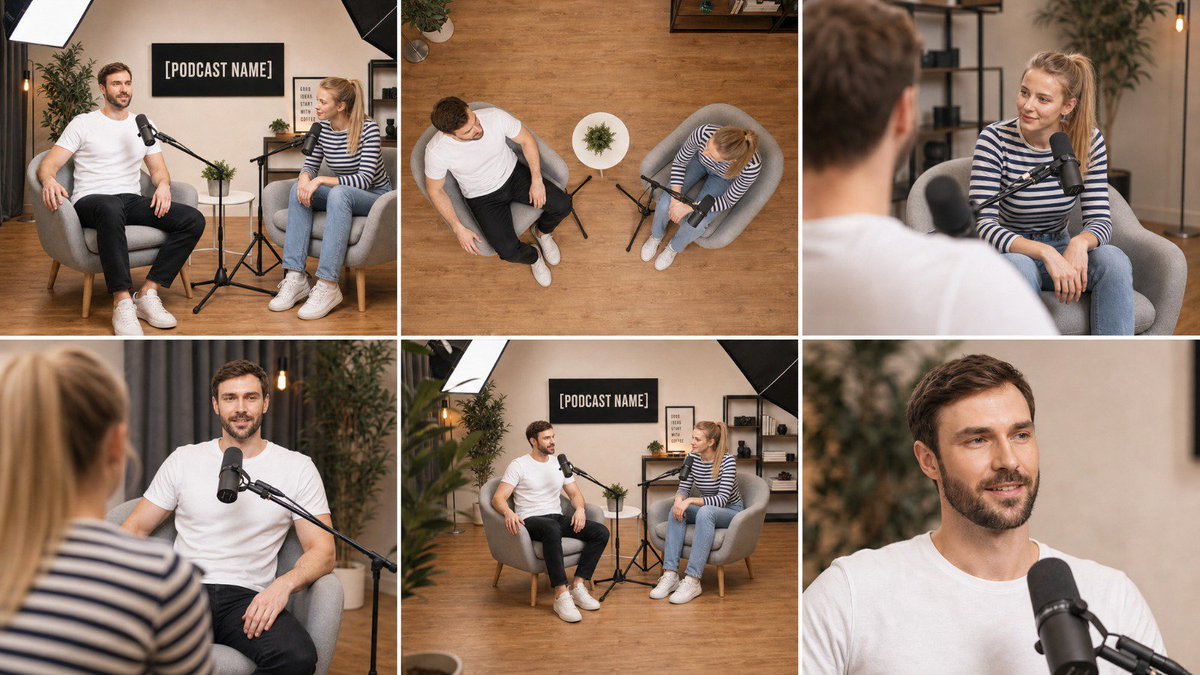
Multi-Angle Scene Reconstruction Grid
A specialized master prompt for GPT Image 2 that transforms a single wide-angle photograph into a clean 3x2 grid of six consistent shots from different camera positions, lens types, and angles.
Dies ist ein GPT Image 2 -Prompt für Innenarchitektur . Verwenden Sie den unten stehenden, kopierfertigen Prompt, um ähnliche Grafiken zu erstellen, und überprüfen Sie vor der Wiederverwendung Awesome GPT Image 2 Prompts -Quellenangaben sowie die kommerziellen Nutzungsrechte.
Benötigen Sie den vollständigen Prompt-Satz? Verwenden Sie den Innenarchitektur Weitere verwandte Beispiele finden Sie im Themen-Hub oder öffnen Sie die GPT Image 2 Prompt-Katalog für das vollständige Beispielverzeichnis, wiederverwendbare Strukturen und Quellenangaben.
Free 1K preview
Generate one preview image instantly, no sign-up required.
Free text preview doesn’t preserve reference-image consistency.
2711/4000
Eingabeaufforderung
Kopierfertige Eingabeaufforderung
Using the attached image as the single source of truth, create ONE image that is a clean 3-column by 2-row grid of six photographs of the EXACT same scene, captured from six different camera positions, as if six cameras were placed around the room at the same instant.

Lock everything from the attached image: the same people with the same faces, hair, skin tone, glasses, clothing and body proportions; the same furniture, props, walls, signage with the same text, lighting setup and color grade; the same time of day. Nothing is added, removed, or rearranged — only the camera position, lens and framing change between panels. Every object stays in the same physical place in the room, so the spatial relationships remain consistent from angle to angle.

Panel 1 (top-left): Wide master shot — the same framing and camera position as the attached image, eye-level, 35mm lens, the full scene visible.

Panel 2 (top-center): High-angle top-down shot — camera mounted directly above the center of the scene looking straight down at the floor, 24mm lens, showing the layout of the furniture, props and people from above, like a ceiling camera.

Panel 3 (top-right): Over-the-shoulder shot from behind the subject on the LEFT of the original image, looking across at the subject on the RIGHT, 50mm lens at f/2.0, the near shoulder soft in the foreground, the far subject sharp.

Panel 4 (bottom-left): Reverse over-the-shoulder shot from behind the subject on the RIGHT of the original image, looking across at the subject on the LEFT, 50mm lens at f/2.0, near shoulder soft, far subject sharp.

Panel 5 (bottom-center): Low-angle three-quarter shot — camera placed low near floor height at the front-left corner of the scene, tilted slightly upward, 28mm lens, showing the scene with depth toward the back wall.

Panel 6 (bottom-right): Tight close-up on the main subject's face and upper body, 85mm lens at f/1.8, eye-level, shallow depth of field, background softly blurred, natural skin texture, catchlights in the eyes.

If the scene contains only one person, apply the over-the-shoulder panels as a three-quarter side angle from the left and from the right of that person instead. If the scene contains no people, treat the main object or furniture group as the subject for panels 3, 4 and 6.

Grid rules: six equal-sized panels, thin clean white gutters between them, no borders, no text labels, no numbers, no captions, no watermarks inside the image. All six panels share identical photographic style: photorealistic, same white balance, same exposure, same color grade, same subtle film grain, consistent lighting direction as in the attached image. Sharp, professional, real-camera look in every panel.
Best for
- - Innenarchitektur visual exploration
- - Image generation and reference-image edits
- - Reusable briefs that keep source attribution visible
Change these parts
- - Subject, product, character, or scene
- - Aspect ratio, camera, lighting, and background
- - Brand, text, color, and output constraints
Recommended model and settings
- - Model: gpt-image-2
- - Input mode: Bild zu Bild
- - Aspect ratio: source
- - Commercial status: review original source
How to use this prompt
- 1. Copy the prompt and preserve its structure for the first test.
- 2. Replace the subject, context, and publishing channel.
- 3. Change one camera, lighting, or style variable per iteration.
- 4. Inspect the output, source, text, and rights before reuse.
Limitations, source, and reuse cautions
- - Generated output is an editable draft, not factual, legal, or rights evidence.
- - Review the linked source, people, brands, logos, text, and third-party media before commercial use.
Importiert von Awesome GPT Image 2 Prompts . Quellenangabe erforderlich. Status der kommerziellen Nutzung: allowed ; Rechte an der Quelle vor kostenpflichtiger Nutzung prüfen.
Weitere Fälle in dieser Kategorie
Priorisiert nach Kategorie, Kompatibilität der Eingabemodi, Qualität und geringerem Risiko.






Hinweise zur Wiederverwendung und Quellenangabe
Verwenden Sie diese Eingabeaufforderung sicher, nachdem Sie den Fall in der Vorschau angezeigt haben.
- 1.Kopieren Sie die Eingabeaufforderung oder öffnen Sie sie direkt in Dovoo mit der Schaltfläche „Generieren“.
- 2.Passen Sie Variablen, Seitenverhältnis und Referenzbilder an Ihren Anwendungsfall an.
- 3.Vor der Veröffentlichung oder kostenpflichtigen Nutzung sollten Sie die Rechte an der Quelle, die Anforderungen an die Namensnennung sowie die Risiken für die Marke oder das Abbild prüfen.