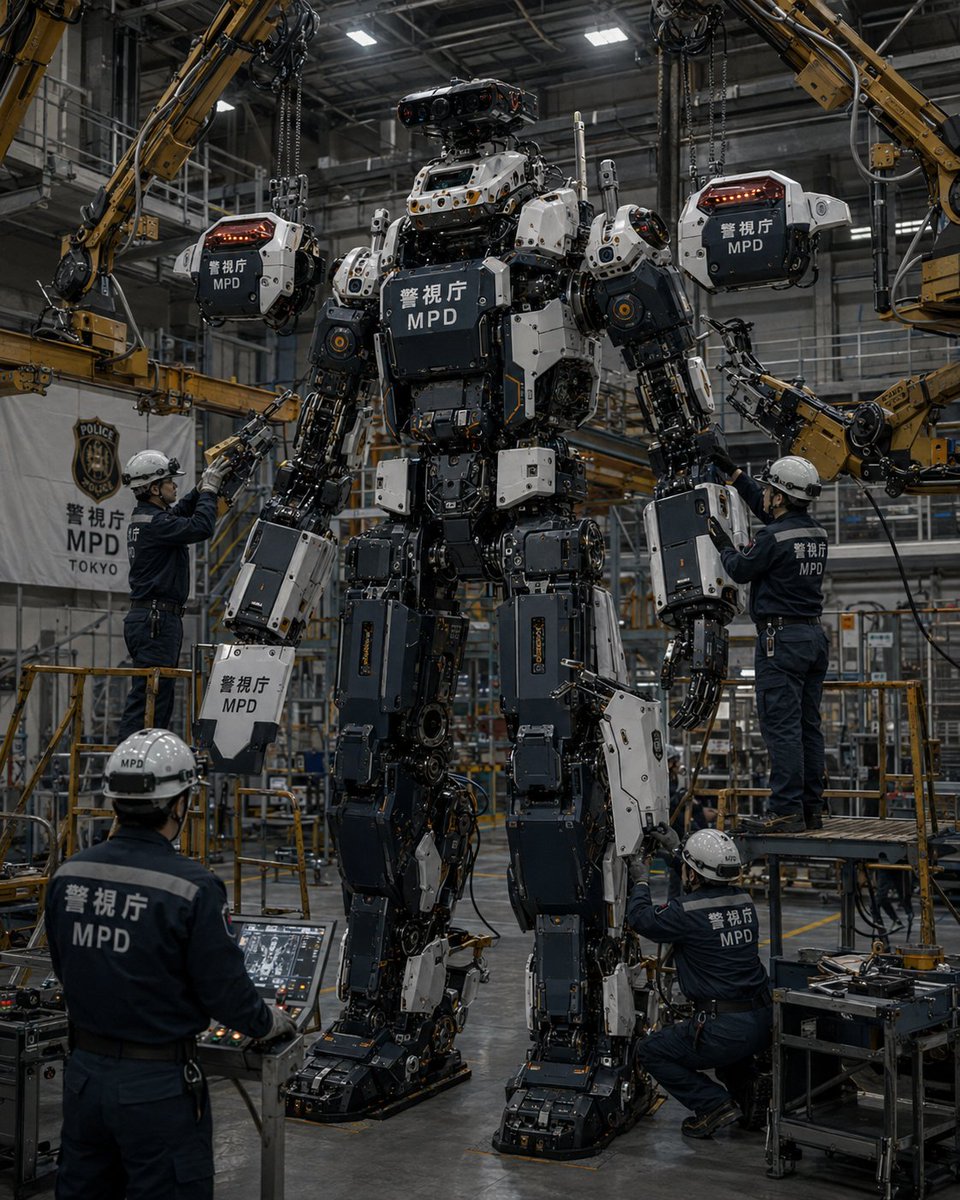
MPD Robot Assembly Bay
A photorealistic near-future scene of Japanese police technicians assembling armor panels onto a giant MPD humanoid robot in an industrial factory.
Dies ist ein GPT Image 2 -Prompt für Anime & Spiel . Verwenden Sie den unten stehenden, kopierfertigen Prompt, um ähnliche Grafiken zu erstellen, und überprüfen Sie vor der Wiederverwendung Awesome GPT Image 2 Prompts -Quellenangaben sowie die kommerziellen Nutzungsrechte.
Benötigen Sie den vollständigen Prompt-Satz? Verwenden Sie den Anime & Spiel Weitere verwandte Beispiele finden Sie im Themen-Hub oder öffnen Sie die GPT Image 2 Prompt-Katalog für das vollständige Beispielverzeichnis, wiederverwendbare Strukturen und Quellenangaben.
Free 1K preview
Generate one preview image instantly, no sign-up required.
3860/4000
Eingabeaufforderung
Kopierfertige Eingabeaufforderung
Create a hyper-realistic cinematic industrial photo of a giant police humanoid robot being assembled inside a large high-ceiling robotics factory. The central subject is a towering bipedal mech, about 6–7 meters tall, standing upright on heavy black mechanical feet, with exposed pistons, cables, actuators, joints, hydraulic lines, and layered armor plates. Its armor is mostly dark charcoal, black, and off-white, with small orange warning lights and metallic fasteners. The chest has a large dark rectangular armor cover with white Japanese police text and “MPD” beneath it. The robot has a compact sensor head with multiple camera lenses and red-tinted optics, broad shoulders, bulky arms, mechanical hands, thick armored thighs, and complex open-frame lower legs.

Scene and layout: Set the image in a busy Japanese police robotics assembly bay with steel catwalks, railings, scaffolding, yellow safety barriers, overhead lights, industrial beams, cables, tool carts, and a polished concrete floor. Use a vertical 4:5 composition, eye-level to slightly low angle, with the robot centered and filling most of the frame from feet to head. Lighting should be cool, moody, and realistic, with bright overhead factory panels reflecting off metal surfaces and soft haze in the background.

Counted elements: Include exactly 5 human technicians in navy police work uniforms and white hard hats. One technician stands in the left midground reaching up toward the robot’s left arm. One technician stands on a raised work platform on the right adjusting the robot’s right arm. One technician kneels at the lower right working on the robot’s leg. One technician is seen from behind in the lower left operating a diagnostic console. One additional technician is partially visible near the lower area of the robot, assisting with assembly. Include exactly 4 yellow industrial robotic crane arms around the robot: two large arms descending from the upper left and upper right corners, and two mid-level arms reaching in from the left and right sides. Include exactly 3 suspended armor cover modules being installed: one hanging near the robot’s left shoulder, one near the robot’s right shoulder, and one above the head area. Each suspended cover is off-white and dark gray, attached to chains or robotic grippers, with red-orange light strips and Japanese police markings.

Text and markings: Put “警視庁” and “MPD” clearly on the robot chest, shoulder armor covers, and some limb armor panels. Put “警視庁 MPD TOKYO” on a white vertical banner in the left background with a police-style crest above it. Put “MPD” on the hard hats and backs of uniforms where visible. Keep the Japanese characters realistic and legible.

Visual style: Ultra-detailed photorealism, gritty near-future Japanese police engineering, documentary factory photography, sharp mechanical detail, realistic reflections, worn metal, oil stains, tiny screws, cables, labels, tools, and safety equipment. Color palette: gunmetal black, dark navy, white armor panels, industrial yellow machinery, cool gray factory environment, small orange and red LEDs.

Parameters: The robot unit should be labeled {argument name="police unit name" default="警視庁 MPD"}; the factory banner should read {argument name="banner text" default="警視庁 MPD TOKYO"}; the mech armor color scheme should be {argument name="armor color scheme" default="charcoal black and off-white"}; the scene should depict {argument name="assembly task" default="installing armored cover panels"}; the overall mood should be {argument name="mood" default="serious cinematic industrial realism"}.

Constraints: No cartoon style, no anime style, no fantasy magic, no clean showroom look, no extra robots, no extra technicians beyond the 5 specified, no extra suspended armor modules beyond the 3 specified, no watermark, no caption outside the scene.
Eingabeaufforderungsvariablen
In der Eingabeaufforderung befinden sich bearbeitbare Argumentplatzhalter mit ihren Standardwerten.
Variable
police unit name
Standard
警視庁 MPD
Variable
banner text
Standard
警視庁 MPD TOKYO
Variable
armor color scheme
Standard
charcoal black and off-white
Variable
assembly task
Standard
installing armored cover panels
Variable
mood
Standard
serious cinematic industrial realism
Best for
- - Anime & Spiel visual exploration
- - Image generation and reference-image edits
- - Reusable briefs that keep source attribution visible
Change these parts
- - Subject, product, character, or scene
- - Aspect ratio, camera, lighting, and background
- - Brand, text, color, and output constraints
Recommended model and settings
- - Model: gpt-image-2
- - Input mode: Text zu Bild
- - Aspect ratio: source
- - Commercial status: review original source
How to use this prompt
- 1. Copy the prompt and preserve its structure for the first test.
- 2. Replace the subject, context, and publishing channel.
- 3. Change one camera, lighting, or style variable per iteration.
- 4. Inspect the output, source, text, and rights before reuse.
Limitations, source, and reuse cautions
- - Generated output is an editable draft, not factual, legal, or rights evidence.
- - Review the linked source, people, brands, logos, text, and third-party media before commercial use.
Importiert von Awesome GPT Image 2 Prompts . Quellenangabe erforderlich. Status der kommerziellen Nutzung: allowed ; Rechte an der Quelle vor kostenpflichtiger Nutzung prüfen.
Weitere Fälle in dieser Kategorie
Priorisiert nach Kategorie, Kompatibilität der Eingabemodi, Qualität und geringerem Risiko.






Hinweise zur Wiederverwendung und Quellenangabe
Verwenden Sie diese Eingabeaufforderung sicher, nachdem Sie den Fall in der Vorschau angezeigt haben.
- 1.Kopieren Sie die Eingabeaufforderung oder öffnen Sie sie direkt in Dovoo mit der Schaltfläche „Generieren“.
- 2.Passen Sie Variablen, Seitenverhältnis und Referenzbilder an Ihren Anwendungsfall an.
- 3.Vor der Veröffentlichung oder kostenpflichtigen Nutzung sollten Sie die Rechte an der Quelle, die Anforderungen an die Namensnennung sowie die Risiken für die Marke oder das Abbild prüfen.