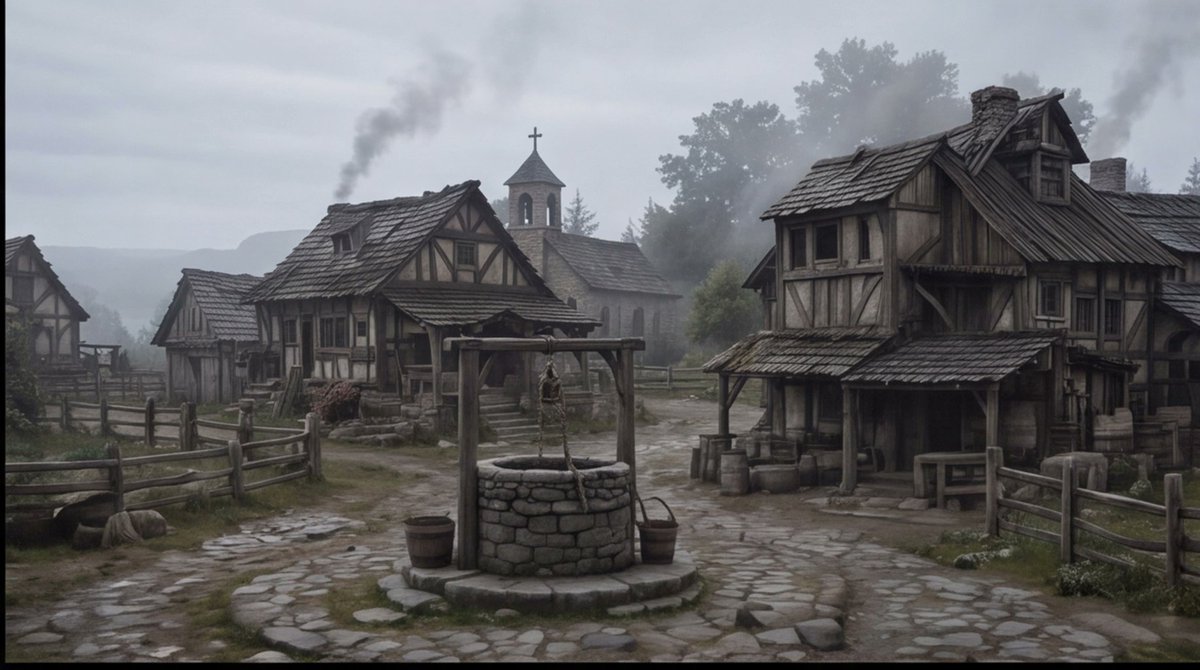
Einstellungsaufnahme eines nebligen mittelalterlichen Dorfes
Erzeugt einen filmreifen, düsteren Fantasy-Dorfplatz im mittelalterlichen Stil, der sich für Storyboards, Konzeptzeichnungen oder Szenendarstellungen eignet.
Dies ist ein GPT Image 2 -Prompt für Landschaft & Natur . Verwenden Sie den unten stehenden, kopierfertigen Prompt, um ähnliche Grafiken zu erstellen, und überprüfen Sie vor der Wiederverwendung Awesome GPT Image 2 Prompts -Quellenangaben sowie die kommerziellen Nutzungsrechte.
Free 1K preview
Generate one preview image instantly, no sign-up required.
Eingabeaufforderung
Kopierfertige Eingabeaufforderung
Create a cinematic wide establishing shot of a quiet {argument name="setting" default="medieval European village square"} on a cold misty morning, rendered in realistic dark fantasy style. The scene centers on a circular stone well with a wooden frame, hanging rope, bucket, and small barrels beside it, placed on an uneven cobblestone path that forks between rustic half-timbered houses. Show at least four visible timber-and-plaster buildings: a large weathered two-story house on the right with a sagging shingled roof, porch, barrels, crates, and a small table; two smaller cottages on the left and midground with fenced yards; and a stone church in the background with a bell tower and cross. Add wooden split-rail fences, muddy grass patches, scattered stones, worn steps, smoke rising from chimneys, and distant tree silhouettes fading into fog. Use a muted palette of gray, brown, moss green, and charcoal, with overcast sky, damp ground, soft diffuse light, low contrast, subtle haze, and a slightly desaturated film look. No people are visible, making the village feel abandoned or early before dawn. Compose as a wide 16:9 storyboard frame with the well in the lower center foreground, buildings framing both sides, the church tower near the central background, and atmospheric depth created by mist and smoke. Overall mood: {argument name="mood" default="somber, quiet, and ominous"}.Eingabeaufforderungsvariablen
In der Eingabeaufforderung befinden sich bearbeitbare Argumentplatzhalter mit ihren Standardwerten.
Best for
- - Landschaft & Natur visual exploration
- - Image generation and reference-image edits
- - Reusable briefs that keep source attribution visible
Change these parts
- - Subject, product, character, or scene
- - Aspect ratio, camera, lighting, and background
- - Brand, text, color, and output constraints
Recommended model and settings
- - Model: gpt-image-2
- - Input mode: Text zu Bild
- - Aspect ratio: source
- - Commercial status: review original source
How to use this prompt
- 1. Copy the prompt and preserve its structure for the first test.
- 2. Replace the subject, context, and publishing channel.
- 3. Change one camera, lighting, or style variable per iteration.
- 4. Inspect the output, source, text, and rights before reuse.
Limitations, source, and reuse cautions
- - Generated output is an editable draft, not factual, legal, or rights evidence.
- - Review the linked source, people, brands, logos, text, and third-party media before commercial use.
Weitere Fälle in dieser Kategorie
Priorisiert nach Kategorie, Kompatibilität der Eingabemodi, Qualität und geringerem Risiko.






Hinweise zur Wiederverwendung und Quellenangabe
Verwenden Sie diese Eingabeaufforderung sicher, nachdem Sie den Fall in der Vorschau angezeigt haben.
- 1.Kopieren Sie die Eingabeaufforderung oder öffnen Sie sie direkt in Dovoo mit der Schaltfläche „Generieren“.
- 2.Passen Sie Variablen, Seitenverhältnis und Referenzbilder an Ihren Anwendungsfall an.
- 3.Vor der Veröffentlichung oder kostenpflichtigen Nutzung sollten Sie die Rechte an der Quelle, die Anforderungen an die Namensnennung sowie die Risiken für die Marke oder das Abbild prüfen.