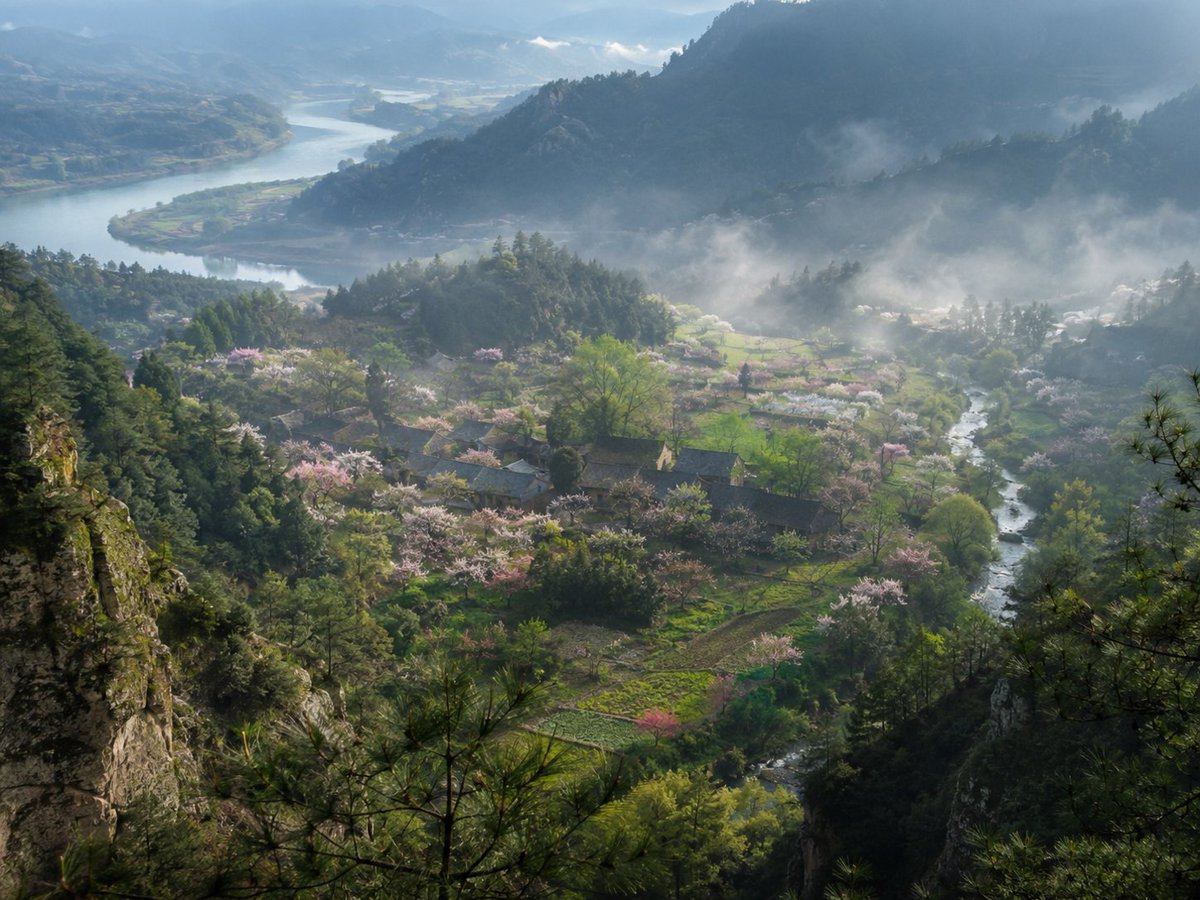
Dorf im Nebeligen Frühlingsberg
Eine realistische, kunstvolle Landschaftsfotografie eines versteckten chinesischen Bergdorfes mit Blüten, Flüssen, Kiefernfelsen und Morgennebel.
Dies ist ein GPT Image 2 -Prompt für Landschaft & Natur . Verwenden Sie den unten stehenden, kopierfertigen Prompt, um ähnliche Grafiken zu erstellen, und überprüfen Sie vor der Wiederverwendung Awesome GPT Image 2 Prompts -Quellenangaben sowie die kommerziellen Nutzungsrechte.
Benötigen Sie den vollständigen Prompt-Satz? Verwenden Sie den Landschaft & Natur Weitere verwandte Beispiele finden Sie im Themen-Hub oder öffnen Sie die GPT Image 2 Prompt-Katalog für das vollständige Beispielverzeichnis, wiederverwendbare Strukturen und Quellenangaben.
Free 1K preview
Generate one preview image instantly, no sign-up required.
1616/4000
Eingabeaufforderung
Kopierfertige Eingabeaufforderung
Create a museum-quality realistic landscape photograph inspired by {argument name="source material" default="an ancient Chinese poetic description of a hidden spring mountain village"}. Show a high, elevated viewpoint from a rocky pine-covered cliff looking down into a secluded valley village in {argument name="season" default="early spring"}. The composition features layered blue-green mountains receding into mist, a broad winding river in the far left background, and a smaller clear stream curving through the right side of the valley. In the middle ground, place a small traditional rural Chinese settlement with dark tiled roofs, scattered farm plots, footpaths, and orchards filled with pale pink and white blossoms. Count the visible major landscape elements as exactly 6: one foreground rocky cliff with pine branches, one central village, one blossom-filled orchard belt, one small winding valley stream, one distant broad river, and one layered misty mountain backdrop. Use soft morning light after rain, drifting low fog, luminous haze, wet greenery, and a tranquil atmosphere as if captured by a top National Geographic landscape photographer. The image should feel like a real, collectible fine-art photograph rather than an illustration: natural colors, deep depth, atmospheric perspective, crisp foreground texture, delicate highlights on the blossoms, no people, no animals, no modern buildings, no roads, no power lines, no text or watermark. Use a wide horizontal frame, approximately {argument name="aspect ratio" default="4:3"}, with cinematic realism and subtle Chinese shanshui sensibility.Eingabeaufforderungsvariablen
In der Eingabeaufforderung befinden sich bearbeitbare Argumentplatzhalter mit ihren Standardwerten.
Variable
source material
Standard
an ancient Chinese poetic description of a hidden spring mountain village
Variable
season
Standard
early spring
Variable
aspect ratio
Standard
4:3
Best for
- - Landschaft & Natur visual exploration
- - Image generation and reference-image edits
- - Reusable briefs that keep source attribution visible
Change these parts
- - Subject, product, character, or scene
- - Aspect ratio, camera, lighting, and background
- - Brand, text, color, and output constraints
Recommended model and settings
- - Model: gpt-image-2
- - Input mode: Text zu Bild
- - Aspect ratio: source
- - Commercial status: review original source
How to use this prompt
- 1. Copy the prompt and preserve its structure for the first test.
- 2. Replace the subject, context, and publishing channel.
- 3. Change one camera, lighting, or style variable per iteration.
- 4. Inspect the output, source, text, and rights before reuse.
Limitations, source, and reuse cautions
- - Generated output is an editable draft, not factual, legal, or rights evidence.
- - Review the linked source, people, brands, logos, text, and third-party media before commercial use.
Importiert von Awesome GPT Image 2 Prompts . Quellenangabe erforderlich. Status der kommerziellen Nutzung: allowed ; Rechte an der Quelle vor kostenpflichtiger Nutzung prüfen.
Weitere Fälle in dieser Kategorie
Priorisiert nach Kategorie, Kompatibilität der Eingabemodi, Qualität und geringerem Risiko.






Hinweise zur Wiederverwendung und Quellenangabe
Verwenden Sie diese Eingabeaufforderung sicher, nachdem Sie den Fall in der Vorschau angezeigt haben.
- 1.Kopieren Sie die Eingabeaufforderung oder öffnen Sie sie direkt in Dovoo mit der Schaltfläche „Generieren“.
- 2.Passen Sie Variablen, Seitenverhältnis und Referenzbilder an Ihren Anwendungsfall an.
- 3.Vor der Veröffentlichung oder kostenpflichtigen Nutzung sollten Sie die Rechte an der Quelle, die Anforderungen an die Namensnennung sowie die Risiken für die Marke oder das Abbild prüfen.