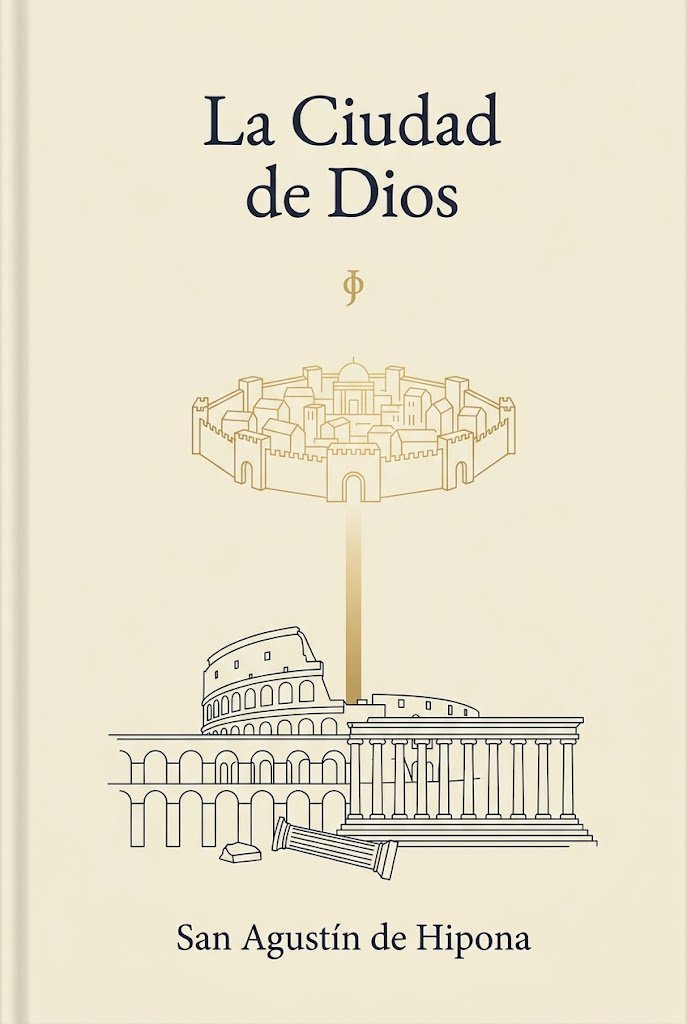
Minimalistischer Saint Augustine Buchcover
Diese Vorlage generiert ein elegantes, minimalistisches Cover für ein klassisches religiöses oder philosophisches Buch, ideal für literarische Ausgaben und Andachtsbücher.
Dies ist ein GPT Image 2 -Prompt für Grafik & Poster . Verwenden Sie den unten stehenden, kopierfertigen Prompt, um ähnliche Grafiken zu erstellen, und überprüfen Sie vor der Wiederverwendung Awesome GPT Image 2 Prompts -Quellenangaben sowie die kommerziellen Nutzungsrechte.
Free 1K preview
Generate one preview image instantly, no sign-up required.
Eingabeaufforderung
Kopierfertige Eingabeaufforderung
A minimalist classical book cover in vertical format on a warm ivory or parchment background. At the top center, set the title in elegant large dark navy serif type across 2 lines: {argument name="title text" default="La Ciudad de Dios"}. Beneath it, centered with generous spacing, place a small gold phi symbol. In the upper-middle area, draw a delicate thin-line gold illustration of a fortified circular heavenly city with exactly 8 visible outer towers or gate structures, crenelated walls, and compact classical buildings inside, including a central dome. From the bottom center of this city, extend a soft vertical gold beam of light downward. In the lower-middle area, create thin dark navy line art of earthly classical ruins: the Roman Colosseum on the left, a large Greek or Roman temple with a triangular pediment and a long row of columns on the right, a broken fallen column in front, a small stone block near it, and an arched ruin structure spanning the lower left. Keep the composition symmetrical and airy, with lots of empty space, refined editorial balance, and subtle contrast between gold heavenly imagery and dark navy earthly architecture. At the bottom center, place the author name in matching dark navy serif type: {argument name="author name" default="San Agustín de Hipona"}. Clean premium literary design, sacred philosophy aesthetic, no extra text, no texture-heavy effects, no photographic elements.Eingabeaufforderungsvariablen
In der Eingabeaufforderung befinden sich bearbeitbare Argumentplatzhalter mit ihren Standardwerten.
Best for
- - Grafik & Poster visual exploration
- - Image generation and reference-image edits
- - Reusable briefs that keep source attribution visible
Change these parts
- - Subject, product, character, or scene
- - Aspect ratio, camera, lighting, and background
- - Brand, text, color, and output constraints
Recommended model and settings
- - Model: gpt-image-2
- - Input mode: Text zu Bild
- - Aspect ratio: source
- - Commercial status: review original source
How to use this prompt
- 1. Copy the prompt and preserve its structure for the first test.
- 2. Replace the subject, context, and publishing channel.
- 3. Change one camera, lighting, or style variable per iteration.
- 4. Inspect the output, source, text, and rights before reuse.
Limitations, source, and reuse cautions
- - Generated output is an editable draft, not factual, legal, or rights evidence.
- - Review the linked source, people, brands, logos, text, and third-party media before commercial use.
Weitere Fälle in dieser Kategorie
Priorisiert nach Kategorie, Kompatibilität der Eingabemodi, Qualität und geringerem Risiko.






Hinweise zur Wiederverwendung und Quellenangabe
Verwenden Sie diese Eingabeaufforderung sicher, nachdem Sie den Fall in der Vorschau angezeigt haben.
- 1.Kopieren Sie die Eingabeaufforderung oder öffnen Sie sie direkt in Dovoo mit der Schaltfläche „Generieren“.
- 2.Passen Sie Variablen, Seitenverhältnis und Referenzbilder an Ihren Anwendungsfall an.
- 3.Vor der Veröffentlichung oder kostenpflichtigen Nutzung sollten Sie die Rechte an der Quelle, die Anforderungen an die Namensnennung sowie die Risiken für die Marke oder das Abbild prüfen.