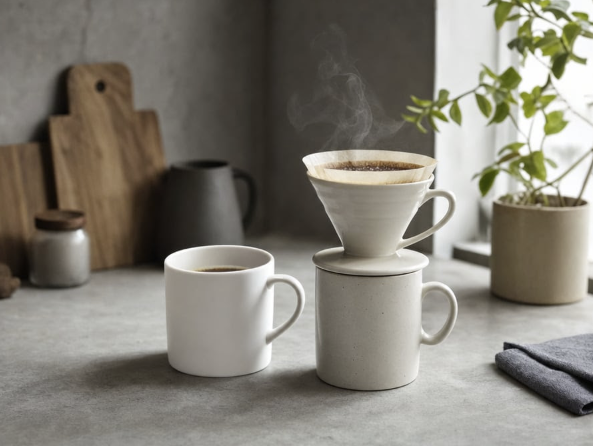
Minimalistische Pour-Over-Kaffeeszene
Ein realistisches Küchenstillleben bei natürlichem Licht mit einer Pour-Over-Kaffeezubereitung, Tassen, Dampf, Pflanze und neutralem, minimalistischem Styling.
Dies ist ein GPT Image 2 -Prompt für Speisen und Getränke . Verwenden Sie den unten stehenden, kopierfertigen Prompt, um ähnliche Grafiken zu erstellen, und überprüfen Sie vor der Wiederverwendung Awesome GPT Image 2 Prompts -Quellenangaben sowie die kommerziellen Nutzungsrechte.
Free 1K preview
Generate one preview image instantly, no sign-up required.
Eingabeaufforderung
Kopierfertige Eingabeaufforderung
Create a realistic lifestyle product photograph of a calm morning coffee scene on a gray concrete kitchen countertop. In the foreground, place exactly 3 white ceramic coffee items: 1 plain white mug on the left filled with black coffee, 1 taller off-white speckled ceramic mug on the right, and 1 white ceramic pour-over dripper sitting on top of the taller mug. The dripper contains a tan paper filter with dark coffee grounds and brewed coffee visible, with thin wisps of steam rising upward. Use {argument name="coffee setup" default="a white ceramic pour-over dripper on an off-white mug beside a white coffee mug"} as the central subject. The scene should feel minimalist, cozy, and natural, with soft diffused daylight coming from a window on the right. In the background, include exactly 5 supporting objects: 2 wooden cutting boards leaning against a gray wall on the left, 1 matte black kettle behind the left mug, 1 small white ceramic jar with a brown lid near the cutting boards, and 1 beige potted green plant by the bright window on the right. Add 1 folded dark gray cloth napkin at the bottom-right edge of the counter. Use a muted neutral color palette of {argument name="color palette" default="warm whites, stone gray, beige, natural wood, matte black, and leafy green"}. Set the environment in a {argument name="room style" default="minimal modern kitchen with concrete surfaces"}. Shoot at eye-level with a slight front angle, shallow depth of field, realistic shadows, soft background blur, no people, no text, no logos, no extra cups or objects. Make it look like a premium editorial coffee advertisement photographed with natural light, crisp focus on the cups and dripper, subtle steam, and a serene quiet atmosphere.Eingabeaufforderungsvariablen
In der Eingabeaufforderung befinden sich bearbeitbare Argumentplatzhalter mit ihren Standardwerten.
Best for
- - Speisen und Getränke visual exploration
- - Image generation and reference-image edits
- - Reusable briefs that keep source attribution visible
Change these parts
- - Subject, product, character, or scene
- - Aspect ratio, camera, lighting, and background
- - Brand, text, color, and output constraints
Recommended model and settings
- - Model: gpt-image-2
- - Input mode: Text zu Bild
- - Aspect ratio: source
- - Commercial status: review original source
How to use this prompt
- 1. Copy the prompt and preserve its structure for the first test.
- 2. Replace the subject, context, and publishing channel.
- 3. Change one camera, lighting, or style variable per iteration.
- 4. Inspect the output, source, text, and rights before reuse.
Limitations, source, and reuse cautions
- - Generated output is an editable draft, not factual, legal, or rights evidence.
- - Review the linked source, people, brands, logos, text, and third-party media before commercial use.
Weitere Fälle in dieser Kategorie
Priorisiert nach Kategorie, Kompatibilität der Eingabemodi, Qualität und geringerem Risiko.





Hinweise zur Wiederverwendung und Quellenangabe
Verwenden Sie diese Eingabeaufforderung sicher, nachdem Sie den Fall in der Vorschau angezeigt haben.
- 1.Kopieren Sie die Eingabeaufforderung oder öffnen Sie sie direkt in Dovoo mit der Schaltfläche „Generieren“.
- 2.Passen Sie Variablen, Seitenverhältnis und Referenzbilder an Ihren Anwendungsfall an.
- 3.Vor der Veröffentlichung oder kostenpflichtigen Nutzung sollten Sie die Rechte an der Quelle, die Anforderungen an die Namensnennung sowie die Risiken für die Marke oder das Abbild prüfen.