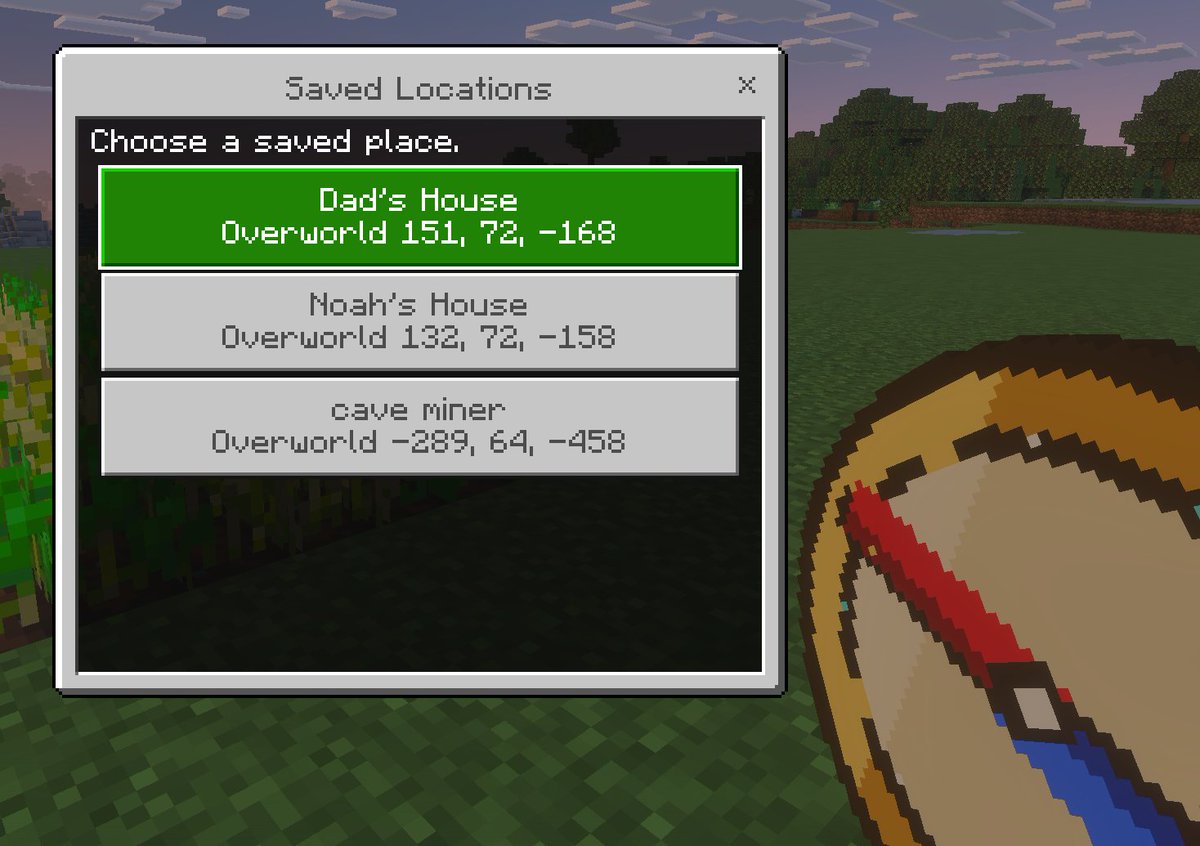
Minecraft-Benutzeroberflächen-Mockup für gespeicherte Orte
Ein Screenshot aus der Egoperspektive im Minecraft-Pixel-Art-Stil mit einem benutzerdefinierten Menü zum Speichern von Orten, der sich gut eignet, um Spiel-UI-Konzepte, Add-ons oder Teleport-Navigationswerkzeuge zu präsentieren.
Dies ist ein GPT Image 2 -Prompt für Anime & Spiel . Verwenden Sie den unten stehenden, kopierfertigen Prompt, um ähnliche Grafiken zu erstellen, und überprüfen Sie vor der Wiederverwendung Awesome GPT Image 2 Prompts -Quellenangaben sowie die kommerziellen Nutzungsrechte.
Free 1K preview
Generate one preview image instantly, no sign-up required.
Eingabeaufforderung
Kopierfertige Eingabeaufforderung
A clean Minecraft Bedrock-style game UI mockup shown as a first-person in-game screenshot at dusk. The background is a blocky grassy field with pixelated trees, a soft purple-blue evening sky, and a small patch of crops on the far left edge. In the lower right foreground, show a large pixel-art compass item held in the player’s hand, angled diagonally upward, with a tan face, dark brown rim, red needle, and blue tip. Center-left, overlay a rectangular Minecraft menu window with a light gray frame, thin dark border, and a black translucent interior panel. At the top of the window, a title bar reads {argument name="window title" default="Saved Locations"} in a Minecraft-inspired pixel font, with a small x close button on the top right. Inside the panel, add the instruction text {argument name="instruction text" default="Choose a saved place."} near the top left. Below it, display exactly 3 stacked destination buttons, each wide and centered. The first button is highlighted bright green with white pixel text and contains 2 lines: {argument name="location 1 name" default="Dad's House"} and "Overworld 151, 72, -168". The second button is light gray with darker gray text and contains 2 lines: "Noah's House" and "Overworld 132, 72, -158". The third button is light gray with darker gray text and contains 2 lines: {argument name="location 3 name" default="cave miner"} and "Overworld -289, 64, -458". Use crisp pixel edges, retro voxel-game aesthetics, subtle screen depth, and an authentic Minecraft Bedrock menu look.Eingabeaufforderungsvariablen
In der Eingabeaufforderung befinden sich bearbeitbare Argumentplatzhalter mit ihren Standardwerten.
Best for
- - Anime & Spiel visual exploration
- - Image generation and reference-image edits
- - Reusable briefs that keep source attribution visible
Change these parts
- - Subject, product, character, or scene
- - Aspect ratio, camera, lighting, and background
- - Brand, text, color, and output constraints
Recommended model and settings
- - Model: gpt-image-2
- - Input mode: Text zu Bild
- - Aspect ratio: source
- - Commercial status: review original source
How to use this prompt
- 1. Copy the prompt and preserve its structure for the first test.
- 2. Replace the subject, context, and publishing channel.
- 3. Change one camera, lighting, or style variable per iteration.
- 4. Inspect the output, source, text, and rights before reuse.
Limitations, source, and reuse cautions
- - Generated output is an editable draft, not factual, legal, or rights evidence.
- - Review the linked source, people, brands, logos, text, and third-party media before commercial use.
Weitere Fälle in dieser Kategorie
Priorisiert nach Kategorie, Kompatibilität der Eingabemodi, Qualität und geringerem Risiko.






Hinweise zur Wiederverwendung und Quellenangabe
Verwenden Sie diese Eingabeaufforderung sicher, nachdem Sie den Fall in der Vorschau angezeigt haben.
- 1.Kopieren Sie die Eingabeaufforderung oder öffnen Sie sie direkt in Dovoo mit der Schaltfläche „Generieren“.
- 2.Passen Sie Variablen, Seitenverhältnis und Referenzbilder an Ihren Anwendungsfall an.
- 3.Vor der Veröffentlichung oder kostenpflichtigen Nutzung sollten Sie die Rechte an der Quelle, die Anforderungen an die Namensnennung sowie die Risiken für die Marke oder das Abbild prüfen.