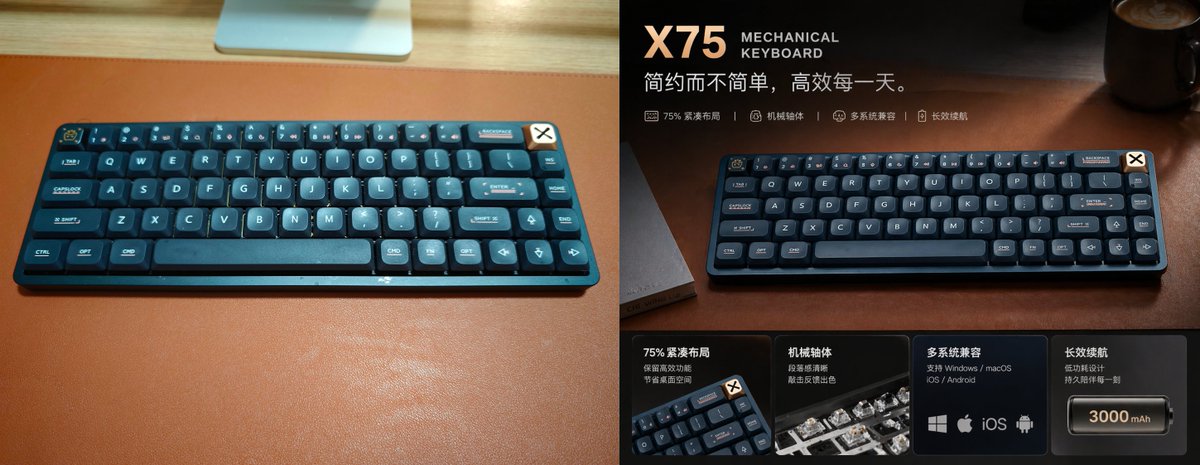
Werbeplakat für Premium-Tastaturen
Eine aufwendig gestaltete Werbegrafik im Split-Screen-Format zeigt eine kompakte mechanische Tastatur, die von einem lässigen Schreibtischfoto in eine hochwertige Anzeige im Stil des chinesischen E-Commerce verwandelt wurde.
Dies ist ein GPT Image 2 -Prompt für Produkt & Vertrieb . Verwenden Sie den unten stehenden, kopierfertigen Prompt, um ähnliche Grafiken zu erstellen, und überprüfen Sie vor der Wiederverwendung Awesome GPT Image 2 Prompts -Quellenangaben sowie die kommerziellen Nutzungsrechte.
Free 1K preview
Generate one preview image instantly, no sign-up required.
Eingabeaufforderung
Kopierfertige Eingabeaufforderung
{
  "type": "premium product advertisement poster",
  "subject": {
    "product": "{argument name=\"product name\" default=\"X75\"} mechanical keyboard",
    "category": "75% compact wireless mechanical keyboard",
    "color": "deep navy blue with dark teal accents",
    "material": "matte plastic case with rounded keycaps",
    "branding": "small badge in the top-right corner of the keyboard",
    "layout badge": "cream square badge with a black X symbol attached near the keyboard's top-right edge"
  },
  "scene": {
    "setting": "warm moody desktop setup",
    "surface": "rich brown leather desk mat on a light wood desk",
    "lighting": "cinematic warm directional light from upper right, soft reflections, luxury tech advertisement mood",
    "background": "dark blurred office or desk environment with a coffee mug in the upper-right corner and faint desk objects"
  },
  "composition": {
    "format": "split-screen before-and-after promotional comparison",
    "panels": [
      {
        "position": "left half",
        "style": "plain casual snapshot",
        "description": "top-down angled photo of the keyboard centered on a large brown desk mat, bright ambient room light, visible light wood desk edge at top, part of a monitor stand or silver device at the top center, realistic unstyled product photo"
      },
      {
        "position": "right half",
        "style": "upgraded premium ad design",
        "description": "the same keyboard presented dramatically on the brown leather desk mat with darker exposure, richer contrast, warm highlights, shallow depth of field, and polished commercial retouching"
      }
    ]
  },
  "text elements": {
    "headline": "{argument name=\"headline text\" default=\"X75\"}",
    "subheadline": "MECHANICAL KEYBOARD",
    "tagline": "{argument name=\"tagline\" default=\"Simple but not simplistic, efficient every day.\"}",
    "feature line count": 4,
    "feature line items": [
      "75% compact layout",
      "Mechanical axis",
      "Multi-system compatibility",
      "Long-lasting battery life"
    ]
  },
  "bottom feature cards": {
    "count": 4,
    "cards": [
      {
        "title": "75% compact layout",
        "description": "Retain efficient area, save desktop space",
        "visual": "small angled keyboard corner close-up"
      },
      {
        "title": "Mechanical axis",
        "description": "Clear paragraphing and excellent typing feedback",
        "visual": "close-up of mechanical switches with translucent housings"
      },
      {
        "title": "Multi-system compatibility",
        "description": "Supports Windows / macOS / iOS / Android",
        "visual": "4 platform icons: Windows, Apple, iOS, Android"
      },
      {
        "title": "Long-lasting battery life",
        "description": "Low-power design, lasting companionship every moment",
        "visual": "battery icon labeled {argument name=\"battery capacity\" default=\"3000 mAh\"}"
      }
    ]
  },
  "style": {
    "design language": "high-end Chinese e-commerce hero banner",
    "color palette": "dark navy, charcoal, copper brown, warm amber highlights, cream typography",
    "typography": "bold modern sans-serif for product name, smaller uppercase English subtitle, clean Chinese body text",
    "finish": "sleek commercial retouching, subtle vignetting, glossy highlights, premium atmosphere"
  }
}
Eingabeaufforderungsvariablen
In der Eingabeaufforderung befinden sich bearbeitbare Argumentplatzhalter mit ihren Standardwerten.
Best for
- - Produkt & Vertrieb visual exploration
- - Image generation and reference-image edits
- - Reusable briefs that keep source attribution visible
Change these parts
- - Subject, product, character, or scene
- - Aspect ratio, camera, lighting, and background
- - Brand, text, color, and output constraints
Recommended model and settings
- - Model: gpt-image-2
- - Input mode: Text zu Bild
- - Aspect ratio: source
- - Commercial status: review original source
How to use this prompt
- 1. Copy the prompt and preserve its structure for the first test.
- 2. Replace the subject, context, and publishing channel.
- 3. Change one camera, lighting, or style variable per iteration.
- 4. Inspect the output, source, text, and rights before reuse.
Limitations, source, and reuse cautions
- - Generated output is an editable draft, not factual, legal, or rights evidence.
- - Review the linked source, people, brands, logos, text, and third-party media before commercial use.
Weitere Fälle in dieser Kategorie
Priorisiert nach Kategorie, Kompatibilität der Eingabemodi, Qualität und geringerem Risiko.






Hinweise zur Wiederverwendung und Quellenangabe
Verwenden Sie diese Eingabeaufforderung sicher, nachdem Sie den Fall in der Vorschau angezeigt haben.
- 1.Kopieren Sie die Eingabeaufforderung oder öffnen Sie sie direkt in Dovoo mit der Schaltfläche „Generieren“.
- 2.Passen Sie Variablen, Seitenverhältnis und Referenzbilder an Ihren Anwendungsfall an.
- 3.Vor der Veröffentlichung oder kostenpflichtigen Nutzung sollten Sie die Rechte an der Quelle, die Anforderungen an die Namensnennung sowie die Risiken für die Marke oder das Abbild prüfen.