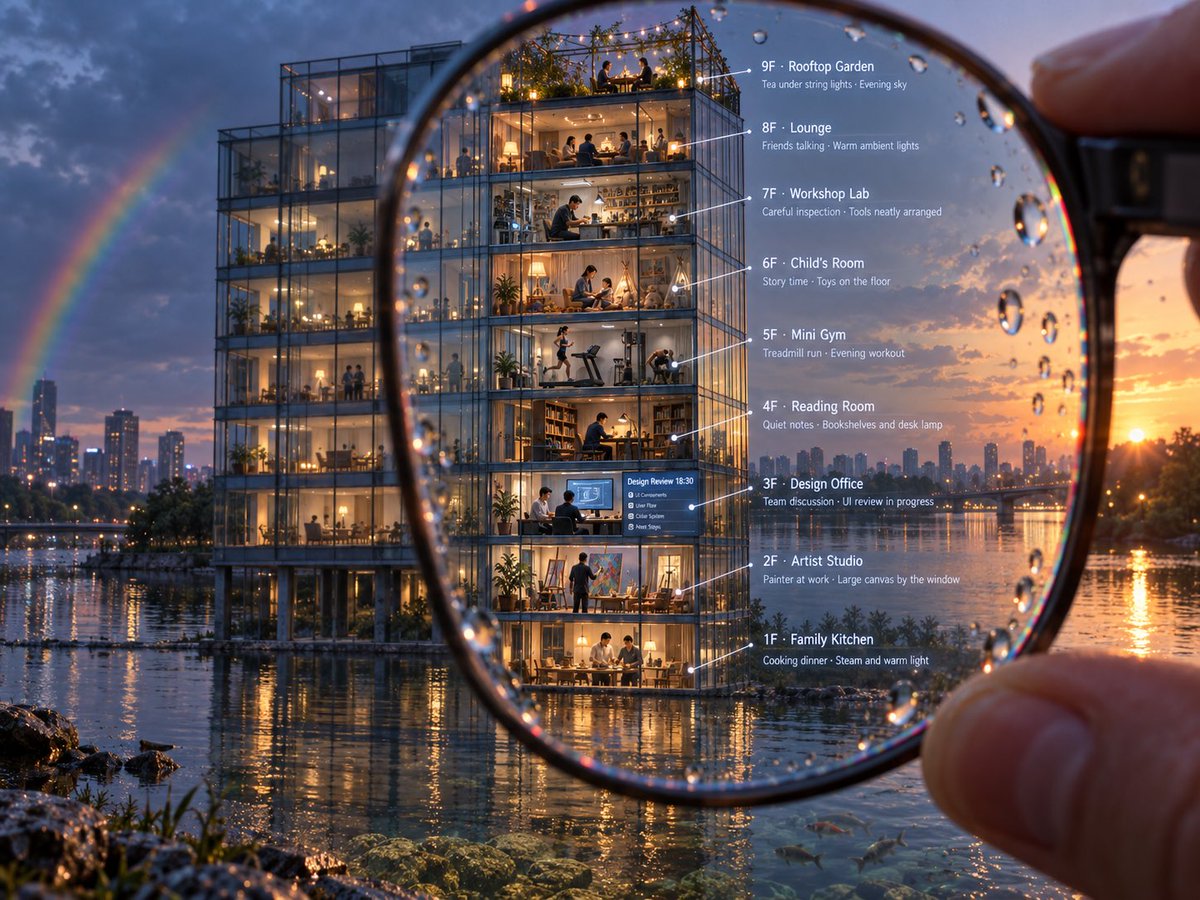
Magnified Glass Building Cutaway
A cinematic photorealistic prompt for generating a nine-floor annotated glass building cutaway viewed through a rainy magnifying glass.
Dies ist ein GPT Image 2 -Prompt für Innenarchitektur . Verwenden Sie den unten stehenden, kopierfertigen Prompt, um ähnliche Grafiken zu erstellen, und überprüfen Sie vor der Wiederverwendung Awesome GPT Image 2 Prompts -Quellenangaben sowie die kommerziellen Nutzungsrechte.
Diese Eingabeaufforderung ist für mehrere Referenzbilder vorgesehen. Wir öffnen Dovoo mit der Eingabeaufforderung und dem verfügbaren Vorschaubild; fügen Sie die restlichen Referenzen in Dovoo hinzu, bevor Sie den Generierungsvorgang starten.
Free 1K preview
Generate one preview image instantly, no sign-up required.
Free text preview doesn’t preserve reference-image consistency.
Eingabeaufforderung
Kopierfertige Eingabeaufforderung
Goal: Create a cinematic photorealistic architectural cutaway scene of a glass apartment building viewed through a handheld magnifying glass, with annotated floor-by-floor labels.

Canvas: Landscape 4:3 image, ultra-detailed evening cityscape at sunset after rain. A waterfront modern glass building stands beside a reflective river or lake, with distant skyline, warm orange sun near the horizon, blue storm clouds, and a faint rainbow on the left.

Main composition: In the extreme foreground, a human hand holds a large round magnifying glass at the right edge. The lens dominates the center of the frame and contains sharp focus, visible rim distortion, and many raindrops on the glass. Inside the magnified circle, the front building is crisp and enlarged, revealing a transparent nine-floor cross-section with people, furniture, and warm interior lights. Outside the lens, the same building and city are slightly softer and less magnified, emphasizing the optical effect. Water reflections, wet rocks, plants, and a few small fish near the clear shallows appear along the bottom.

Building details: A tall modern steel-and-glass rectangular building on piloti columns at the waterline, with warm yellow interior lighting and transparent walls. Show exactly 9 stacked visible levels, each as a distinct room or activity scene with tiny realistic people.

Floor labels and annotations: Place thin white leader lines from the rooms to clean white text on the right side inside or beside the magnifying glass. Include exactly these 9 labeled floors, top to bottom:
1. “9F · Rooftop Garden” with subtext “Tea under string lights · Evening sky”; show people seated among plants and string lights on an open roof terrace.
2. “8F · Lounge” with subtext “Friends talking · Warm ambient lights”; show a cozy social lounge with sofas and people chatting.
3. “7F · Workshop Lab” with subtext “Careful inspection · Tools neatly arranged”; show a maker workshop with shelves, tools, and a person working at a bench.
4. “6F · Child's Room” with subtext “Story time · Toys on the floor”; show a warm kids’ room with an adult and child, toys scattered.
5. “5F · Mini Gym” with subtext “Treadmill run · Evening workout”; show exercise machines, one person running, another working out.
6. “4F · Reading Room” with subtext “Quiet notes · Bookshelves and desk lamp”; show bookshelves, desk, lamp, and a seated reader.
7. “3F · Design Office” with subtext “Team discussion · UI review in progress”; show a small office meeting with screens and a blue presentation board.
8. “2F · Artist Studio” with subtext “Painter at work · Large canvas by the window”; show an artist painting on a large canvas, art supplies and easel.
9. “1F · Family Kitchen” with subtext “Cooking dinner · Steam and warm light”; show family members at a dining table/kitchen with glowing lamps and steam.

Visual style: Photorealistic, highly cinematic, rich depth of field, warm interior glow contrasted with cool blue evening outdoors, realistic rain droplets, reflections, refraction through magnifying lens, sharp micro-details, realistic people at miniature scale, premium architectural visualization quality.

Text constraints: The annotation text must be legible, white, modern sans-serif, aligned vertically on the right, with thin white pointer lines. Keep all labels in English. Do not add extra floors, extra labels, logos, watermarks, or unrelated text.
Best for
- - Innenarchitektur visual exploration
- - Image generation and reference-image edits
- - Reusable briefs that keep source attribution visible
Change these parts
- - Subject, product, character, or scene
- - Aspect ratio, camera, lighting, and background
- - Brand, text, color, and output constraints
Recommended model and settings
- - Model: gpt-image-2
- - Input mode: Mehrere Bilder zu Bildern
- - Aspect ratio: source
- - Commercial status: review original source
How to use this prompt
- 1. Copy the prompt and preserve its structure for the first test.
- 2. Replace the subject, context, and publishing channel.
- 3. Change one camera, lighting, or style variable per iteration.
- 4. Inspect the output, source, text, and rights before reuse.
Limitations, source, and reuse cautions
- - Generated output is an editable draft, not factual, legal, or rights evidence.
- - Review the linked source, people, brands, logos, text, and third-party media before commercial use.
Weitere Fälle in dieser Kategorie
Priorisiert nach Kategorie, Kompatibilität der Eingabemodi, Qualität und geringerem Risiko.






Hinweise zur Wiederverwendung und Quellenangabe
Verwenden Sie diese Eingabeaufforderung sicher, nachdem Sie den Fall in der Vorschau angezeigt haben.
- 1.Kopieren Sie die Eingabeaufforderung oder öffnen Sie sie direkt in Dovoo mit der Schaltfläche „Generieren“.
- 2.Passen Sie Variablen, Seitenverhältnis und Referenzbilder an Ihren Anwendungsfall an.
- 3.Vor der Veröffentlichung oder kostenpflichtigen Nutzung sollten Sie die Rechte an der Quelle, die Anforderungen an die Namensnennung sowie die Risiken für die Marke oder das Abbild prüfen.