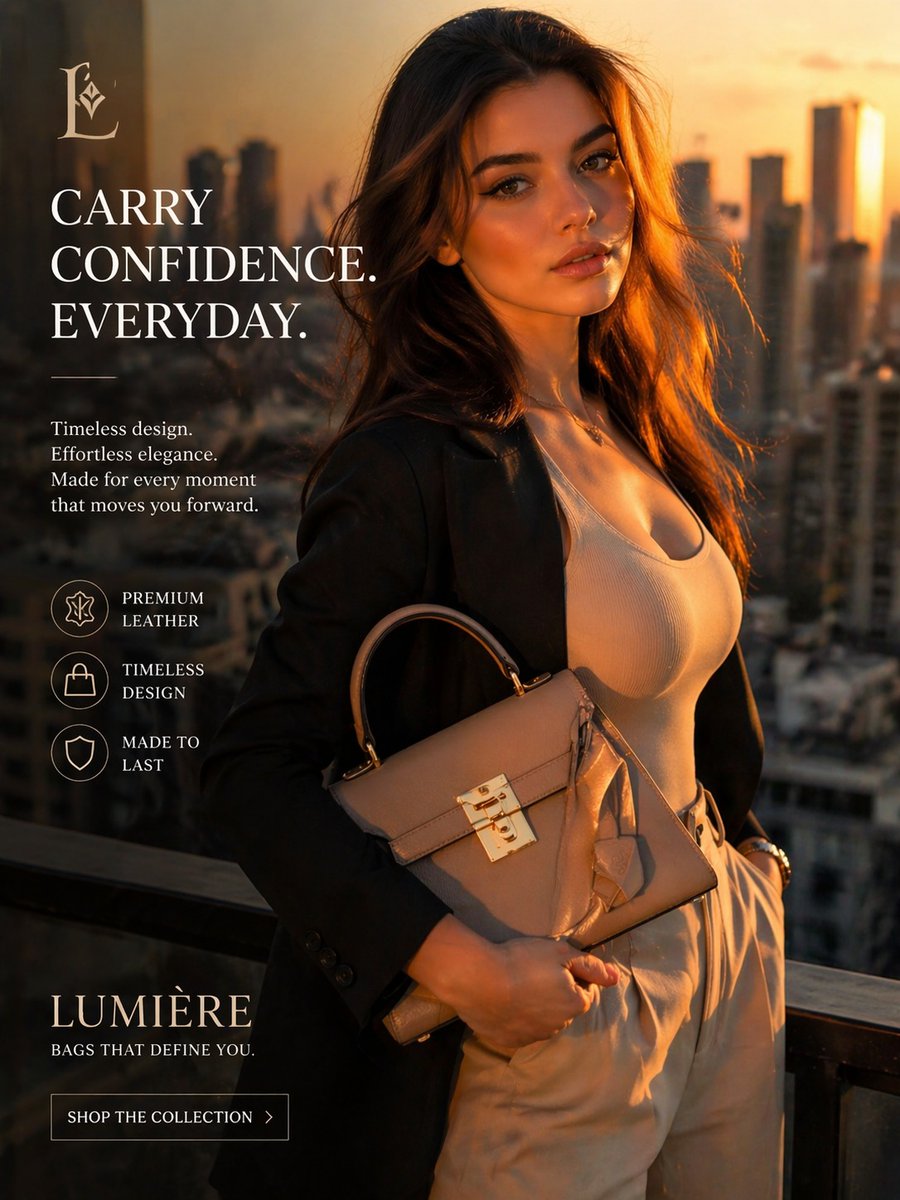
Luxushandtasche Sunset-Anzeige
Diese Vorlage generiert eine elegante, vertikale Luxusmodeanzeige für eine Premium-Handtaschenmarke, ideal für E-Commerce-Kampagnen und Social-Media-Anzeigen.
Dies ist ein GPT Image 2 -Prompt für Produkt & Vertrieb . Verwenden Sie den unten stehenden, kopierfertigen Prompt, um ähnliche Grafiken zu erstellen, und überprüfen Sie vor der Wiederverwendung Awesome GPT Image 2 Prompts -Quellenangaben sowie die kommerziellen Nutzungsrechte.
Free 1K preview
Generate one preview image instantly, no sign-up required.
Eingabeaufforderung
Kopierfertige Eingabeaufforderung
Luxury fashion advertisement, vertical editorial product ad shot at golden hour on a high-rise balcony overlooking a modern city skyline at sunset. A stylish woman stands in a confident three-quarter pose, framed from mid-thigh up, Show every face clearly with natural, detailed facial features. She has long, softly wavy brunette hair lit by warm backlight from the setting sun. She wears a black tailored blazer over a fitted white scoop-neck ribbed top and high-waisted light beige trousers, with one hand in her pocket and the other holding a structured taupe leather handbag with a top handle, flap closure, polished gold clasp hardware, and a hanging leather tag. The bag is the visual hero and should look premium, elegant, and sharply detailed. Use cinematic warm lighting, soft rim light on the hair, subtle luxury color grading, shallow depth of field, and blurred skyscrapers in the background. Compose the layout like a premium brand campaign with large text and icons on the left side. At top left, place a refined serif monogram logo: {argument name="brand monogram" default="L"}. Below it, large white serif headline text stacked in uppercase: {argument name="headline text" default="CARRY CONFIDENCE. EVERYDAY."}. Beneath that, add a short white serif body copy in 4 lines: {argument name="body text" default="Timeless design. Effortless elegance. Made for every moment that moves you forward."}. Add exactly 3 circular line icons with labels arranged vertically: premium leather, timeless design, made to last. At the bottom left, place the brand name in large elegant serif capitals: {argument name="brand name" default="LUMIÈRE"}, with smaller uppercase tagline below: {argument name="tagline" default="BAGS THAT DEFINE YOU."}. Add a bordered call-to-action button reading “SHOP THE COLLECTION” with a small right arrow. Overall style: upscale, aspirational, polished e-commerce campaign, photorealistic fashion ad, luxurious but modern, clean typography, balanced negative space, magazine-quality composition.Eingabeaufforderungsvariablen
In der Eingabeaufforderung befinden sich bearbeitbare Argumentplatzhalter mit ihren Standardwerten.
Best for
- - Produkt & Vertrieb visual exploration
- - Image generation and reference-image edits
- - Reusable briefs that keep source attribution visible
Change these parts
- - Subject, product, character, or scene
- - Aspect ratio, camera, lighting, and background
- - Brand, text, color, and output constraints
Recommended model and settings
- - Model: gpt-image-2
- - Input mode: Text zu Bild
- - Aspect ratio: source
- - Commercial status: review original source
How to use this prompt
- 1. Copy the prompt and preserve its structure for the first test.
- 2. Replace the subject, context, and publishing channel.
- 3. Change one camera, lighting, or style variable per iteration.
- 4. Inspect the output, source, text, and rights before reuse.
Limitations, source, and reuse cautions
- - Generated output is an editable draft, not factual, legal, or rights evidence.
- - Review the linked source, people, brands, logos, text, and third-party media before commercial use.
Weitere Fälle in dieser Kategorie
Priorisiert nach Kategorie, Kompatibilität der Eingabemodi, Qualität und geringerem Risiko.






Hinweise zur Wiederverwendung und Quellenangabe
Verwenden Sie diese Eingabeaufforderung sicher, nachdem Sie den Fall in der Vorschau angezeigt haben.
- 1.Kopieren Sie die Eingabeaufforderung oder öffnen Sie sie direkt in Dovoo mit der Schaltfläche „Generieren“.
- 2.Passen Sie Variablen, Seitenverhältnis und Referenzbilder an Ihren Anwendungsfall an.
- 3.Vor der Veröffentlichung oder kostenpflichtigen Nutzung sollten Sie die Rechte an der Quelle, die Anforderungen an die Namensnennung sowie die Risiken für die Marke oder das Abbild prüfen.