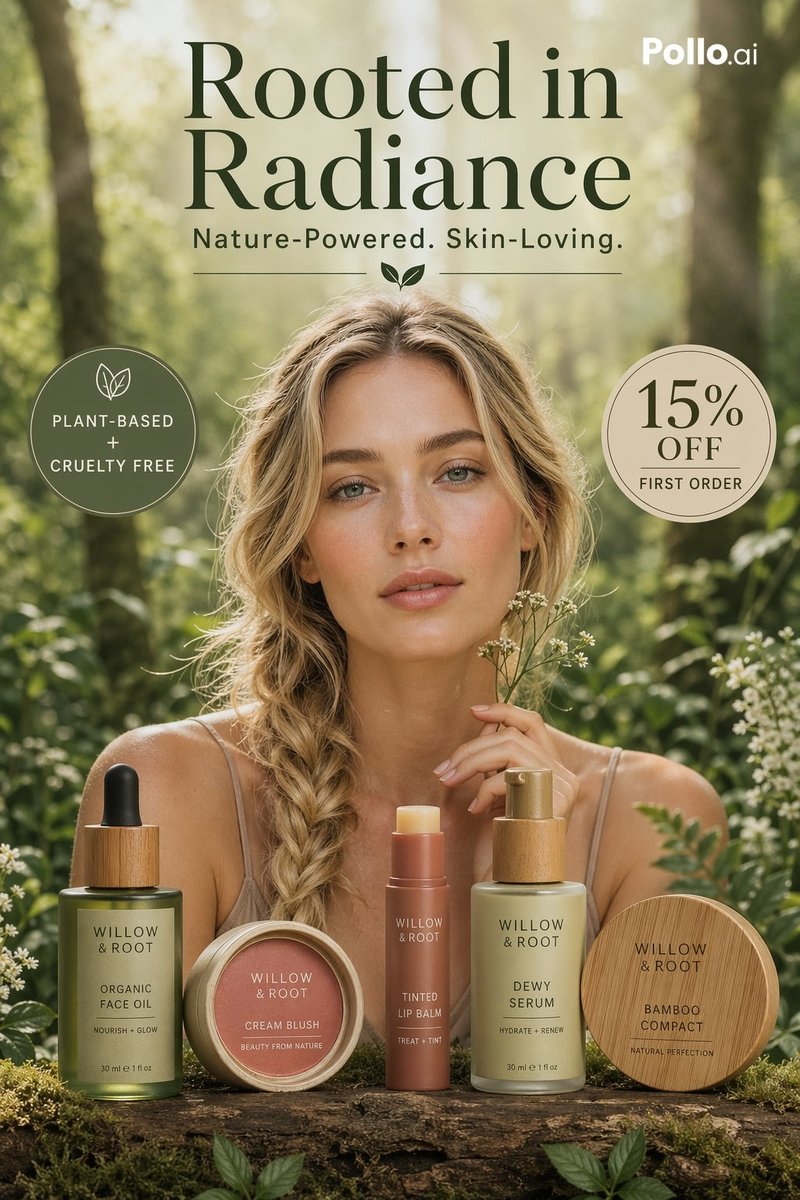
Luxuriöse botanische Hautpflege aus dem Wald
Diese Vorlage generiert eine hochwertige vertikale Beauty-Anzeige für eine Naturkosmetikmarke, ideal für E-Commerce-Aktionen, Social-Media-Anzeigen und redaktionelles Produktmarketing.
Dies ist ein GPT Image 2 -Prompt für Produkt & Vertrieb . Verwenden Sie den unten stehenden, kopierfertigen Prompt, um ähnliche Grafiken zu erstellen, und überprüfen Sie vor der Wiederverwendung Awesome GPT Image 2 Prompts -Quellenangaben sowie die kommerziellen Nutzungsrechte.
Free 1K preview
Generate one preview image instantly, no sign-up required.
Eingabeaufforderung
Kopierfertige Eingabeaufforderung
Luxury natural skincare ad campaign shot in a sun-dappled forest clearing, styled like a premium editorial beauty poster for {argument name="brand name" default="WILLOW & ROOT"}. Center a beautiful young woman with sun-kissed skin and loose blonde hair in a thick side braid, wearing a soft beige spaghetti-strap slip dress, seated behind a rustic moss-covered log table, holding delicate white wildflowers near her face. Show every face clearly with natural, detailed facial features, creating an anonymous model effect. In the foreground on the log, arrange exactly 5 beauty products in a polished e-commerce lineup from left to right: a green glass dropper bottle labeled organic face oil with bamboo cap, a round cream blush compact with dusty rose lid, a tinted lip balm stick in muted terracotta packaging, a frosted pale-green pump bottle labeled dewy serum with bamboo pump, and a closed bamboo compact engraved with the brand name. Add soft white wildflowers and lush green foliage around the products and edges of the frame. Use warm golden-hour backlighting, creamy bokeh, shallow depth of field, soft lens glow, natural green and beige palette, high-end botanical wellness aesthetic, photorealistic skin and packaging, centered composition, vertical 4:5 layout. Overlay elegant dark serif typography at the top with the headline {argument name="headline text" default="Rooted in Radiance"} on two lines, a smaller sans-serif tagline beneath reading {argument name="tagline" default="Nature-Powered. Skin-Loving."}, separated by a small leaf icon and thin horizontal divider lines. Add 2 circular promotional badges: on the upper left, an olive-green badge with a leaf icon and the text {argument name="left badge text" default="PLANT-BASED + CRUELTY FREE"}; on the upper right, a beige badge with the text {argument name="discount text" default="15% OFF FIRST ORDER"}. Place a small white Pollo.ai watermark in the top-right corner. Premium beauty advertising, clean luxury composition, modern mobile-first e-commerce campaign.Eingabeaufforderungsvariablen
In der Eingabeaufforderung befinden sich bearbeitbare Argumentplatzhalter mit ihren Standardwerten.
Best for
- - Produkt & Vertrieb visual exploration
- - Image generation and reference-image edits
- - Reusable briefs that keep source attribution visible
Change these parts
- - Subject, product, character, or scene
- - Aspect ratio, camera, lighting, and background
- - Brand, text, color, and output constraints
Recommended model and settings
- - Model: gpt-image-2
- - Input mode: Text zu Bild
- - Aspect ratio: source
- - Commercial status: review original source
How to use this prompt
- 1. Copy the prompt and preserve its structure for the first test.
- 2. Replace the subject, context, and publishing channel.
- 3. Change one camera, lighting, or style variable per iteration.
- 4. Inspect the output, source, text, and rights before reuse.
Limitations, source, and reuse cautions
- - Generated output is an editable draft, not factual, legal, or rights evidence.
- - Review the linked source, people, brands, logos, text, and third-party media before commercial use.
Weitere Fälle in dieser Kategorie
Priorisiert nach Kategorie, Kompatibilität der Eingabemodi, Qualität und geringerem Risiko.






Hinweise zur Wiederverwendung und Quellenangabe
Verwenden Sie diese Eingabeaufforderung sicher, nachdem Sie den Fall in der Vorschau angezeigt haben.
- 1.Kopieren Sie die Eingabeaufforderung oder öffnen Sie sie direkt in Dovoo mit der Schaltfläche „Generieren“.
- 2.Passen Sie Variablen, Seitenverhältnis und Referenzbilder an Ihren Anwendungsfall an.
- 3.Vor der Veröffentlichung oder kostenpflichtigen Nutzung sollten Sie die Rechte an der Quelle, die Anforderungen an die Namensnennung sowie die Risiken für die Marke oder das Abbild prüfen.