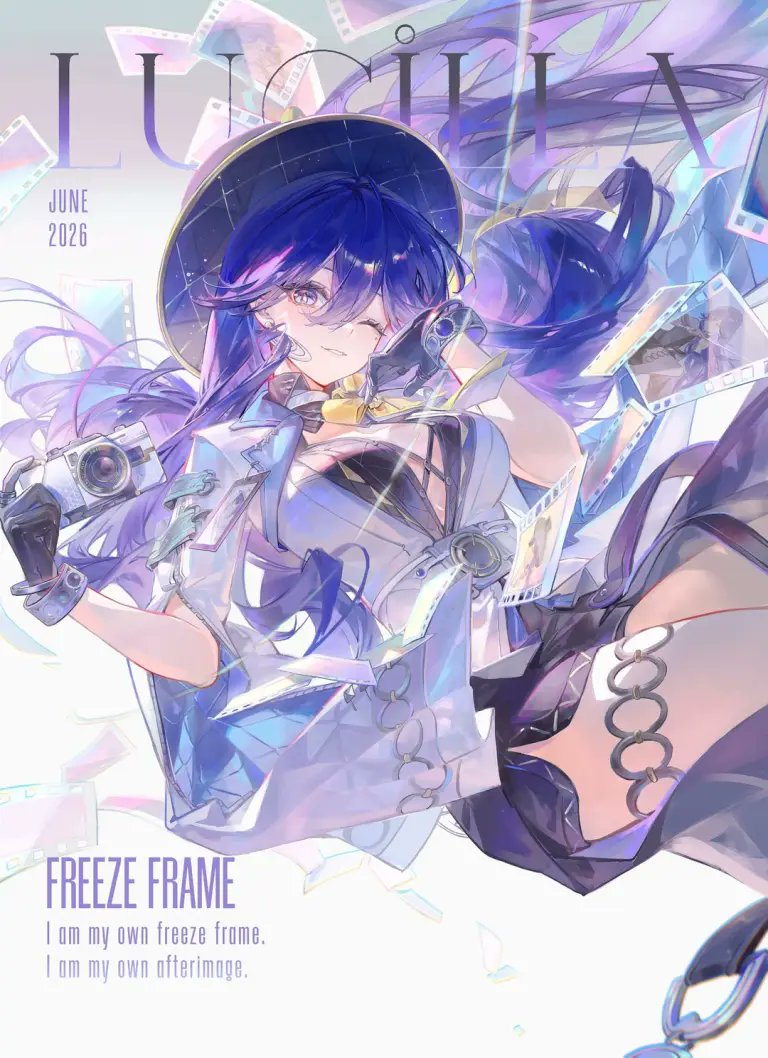
Lumia Freeze Frame Cover
A vertical anime magazine-cover style key visual of a camera-themed Wuthering Waves heroine surrounded by floating film strips and editorial typography.
Dies ist ein GPT Image 2 -Prompt für Anime & Spiel . Verwenden Sie den unten stehenden, kopierfertigen Prompt, um ähnliche Grafiken zu erstellen, und überprüfen Sie vor der Wiederverwendung Awesome GPT Image 2 Prompts -Quellenangaben sowie die kommerziellen Nutzungsrechte.
Benötigen Sie den vollständigen Prompt-Satz? Verwenden Sie den Anime & Spiel Weitere verwandte Beispiele finden Sie im Themen-Hub oder öffnen Sie die GPT Image 2 Prompt-Katalog für das vollständige Beispielverzeichnis, wiederverwendbare Strukturen und Quellenangaben.
Free 1K preview
Generate one preview image instantly, no sign-up required.
1829/4000
Eingabeaufforderung
Kopierfertige Eingabeaufforderung
Create a polished anime magazine-cover illustration for Wuthering Waves featuring {argument name="character name" default="Lumia"} as a stylish camera-themed heroine suspended in a dynamic floating pose. Vertical portrait canvas, 3:4 ratio, bright high-key white background with pale lavender, icy blue, and iridescent rainbow accents. Place oversized thin serif title text “LUMIA” across the top behind the character, with small stacked date text “JUNE 2026” on the upper left. At the bottom left add the headline “FREEZE FRAME” in tall condensed purple capitals, followed by two smaller lines: “I am my own freeze frame.” and “I am my own afterimage.” The character has long flowing {argument name="hair color" default="deep indigo-blue with violet highlights"} hair, one visible golden-lavender eye, a confident playful smile, and a black wide-brim hat with subtle starry grid texture. Outfit: futuristic white-and-pale-blue cropped jacket, black cutout bodice, translucent glossy panels, metallic rings and straps, black gloves, thigh-high dark legwear, and silver circular garter rings on the exposed thigh. She holds one compact retro camera in her left hand and one small camcorder-like device near her face in her right hand. Surround her with exactly 12 floating film-related elements: 6 translucent film-strip ribbons curling around her, 4 pastel photo-frame negatives, 1 large iridescent shard near the lower center, and 1 dangling metal chain ring at the bottom right edge. Use a luminous anime key visual style with delicate line art, soft cel shading, pearlescent highlights, lens flares, motion blur in the hair and ribbons, and a dreamy photographic afterimage effect. Keep the composition airy and elegant, with the typography partially obscured by the character but still readable; no extra logos or watermarks.Eingabeaufforderungsvariablen
In der Eingabeaufforderung befinden sich bearbeitbare Argumentplatzhalter mit ihren Standardwerten.
Variable
character name
Standard
Lumia
Variable
hair color
Standard
deep indigo-blue with violet highlights
Best for
- - Anime & Spiel visual exploration
- - Image generation and reference-image edits
- - Reusable briefs that keep source attribution visible
Change these parts
- - Subject, product, character, or scene
- - Aspect ratio, camera, lighting, and background
- - Brand, text, color, and output constraints
Recommended model and settings
- - Model: gpt-image-2
- - Input mode: Text zu Bild
- - Aspect ratio: source
- - Commercial status: review original source
How to use this prompt
- 1. Copy the prompt and preserve its structure for the first test.
- 2. Replace the subject, context, and publishing channel.
- 3. Change one camera, lighting, or style variable per iteration.
- 4. Inspect the output, source, text, and rights before reuse.
Limitations, source, and reuse cautions
- - Generated output is an editable draft, not factual, legal, or rights evidence.
- - Review the linked source, people, brands, logos, text, and third-party media before commercial use.
Importiert von Awesome GPT Image 2 Prompts . Quellenangabe erforderlich. Status der kommerziellen Nutzung: allowed ; Rechte an der Quelle vor kostenpflichtiger Nutzung prüfen.
Weitere Fälle in dieser Kategorie
Priorisiert nach Kategorie, Kompatibilität der Eingabemodi, Qualität und geringerem Risiko.

Anime Girl Heterochromia Portrait
Text zu Bild

Hell Hound Character Sheet Infographic
Text zu Bild

GPT Image 2 Real-Life Character Street Snap
Text zu Bild

Luxury Travel Fashion Portrait Prompt
Text zu Bild

Cute Focus Desk Flat Lay and Kawaii Illustration
Text zu Bild

Studio Portrait of Woman with Sunglasses
Text zu Bild
Hinweise zur Wiederverwendung und Quellenangabe
Verwenden Sie diese Eingabeaufforderung sicher, nachdem Sie den Fall in der Vorschau angezeigt haben.
- 1.Kopieren Sie die Eingabeaufforderung oder öffnen Sie sie direkt in Dovoo mit der Schaltfläche „Generieren“.
- 2.Passen Sie Variablen, Seitenverhältnis und Referenzbilder an Ihren Anwendungsfall an.
- 3.Vor der Veröffentlichung oder kostenpflichtigen Nutzung sollten Sie die Rechte an der Quelle, die Anforderungen an die Namensnennung sowie die Risiken für die Marke oder das Abbild prüfen.