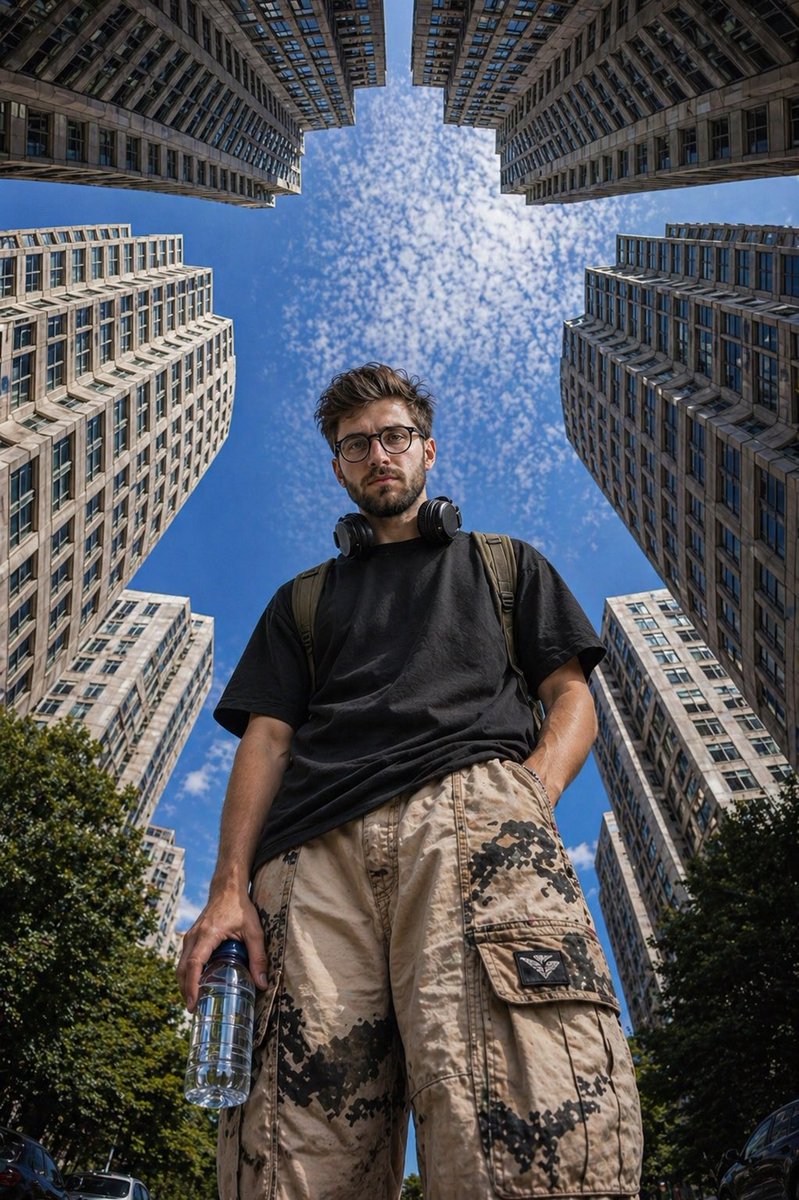
Urbane Straßenfotografie aus der Froschperspektive
Eine Streetfotografie-Aufforderung aus der Froschperspektive, die einen stilvollen Mann in einer modernen Stadtkulisse mit geometrischen Hochhausrahmen zeigt.
Dies ist ein GPT Image 2 -Prompt für Porträt & Charakter . Verwenden Sie den unten stehenden, kopierfertigen Prompt, um ähnliche Grafiken zu erstellen, und überprüfen Sie vor der Wiederverwendung Awesome GPT Image 2 Prompts -Quellenangaben sowie die kommerziellen Nutzungsrechte.
Free 1K preview
Generate one preview image instantly, no sign-up required.
Eingabeaufforderung
Kopierfertige Eingabeaufforderung
Ultra-realistic {argument name="angle" default="low-angle"} street photography of a {argument name="subject" default="young man standing confidently"} in the middle of a modern city, surrounded by tall symmetrical high-rise apartment buildings forming a geometric frame around the sky. Shot from ground level looking upward (worm’s-eye view), creating a powerful and dominant perspective.

The subject is a stylish young man with short curly hair and light facial hair, wearing {argument name="outfit" default="yellow-tinted rectangular sunglasses, a plain black oversized t-shirt, beige cargo pants with subtle camo patches"}, and carrying a transparent water bottle in one hand. Black headphones rest around his neck, and a backpack strap is visible on his shoulders.

Expression calm and slightly serious, looking directly into the camera.

Background: bright blue sky with scattered soft clouds, buildings converging inward creating strong leading lines and symmetry. Urban residential towers with repeating windows and light concrete tones.

Lighting: natural daylight, crisp shadows, high contrast, sharp details, HDR look.

Composition: centered subject, vertical framing, strong perspective distortion from wide-angle lens (24mm or wider), cinematic depth.

Style: fashion editorial meets urban realism, ultra-detailed, 8k, sharp focus, realistic skin texture, high dynamic range.
Eingabeaufforderungsvariablen
In der Eingabeaufforderung befinden sich bearbeitbare Argumentplatzhalter mit ihren Standardwerten.
Best for
- - Porträt & Charakter visual exploration
- - Image generation and reference-image edits
- - Reusable briefs that keep source attribution visible
Change these parts
- - Subject, product, character, or scene
- - Aspect ratio, camera, lighting, and background
- - Brand, text, color, and output constraints
Recommended model and settings
- - Model: gpt-image-2
- - Input mode: Text zu Bild
- - Aspect ratio: source
- - Commercial status: review original source
How to use this prompt
- 1. Copy the prompt and preserve its structure for the first test.
- 2. Replace the subject, context, and publishing channel.
- 3. Change one camera, lighting, or style variable per iteration.
- 4. Inspect the output, source, text, and rights before reuse.
Limitations, source, and reuse cautions
- - Generated output is an editable draft, not factual, legal, or rights evidence.
- - Review the linked source, people, brands, logos, text, and third-party media before commercial use.
Weitere Fälle in dieser Kategorie
Priorisiert nach Kategorie, Kompatibilität der Eingabemodi, Qualität und geringerem Risiko.






Hinweise zur Wiederverwendung und Quellenangabe
Verwenden Sie diese Eingabeaufforderung sicher, nachdem Sie den Fall in der Vorschau angezeigt haben.
- 1.Kopieren Sie die Eingabeaufforderung oder öffnen Sie sie direkt in Dovoo mit der Schaltfläche „Generieren“.
- 2.Passen Sie Variablen, Seitenverhältnis und Referenzbilder an Ihren Anwendungsfall an.
- 3.Vor der Veröffentlichung oder kostenpflichtigen Nutzung sollten Sie die Rechte an der Quelle, die Anforderungen an die Namensnennung sowie die Risiken für die Marke oder das Abbild prüfen.