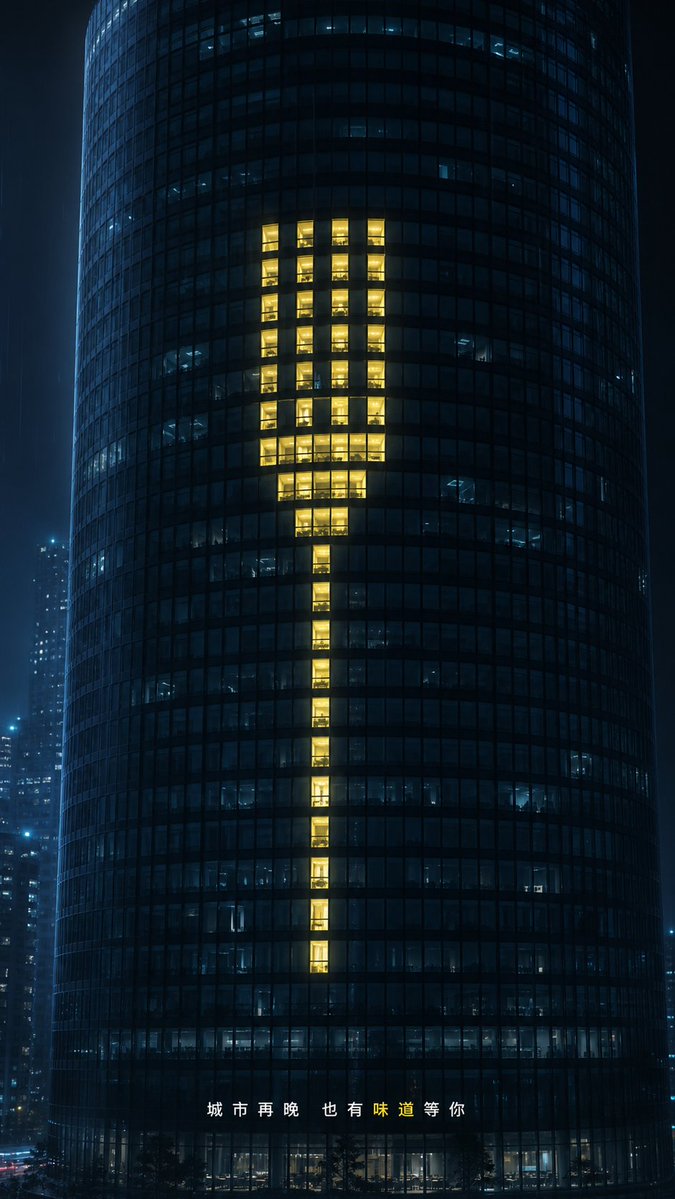
Glowing Exclamation Skyscraper
A cinematic night city ad visual where lit office windows form a warm exclamation mark on a dark glass tower.
Dies ist ein GPT Image 2 -Prompt für Innenarchitektur . Verwenden Sie den unten stehenden, kopierfertigen Prompt, um ähnliche Grafiken zu erstellen, und überprüfen Sie vor der Wiederverwendung Awesome GPT Image 2 Prompts -Quellenangaben sowie die kommerziellen Nutzungsrechte.
Benötigen Sie den vollständigen Prompt-Satz? Verwenden Sie den Innenarchitektur Weitere verwandte Beispiele finden Sie im Themen-Hub oder öffnen Sie die GPT Image 2 Prompt-Katalog für das vollständige Beispielverzeichnis, wiederverwendbare Strukturen und Quellenangaben.
Free 1K preview
Generate one preview image instantly, no sign-up required.
1620/4000
Eingabeaufforderung
Kopierfertige Eingabeaufforderung
Create a cinematic nighttime commercial visual, with the background being a dark cylindrical glass office skyscraper located in a blue-black city in the rain. The tower fills the vertical frame, shot from the front with a slight telephoto compression, its curved facade composed of dense square small windows. Most windows are closed or dimly lit in a cold blue hue, with glimpses of the interior office scenes. In the center of the tower, create 60 warm golden yellow glowing windows arranged in the shape of a giant minimalist fork: with 4 slender parallel tines at the top, a compact wider neck below, and a narrow elongated handle extending downwards. The glowing windows should present a realistic sense of people working inside, rather than a flat graphic overlay, requiring warm interior lighting, reflections, and subtle highlights and shadows. Add out-of-focus distant skyscrapers on either side to create a slight rainy mist, a moist city atmosphere, and a restrained luxury advertising aesthetic. At the bottom center, place spaced Chinese text {argument name="bottom caption" default="The city, no matter how late, always has a flavor waiting for you."}, with the character “味” highlighted in warm yellow and the rest of the text in white. Use {argument name="building type" default="9:16"}, {argument name="window symbol" default="Fork"}, {argument name="accent light color" default="Warm golden yellow"}, and {argument name="city mood" default="Quiet rainy night at midnight"}. 9:16 vertical composition, photorealistic, high contrast, elegant, minimalist, no Logo, no extra text, no one in the foreground.Eingabeaufforderungsvariablen
In der Eingabeaufforderung befinden sich bearbeitbare Argumentplatzhalter mit ihren Standardwerten.
Variable
bottom caption
Standard
The city, no matter how late, always has a flavor waiting for you.
Variable
building type
Standard
9:16
Variable
window symbol
Standard
Fork
Variable
accent light color
Standard
Warm golden yellow
Variable
city mood
Standard
Quiet rainy night at midnight
Best for
- - Innenarchitektur visual exploration
- - Image generation and reference-image edits
- - Reusable briefs that keep source attribution visible
Change these parts
- - Subject, product, character, or scene
- - Aspect ratio, camera, lighting, and background
- - Brand, text, color, and output constraints
Recommended model and settings
- - Model: gpt-image-2
- - Input mode: Text zu Bild
- - Aspect ratio: source
- - Commercial status: review original source
How to use this prompt
- 1. Copy the prompt and preserve its structure for the first test.
- 2. Replace the subject, context, and publishing channel.
- 3. Change one camera, lighting, or style variable per iteration.
- 4. Inspect the output, source, text, and rights before reuse.
Limitations, source, and reuse cautions
- - Generated output is an editable draft, not factual, legal, or rights evidence.
- - Review the linked source, people, brands, logos, text, and third-party media before commercial use.
Importiert von Awesome GPT Image 2 Prompts . Quellenangabe erforderlich. Status der kommerziellen Nutzung: allowed ; Rechte an der Quelle vor kostenpflichtiger Nutzung prüfen.
Weitere Fälle in dieser Kategorie
Priorisiert nach Kategorie, Kompatibilität der Eingabemodi, Qualität und geringerem Risiko.

Female Clown Cyborg Portrait
Text zu Bild

Fashion Studio Portrait with Blue Rim Lighting
Text zu Bild

Transparent Earbuds on Stone Pedestal
Text zu Bild

Imperial Research Bunker on Volcanic Planet
Text zu Bild

Greyscale Puzzle Portrait with Color Accent
Text zu Bild

Spring Editorial Fashion Collage
Text zu Bild
Hinweise zur Wiederverwendung und Quellenangabe
Verwenden Sie diese Eingabeaufforderung sicher, nachdem Sie den Fall in der Vorschau angezeigt haben.
- 1.Kopieren Sie die Eingabeaufforderung oder öffnen Sie sie direkt in Dovoo mit der Schaltfläche „Generieren“.
- 2.Passen Sie Variablen, Seitenverhältnis und Referenzbilder an Ihren Anwendungsfall an.
- 3.Vor der Veröffentlichung oder kostenpflichtigen Nutzung sollten Sie die Rechte an der Quelle, die Anforderungen an die Namensnennung sowie die Risiken für die Marke oder das Abbild prüfen.