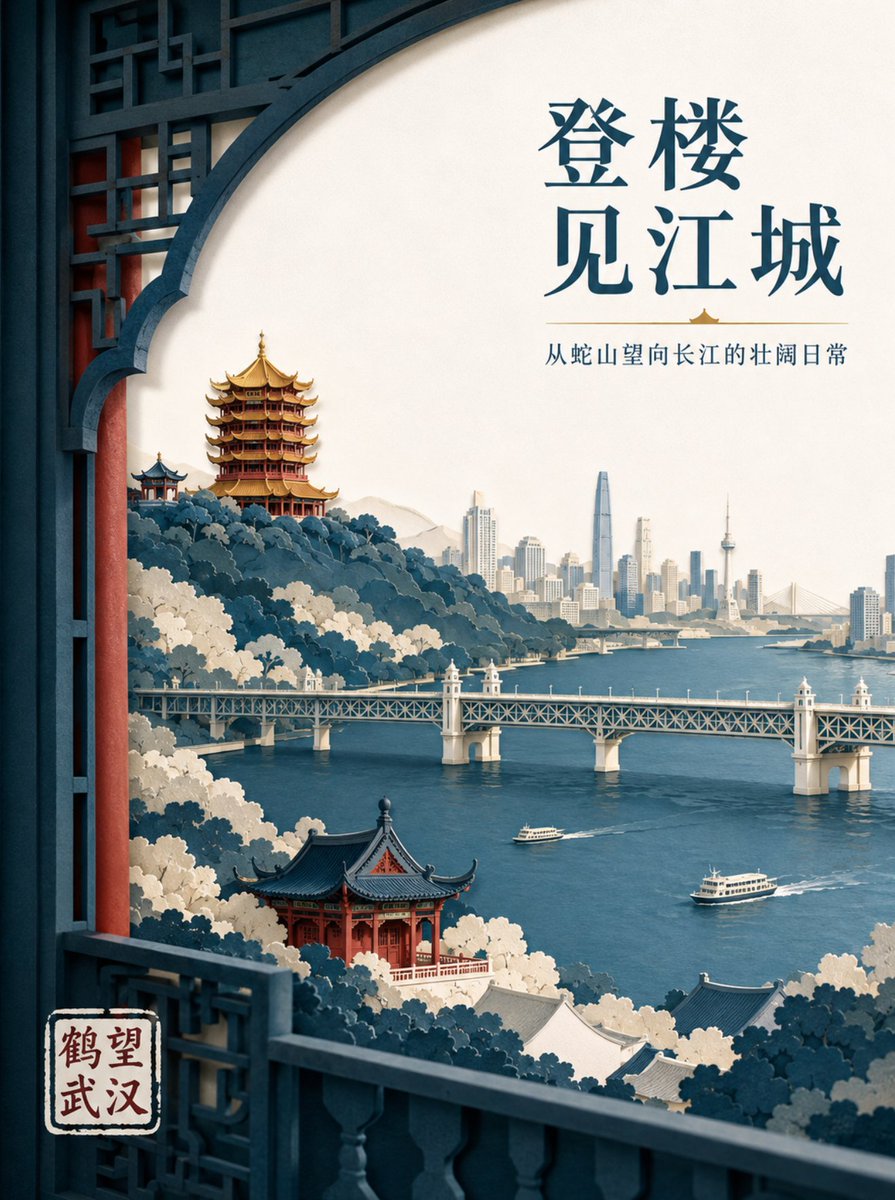
Wuhan Paper Cut Illustration Poster
A sophisticated prompt for creating layered paper-cut style posters featuring Wuhan's iconic landmarks with professional layout and lighting.
Dies ist ein GPT Image 2 -Prompt für Grafik & Poster . Verwenden Sie den unten stehenden, kopierfertigen Prompt, um ähnliche Grafiken zu erstellen, und überprüfen Sie vor der Wiederverwendung Awesome GPT Image 2 Prompts -Quellenangaben sowie die kommerziellen Nutzungsrechte.
Benötigen Sie den vollständigen Prompt-Satz? Verwenden Sie den Grafik & Poster Weitere verwandte Beispiele finden Sie im Themen-Hub oder öffnen Sie die GPT Image 2 Prompt-Katalog für das vollständige Beispielverzeichnis, wiederverwendbare Strukturen und Quellenangaben.
Free 1K preview
Generate one preview image instantly, no sign-up required.
1346/4000
Eingabeaufforderung
Kopierfertige Eingabeaufforderung
Create a high-end layered paper-cut illustration poster for the tourism brand "{argument name="brand name" default="He Wang Wuhan"}" with the theme "{argument name="theme" default="Looking at the river from the tower, seeing the landscape skeleton of Wuhan at a glance"}" in 3:4 vertical format. The composition uses a foreground window framing, with five to seven layers of thick textured paper forming Snake Hill, the Yellow Crane Tower, the Yangtze River, the Wuhan Yangtze River Bridge, and the city skyline on the opposite bank. The Yellow Crane Tower is located on the ridge in the background, with accurate relationships between layered eaves, golden glazed tiles, and vermilion pillars. The Yangtze River Bridge extends horizontally in the middle ground, with two small ferries on the river in controlled scale. The paper edges are sharp, with uniform soft lighting from the top left and realistic shadows between layers. Colors are indigo, warm off-white, cinnabar red, and a small amount of gilded gold for visual focus. The main title "{argument name="main title" default="Seeing the River City from the Tower"}" is placed in the large white space at the top right in two lines of modern Song typeface. The brand name "He Wang Wuhan" is placed at the bottom left in a paper seal format, keeping it modern rather than imitation antique.Eingabeaufforderungsvariablen
In der Eingabeaufforderung befinden sich bearbeitbare Argumentplatzhalter mit ihren Standardwerten.
Variable
brand name
Standard
He Wang Wuhan
Variable
theme
Standard
Looking at the river from the tower, seeing the landscape skeleton of Wuhan at a glance
Variable
main title
Standard
Seeing the River City from the Tower
Best for
- - Grafik & Poster visual exploration
- - Image generation and reference-image edits
- - Reusable briefs that keep source attribution visible
Change these parts
- - Subject, product, character, or scene
- - Aspect ratio, camera, lighting, and background
- - Brand, text, color, and output constraints
Recommended model and settings
- - Model: gpt-image-2
- - Input mode: Text zu Bild
- - Aspect ratio: source
- - Commercial status: review original source
How to use this prompt
- 1. Copy the prompt and preserve its structure for the first test.
- 2. Replace the subject, context, and publishing channel.
- 3. Change one camera, lighting, or style variable per iteration.
- 4. Inspect the output, source, text, and rights before reuse.
Limitations, source, and reuse cautions
- - Generated output is an editable draft, not factual, legal, or rights evidence.
- - Review the linked source, people, brands, logos, text, and third-party media before commercial use.
Importiert von Awesome GPT Image 2 Prompts . Quellenangabe erforderlich. Status der kommerziellen Nutzung: allowed ; Rechte an der Quelle vor kostenpflichtiger Nutzung prüfen.
Weitere Fälle in dieser Kategorie
Priorisiert nach Kategorie, Kompatibilität der Eingabemodi, Qualität und geringerem Risiko.






Hinweise zur Wiederverwendung und Quellenangabe
Verwenden Sie diese Eingabeaufforderung sicher, nachdem Sie den Fall in der Vorschau angezeigt haben.
- 1.Kopieren Sie die Eingabeaufforderung oder öffnen Sie sie direkt in Dovoo mit der Schaltfläche „Generieren“.
- 2.Passen Sie Variablen, Seitenverhältnis und Referenzbilder an Ihren Anwendungsfall an.
- 3.Vor der Veröffentlichung oder kostenpflichtigen Nutzung sollten Sie die Rechte an der Quelle, die Anforderungen an die Namensnennung sowie die Risiken für die Marke oder das Abbild prüfen.