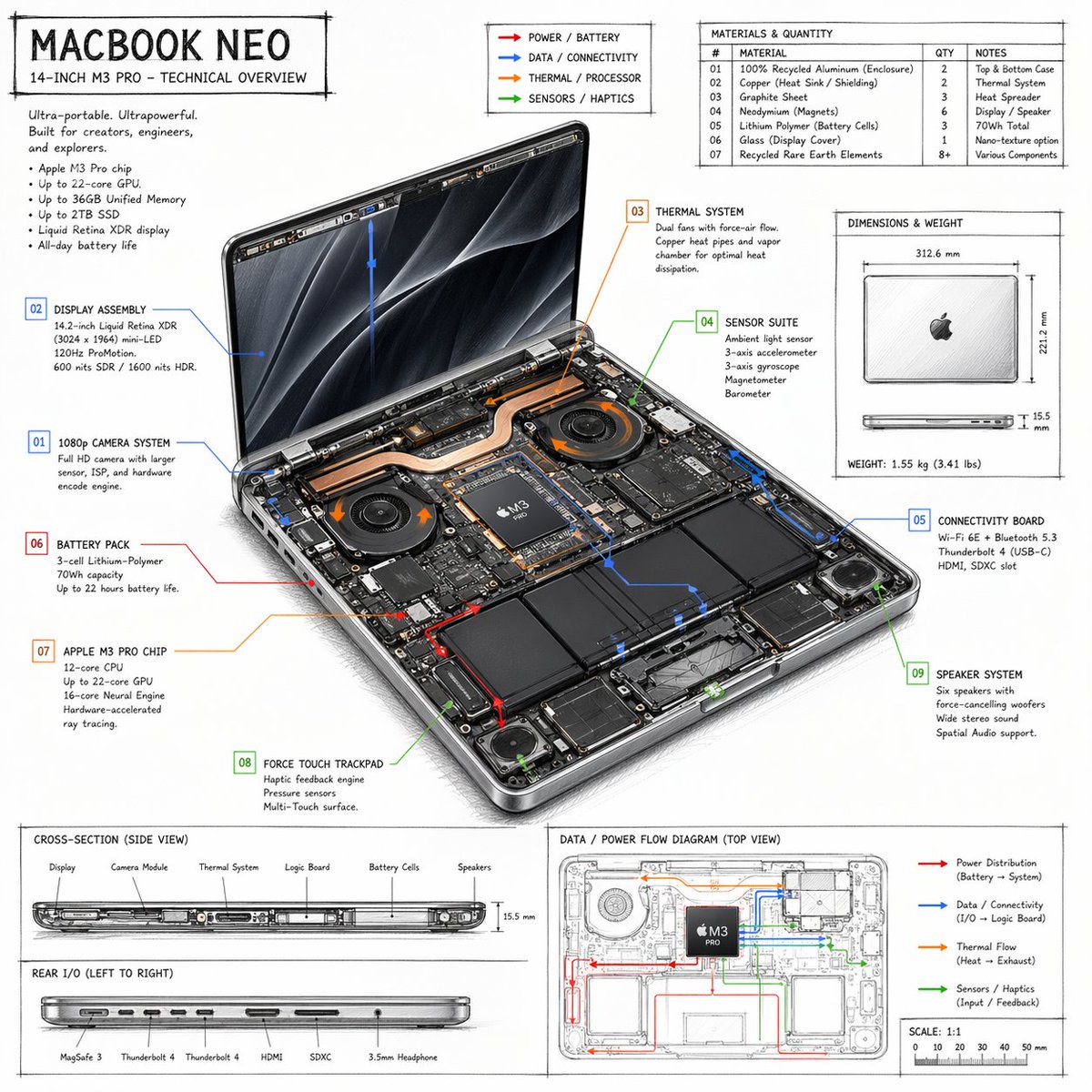
Infografik: Technischer Überblick über Laptops
Ein detailliertes, handgezeichnetes technisches Datenblatt für einen Laptop mit Auflistung der internen Komponenten, Materialtabellen und Flussdiagrammen.
Dies ist ein GPT Image 2 -Prompt für Grafik & Poster . Verwenden Sie den unten stehenden, kopierfertigen Prompt, um ähnliche Grafiken zu erstellen, und überprüfen Sie vor der Wiederverwendung Awesome GPT Image 2 Prompts -Quellenangaben sowie die kommerziellen Nutzungsrechte.
Benötigen Sie den vollständigen Prompt-Satz? Verwenden Sie den Grafik & Poster Weitere verwandte Beispiele finden Sie im Themen-Hub oder öffnen Sie die GPT Image 2 Prompt-Katalog für das vollständige Beispielverzeichnis, wiederverwendbare Strukturen und Quellenangaben.
Free 1K preview
Generate one preview image instantly, no sign-up required.
2331/4000
Eingabeaufforderung
Kopierfertige Eingabeaufforderung
{
  "type": "technical overview infographic",
  "style": "{argument name=\"visual style\" default=\"hand-drawn technical sketch with clean typography\"}",
  "product": {
    "name": "{argument name=\"product name\" default=\"MACBOOK NEO\"}",
    "subtitle": "14-INCH {argument name=\"processor model\" default=\"M3 PRO\"} - TECHNICAL OVERVIEW"
  },
  "layout": {
    "centerpiece": {
      "description": "isometric view of an opened laptop revealing internal hardware components like dual fans, copper heat pipes, battery cells, and logic board",
      "callouts_count": 9,
      "callout_labels": [
        "01 1080p CAMERA SYSTEM",
        "02 DISPLAY ASSEMBLY",
        "03 THERMAL SYSTEM",
        "04 SENSOR SUITE",
        "05 CONNECTIVITY BOARD",
        "06 BATTERY PACK",
        "07 {argument name=\"main component\" default=\"APPLE M3 PRO CHIP\"}",
        "08 FORCE TOUCH TRACKPAD",
        "09 SPEAKER SYSTEM"
      ]
    },
    "sections": [
      {
        "title": "Header Text",
        "position": "top-left",
        "content": "Marketing blurb and 5-bullet specification list"
      },
      {
        "title": "Legend",
        "position": "top-center",
        "content": "4 color-coded arrows indicating {argument name=\"accent colors\" default=\"red, blue, orange, green\"} flow lines for Power, Data, Thermal, and Sensors"
      },
      {
        "title": "MATERIALS & QUANTITY",
        "position": "top-right",
        "type": "table",
        "rows_count": 7,
        "columns": [
          "#",
          "MATERIAL",
          "QTY",
          "NOTES"
        ]
      },
      {
        "title": "DIMENSIONS & WEIGHT",
        "position": "mid-right",
        "content": "Top and side views of closed laptop with measurements"
      },
      {
        "title": "CROSS-SECTION (SIDE VIEW)",
        "position": "bottom-left (top half)",
        "content": "Side profile showing internal component layout with 6 labels"
      },
      {
        "title": "REAR I/O (LEFT TO RIGHT)",
        "position": "bottom-left (bottom half)",
        "content": "Side profile showing 6 ports"
      },
      {
        "title": "DATA / POWER FLOW DIAGRAM (TOP VIEW)",
        "position": "bottom-right",
        "content": "Wireframe top-down view with colored flow lines, legend, and scale bar"
      }
    ]
  }
}
Eingabeaufforderungsvariablen
In der Eingabeaufforderung befinden sich bearbeitbare Argumentplatzhalter mit ihren Standardwerten.
Variable
visual style
Standard
hand-drawn technical sketch with clean typography
Variable
product name
Standard
MACBOOK NEO
Variable
processor model
Standard
M3 PRO
Variable
main component
Standard
APPLE M3 PRO CHIP
Variable
accent colors
Standard
red, blue, orange, green
Best for
- - Grafik & Poster visual exploration
- - Image generation and reference-image edits
- - Reusable briefs that keep source attribution visible
Change these parts
- - Subject, product, character, or scene
- - Aspect ratio, camera, lighting, and background
- - Brand, text, color, and output constraints
Recommended model and settings
- - Model: gpt-image-2
- - Input mode: Text zu Bild
- - Aspect ratio: source
- - Commercial status: review original source
How to use this prompt
- 1. Copy the prompt and preserve its structure for the first test.
- 2. Replace the subject, context, and publishing channel.
- 3. Change one camera, lighting, or style variable per iteration.
- 4. Inspect the output, source, text, and rights before reuse.
Limitations, source, and reuse cautions
- - Generated output is an editable draft, not factual, legal, or rights evidence.
- - Review the linked source, people, brands, logos, text, and third-party media before commercial use.
Importiert von Awesome GPT Image 2 Prompts . Quellenangabe erforderlich. Status der kommerziellen Nutzung: allowed ; Rechte an der Quelle vor kostenpflichtiger Nutzung prüfen.
Weitere Fälle in dieser Kategorie
Priorisiert nach Kategorie, Kompatibilität der Eingabemodi, Qualität und geringerem Risiko.






Hinweise zur Wiederverwendung und Quellenangabe
Verwenden Sie diese Eingabeaufforderung sicher, nachdem Sie den Fall in der Vorschau angezeigt haben.
- 1.Kopieren Sie die Eingabeaufforderung oder öffnen Sie sie direkt in Dovoo mit der Schaltfläche „Generieren“.
- 2.Passen Sie Variablen, Seitenverhältnis und Referenzbilder an Ihren Anwendungsfall an.
- 3.Vor der Veröffentlichung oder kostenpflichtigen Nutzung sollten Sie die Rechte an der Quelle, die Anforderungen an die Namensnennung sowie die Risiken für die Marke oder das Abbild prüfen.