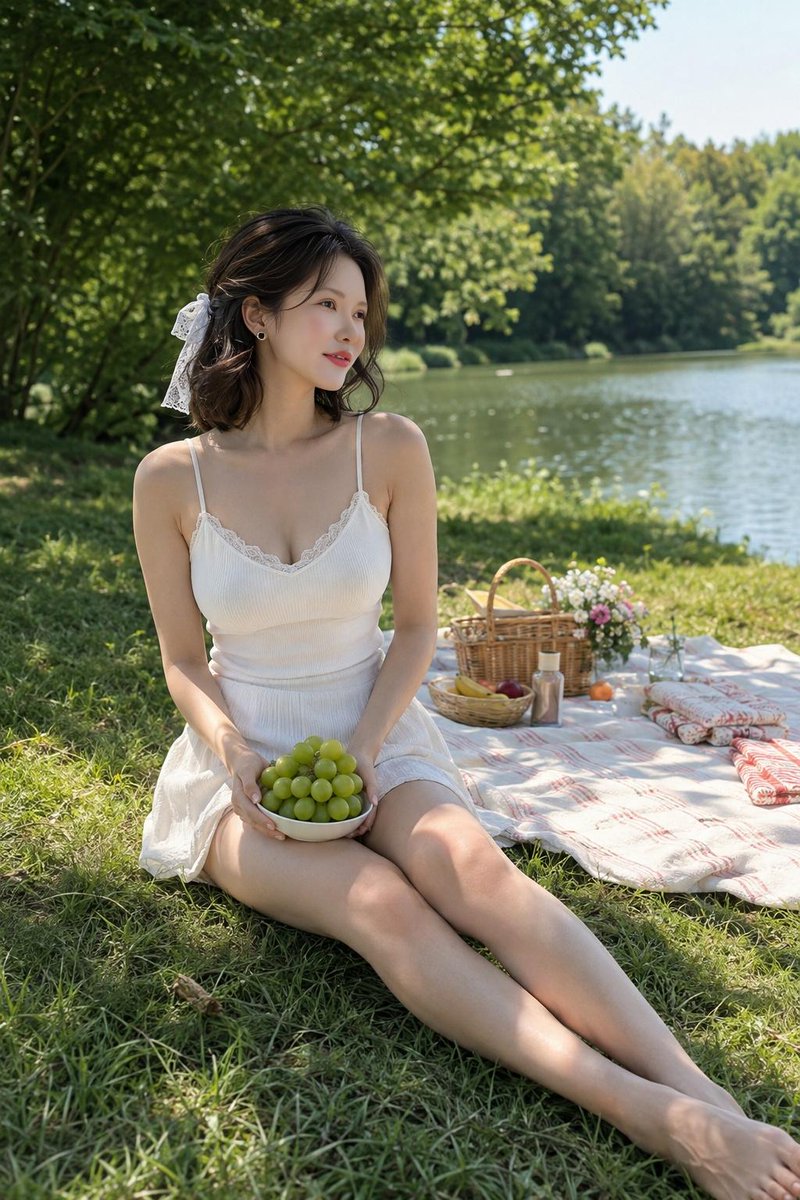
Lakeside Afternoon Picnic Portrait
A photorealistic lifestyle portrait of a woman enjoying a peaceful summer picnic by a lake, useful for serene editorial or social media visuals.
Dies ist ein GPT Image 2 -Prompt für Porträt & Charakter . Verwenden Sie den unten stehenden, kopierfertigen Prompt, um ähnliche Grafiken zu erstellen, und überprüfen Sie vor der Wiederverwendung Awesome GPT Image 2 Prompts -Quellenangaben sowie die kommerziellen Nutzungsrechte.
Benötigen Sie den vollständigen Prompt-Satz? Verwenden Sie den Porträt & Charakter Weitere verwandte Beispiele finden Sie im Themen-Hub oder öffnen Sie die GPT Image 2 Prompt-Katalog für das vollständige Beispielverzeichnis, wiederverwendbare Strukturen und Quellenangaben.
Free 1K preview
Generate one preview image instantly, no sign-up required.
1661/4000
Eingabeaufforderung
Kopierfertige Eingabeaufforderung
Create a photorealistic vertical portrait of {argument name="character name" default="Anri"}, an elegant young Japanese woman relaxing during a quiet afternoon picnic beside a calm lake. She is seated barefoot on lush green grass in the left foreground with her legs extended diagonally toward the lower right, holding a white bowl filled with green grapes in both hands on her lap. She has soft shoulder-length dark brown wavy hair tied partly back with a large white lace ribbon bow, natural makeup, small earrings, and a gentle peaceful expression while gazing off to the left rather than at the camera. Her outfit is a summery {argument name="dress color" default="white"} sleeveless camisole dress with thin straps, delicate lace trim at the neckline, ribbed bodice texture, and a light airy skirt. The setting is a shaded lakeside park with dappled sunlight filtering through dense green trees overhead, a sparkling lake occupying the right background, and a forested far shore under a pale blue sky. Include exactly 8 distinct picnic props on a pale blanket with red stripe accents behind her: 1 woven wicker picnic basket with handles, 1 small bouquet of pink and white flowers, 1 round tray or shallow basket with bananas and red fruit, 1 small bottle, 1 orange fruit, 1 slender glass vase or cup, 1 folded patterned cushion or cloth roll, and 1 second folded patterned cushion or cloth roll. Use natural warm daylight, soft skin tones, shallow depth of field, realistic fabric and grass detail, subtle lens bokeh in the trees and water, relaxed wholesome mood, high-resolution lifestyle photography composition, no text, no watermark, no extra people.Eingabeaufforderungsvariablen
In der Eingabeaufforderung befinden sich bearbeitbare Argumentplatzhalter mit ihren Standardwerten.
Variable
character name
Standard
Anri
Variable
dress color
Standard
white
Best for
- - Porträt & Charakter visual exploration
- - Image generation and reference-image edits
- - Reusable briefs that keep source attribution visible
Change these parts
- - Subject, product, character, or scene
- - Aspect ratio, camera, lighting, and background
- - Brand, text, color, and output constraints
Recommended model and settings
- - Model: gpt-image-2
- - Input mode: Text zu Bild
- - Aspect ratio: source
- - Commercial status: review original source
How to use this prompt
- 1. Copy the prompt and preserve its structure for the first test.
- 2. Replace the subject, context, and publishing channel.
- 3. Change one camera, lighting, or style variable per iteration.
- 4. Inspect the output, source, text, and rights before reuse.
Limitations, source, and reuse cautions
- - Generated output is an editable draft, not factual, legal, or rights evidence.
- - Review the linked source, people, brands, logos, text, and third-party media before commercial use.
Importiert von Awesome GPT Image 2 Prompts . Quellenangabe erforderlich. Status der kommerziellen Nutzung: allowed ; Rechte an der Quelle vor kostenpflichtiger Nutzung prüfen.
Weitere Fälle in dieser Kategorie
Priorisiert nach Kategorie, Kompatibilität der Eingabemodi, Qualität und geringerem Risiko.






Hinweise zur Wiederverwendung und Quellenangabe
Verwenden Sie diese Eingabeaufforderung sicher, nachdem Sie den Fall in der Vorschau angezeigt haben.
- 1.Kopieren Sie die Eingabeaufforderung oder öffnen Sie sie direkt in Dovoo mit der Schaltfläche „Generieren“.
- 2.Passen Sie Variablen, Seitenverhältnis und Referenzbilder an Ihren Anwendungsfall an.
- 3.Vor der Veröffentlichung oder kostenpflichtigen Nutzung sollten Sie die Rechte an der Quelle, die Anforderungen an die Namensnennung sowie die Risiken für die Marke oder das Abbild prüfen.