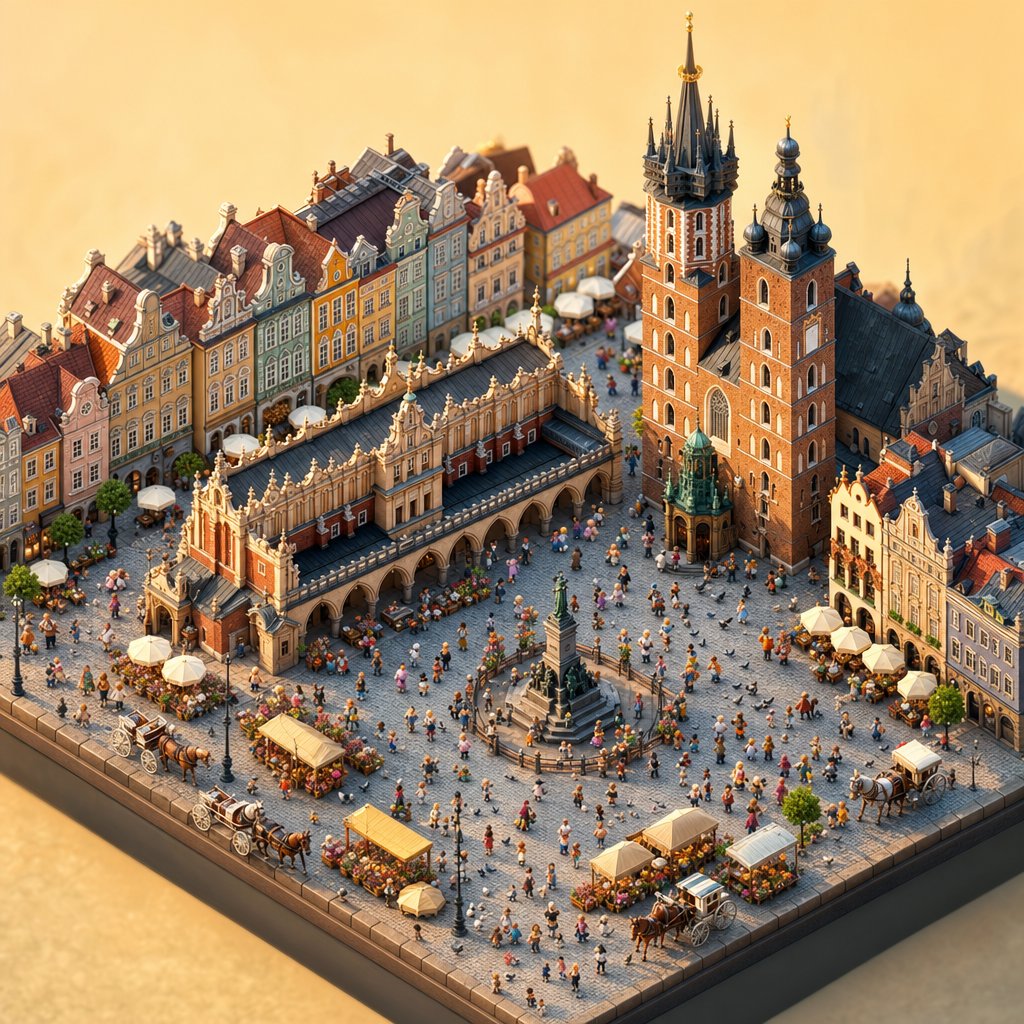
Isometrisches Diorama des Krakauer Marktplatzes
Eine detaillierte Text-zu-Bild-Anweisung zur Erstellung einer warmen Tilt-Shift-Miniatur eines historischen europäischen Stadtplatzes voller Sehenswürdigkeiten, Fußgänger, Stände und Kutschen.
Dies ist ein GPT Image 2 -Prompt für Innenarchitektur . Verwenden Sie den unten stehenden, kopierfertigen Prompt, um ähnliche Grafiken zu erstellen, und überprüfen Sie vor der Wiederverwendung Awesome GPT Image 2 Prompts -Quellenangaben sowie die kommerziellen Nutzungsrechte.
Free 1K preview
Generate one preview image instantly, no sign-up required.
Eingabeaufforderung
Kopierfertige Eingabeaufforderung
Create a highly detailed isometric miniature diorama of {argument name="city square" default="Krakow Main Market Square, Poland"} at warm golden lunch hour, viewed from above at a three-quarter angle like a handcrafted architectural model on a dark square display base. Show ornate European old-town architecture with pastel townhouses along the back and right edges, red tiled roofs, decorative gables, cobblestone paving, and soft shallow-depth-of-field lighting. The main landmarks should be a long Renaissance cloth hall with arcaded sides and an ornate roofline, plus a large brick Gothic basilica with exactly 2 unequal tall towers, dark spires, onion domes, and gilded details. In the open square include exactly 1 central stone monument with a standing statue, exactly 5 horse-drawn carriages, exactly 6 small market stalls or flower kiosks with pale yellow awnings, and exactly 7 white café umbrellas around outdoor seating. Fill the plaza with many tiny colorful pedestrians in summer clothing, clustered naturally around stalls, cafés, the monument, carriages, and church entrances. Use {argument name="visual style" default="ultra-detailed tilt-shift miniature, photorealistic 3D render"}, with warm sunlight, crisp shadows, rich brick and pastel colors, tiny flowers and greenery, and a charming lunch-time tourist atmosphere. Avoid readable signage, modern cars, oversized people, watermarks, or text overlays.Eingabeaufforderungsvariablen
In der Eingabeaufforderung befinden sich bearbeitbare Argumentplatzhalter mit ihren Standardwerten.
Best for
- - Innenarchitektur visual exploration
- - Image generation and reference-image edits
- - Reusable briefs that keep source attribution visible
Change these parts
- - Subject, product, character, or scene
- - Aspect ratio, camera, lighting, and background
- - Brand, text, color, and output constraints
Recommended model and settings
- - Model: gpt-image-2
- - Input mode: Text zu Bild
- - Aspect ratio: source
- - Commercial status: review original source
How to use this prompt
- 1. Copy the prompt and preserve its structure for the first test.
- 2. Replace the subject, context, and publishing channel.
- 3. Change one camera, lighting, or style variable per iteration.
- 4. Inspect the output, source, text, and rights before reuse.
Limitations, source, and reuse cautions
- - Generated output is an editable draft, not factual, legal, or rights evidence.
- - Review the linked source, people, brands, logos, text, and third-party media before commercial use.
Weitere Fälle in dieser Kategorie
Priorisiert nach Kategorie, Kompatibilität der Eingabemodi, Qualität und geringerem Risiko.






Hinweise zur Wiederverwendung und Quellenangabe
Verwenden Sie diese Eingabeaufforderung sicher, nachdem Sie den Fall in der Vorschau angezeigt haben.
- 1.Kopieren Sie die Eingabeaufforderung oder öffnen Sie sie direkt in Dovoo mit der Schaltfläche „Generieren“.
- 2.Passen Sie Variablen, Seitenverhältnis und Referenzbilder an Ihren Anwendungsfall an.
- 3.Vor der Veröffentlichung oder kostenpflichtigen Nutzung sollten Sie die Rechte an der Quelle, die Anforderungen an die Namensnennung sowie die Risiken für die Marke oder das Abbild prüfen.