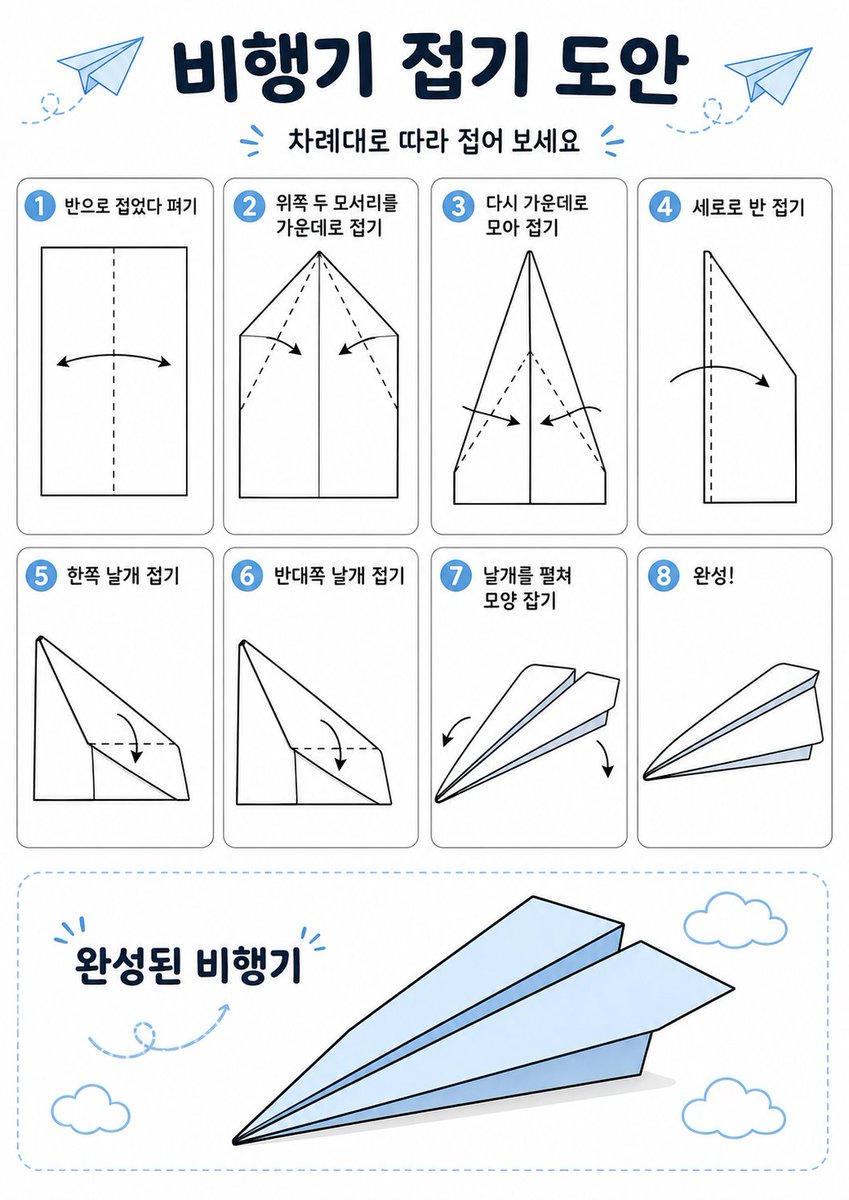
Koreanisches Papierflieger-Faltposter
Diese Aufforderung generiert eine übersichtliche Infografik in koreanischer Sprache mit einer Origami-Anleitung, die in 8 beschrifteten Schritten zeigt, wie man ein Papierflugzeug faltet.
Dies ist ein GPT Image 2 -Prompt für Grafik & Poster . Verwenden Sie den unten stehenden, kopierfertigen Prompt, um ähnliche Grafiken zu erstellen, und überprüfen Sie vor der Wiederverwendung Awesome GPT Image 2 Prompts -Quellenangaben sowie die kommerziellen Nutzungsrechte.
Free 1K preview
Generate one preview image instantly, no sign-up required.
Eingabeaufforderung
Kopierfertige Eingabeaufforderung
{
  "type": "origami instruction poster",
  "topic": "paper airplane folding guide",
  "language": "Korean",
  "style": {
    "overall": "clean educational infographic, simple vector line art, friendly classroom worksheet aesthetic",
    "palette": {
      "background": "white",
      "primary": "dark navy",
      "accent": "light sky blue",
      "line": "black",
      "shadow": "soft light gray"
    },
    "rendering": "flat 2D layout with crisp outlines and minimal shading"
  },
  "canvas": {
    "orientation": "portrait",
    "margin": "generous white margins"
  },
  "header": {
    "title": "{argument name=\"headline text\" default=\"비행기 접기 도안\"}",
    "subtitle": "{argument name=\"subtitle text\" default=\"차례대로 따라 접어 보세요\"}",
    "decorations": {
      "paper_airplanes": 2,
      "dashed_flight_paths": 2,
      "blue_accent_marks": 2
    }
  },
  "layout": {
    "grid": {
      "columns": 4,
      "rows": 2,
      "step_cards": 8
    },
    "sections": [
      {
        "title": "steps row 1",
        "position": "upper middle",
        "count": 4,
        "labels": [
          "1 반으로 접었다 펴기",
          "2 위쪽 두 모서리를 가운데로 접기",
          "3 다시 가운데로 모아 접기",
          "4 세로로 반 접기"
        ]
      },
      {
        "title": "steps row 2",
        "position": "middle",
        "count": 4,
        "labels": [
          "5 한쪽 날개 접기",
          "6 반대쪽 날개 접기",
          "7 날개를 펼쳐 모양 잡기",
          "8 완성!"
        ]
      },
      {
        "title": "finished airplane display",
        "position": "bottom",
        "count": 1,
        "labels": [
          "완성된 비행기"
        ]
      }
    ]
  },
  "step_cards": [
    {
      "step": 1,
      "badge": "1",
      "text": "반으로 접었다 펴기",
      "diagram": "vertical rectangle sheet with a centered vertical dashed fold line and a curved double-headed arrow indicating folding inward and reopening"
    },
    {
      "step": 2,
      "badge": "2",
      "text": "위쪽 두 모서리를 가운데로 접기",
      "diagram": "paper with pointed top, both upper corners folded to the center line, dashed diagonal guide lines, two inward arrows"
    },
    {
      "step": 3,
      "badge": "3",
      "text": "다시 가운데로 모아 접기",
      "diagram": "narrower pointed shape, side edges folded again toward the center line, dashed diagonal guides, two inward arrows near the lower middle"
    },
    {
      "step": 4,
      "badge": "4",
      "text": "세로로 반 접기",
      "diagram": "side-view folded shape with a vertical dashed center line and one large curved arrow showing the model folded in half lengthwise"
    },
    {
      "step": 5,
      "badge": "5",
      "text": "한쪽 날개 접기",
      "diagram": "triangular side-view airplane body with one wing folded downward, dashed horizontal guide near the top edge and a curved arrow"
    },
    {
      "step": 6,
      "badge": "6",
      "text": "반대쪽 날개 접기",
      "diagram": "same side-view as step 5, folding the opposite wing downward with matching dashed guide and curved arrow"
    },
    {
      "step": 7,
      "badge": "7",
      "text": "날개를 펼쳐 모양 잡기",
      "diagram": "3D paper airplane opening into shape, two curved arrows pointing downward and outward on each side"
    },
    {
      "step": 8,
      "badge": "8",
      "text": "완성!",
      "diagram": "completed paper airplane in simple perspective, light blue top faces, black outline, no arrows"
    }
  ],
  "bottom_panel": {
    "container": "large rounded rectangle with light blue dashed border",
    "label": "완성된 비행기",
    "main_object": "large completed paper airplane angled from lower left to upper right, pale blue surfaces with black outline and subtle gray shadow beneath",
    "decorations": {
      "clouds": 3,
      "swirl_arrow": 1
    }
  },
  "text_style": {
    "title": "bold rounded Korean display font in dark navy",
    "subtitle": "smaller bold Korean text",
    "step_labels": "bold black Korean text",
    "number_badges": "white numbers inside blue circles"
  }
}
Eingabeaufforderungsvariablen
In der Eingabeaufforderung befinden sich bearbeitbare Argumentplatzhalter mit ihren Standardwerten.
Best for
- - Grafik & Poster visual exploration
- - Image generation and reference-image edits
- - Reusable briefs that keep source attribution visible
Change these parts
- - Subject, product, character, or scene
- - Aspect ratio, camera, lighting, and background
- - Brand, text, color, and output constraints
Recommended model and settings
- - Model: gpt-image-2
- - Input mode: Text zu Bild
- - Aspect ratio: source
- - Commercial status: review original source
How to use this prompt
- 1. Copy the prompt and preserve its structure for the first test.
- 2. Replace the subject, context, and publishing channel.
- 3. Change one camera, lighting, or style variable per iteration.
- 4. Inspect the output, source, text, and rights before reuse.
Limitations, source, and reuse cautions
- - Generated output is an editable draft, not factual, legal, or rights evidence.
- - Review the linked source, people, brands, logos, text, and third-party media before commercial use.
Weitere Fälle in dieser Kategorie
Priorisiert nach Kategorie, Kompatibilität der Eingabemodi, Qualität und geringerem Risiko.






Hinweise zur Wiederverwendung und Quellenangabe
Verwenden Sie diese Eingabeaufforderung sicher, nachdem Sie den Fall in der Vorschau angezeigt haben.
- 1.Kopieren Sie die Eingabeaufforderung oder öffnen Sie sie direkt in Dovoo mit der Schaltfläche „Generieren“.
- 2.Passen Sie Variablen, Seitenverhältnis und Referenzbilder an Ihren Anwendungsfall an.
- 3.Vor der Veröffentlichung oder kostenpflichtigen Nutzung sollten Sie die Rechte an der Quelle, die Anforderungen an die Namensnennung sowie die Risiken für die Marke oder das Abbild prüfen.