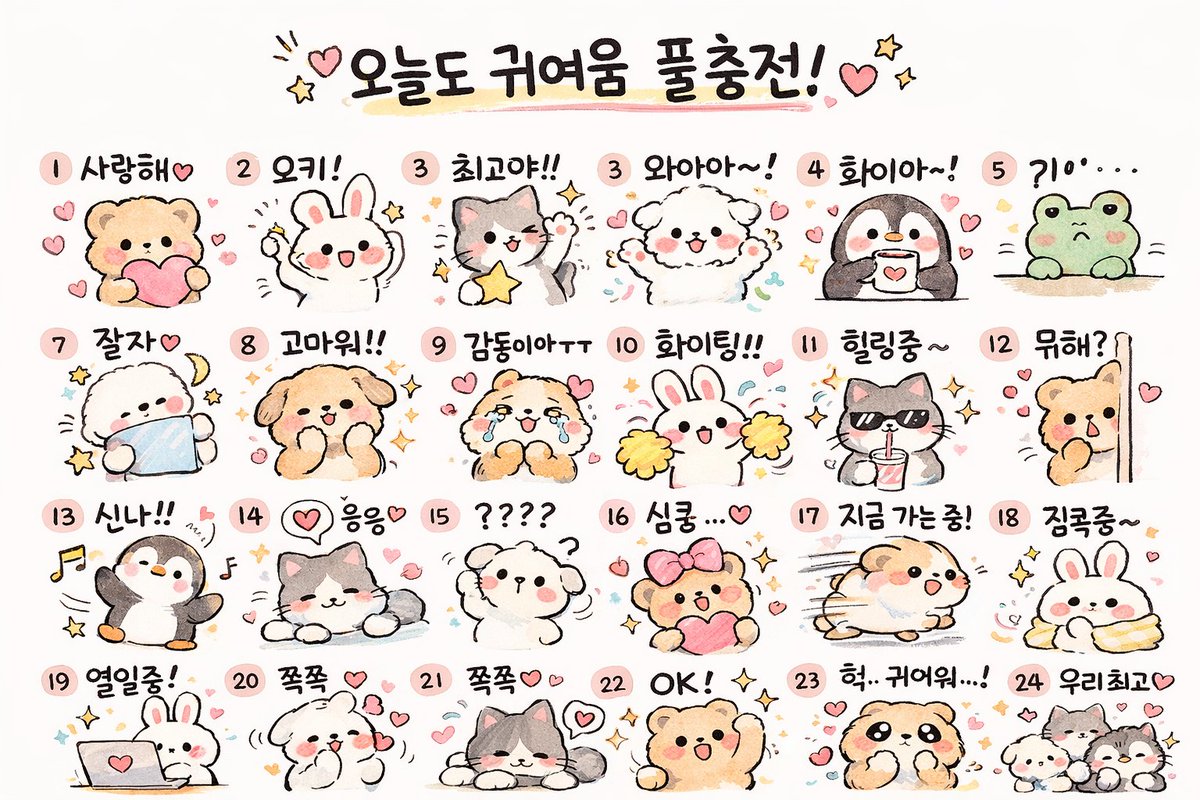
Kawaii-Tier-Stickerbogen-Generator
Erzeugt ein Raster aus 24 niedlichen, handgezeichneten Tieraufklebern mit individuellen Textbeschriftungen, ideal für Mockups von Messaging-Apps oder Planer-Vorlagen zum Ausdrucken.
Dies ist ein GPT Image 2 -Prompt für Illustration & Kunst . Verwenden Sie den unten stehenden, kopierfertigen Prompt, um ähnliche Grafiken zu erstellen, und überprüfen Sie vor der Wiederverwendung Awesome GPT Image 2 Prompts -Quellenangaben sowie die kommerziellen Nutzungsrechte.
Free 1K preview
Generate one preview image instantly, no sign-up required.
Eingabeaufforderung
Kopierfertige Eingabeaufforderung
{
  "type": "kawaii animal sticker sheet",
  "style": "{argument name=\"art style\" default=\"hand-drawn watercolor and colored pencil texture, pastel colors, cute, simple outlines\"}",
  "header": {
    "text": "{argument name=\"header text\" default=\"오늘도 귀여움 풀충전!\"}",
    "decorations": "hearts and stars"
  },
  "layout": {
    "grid": "4 rows by 6 columns",
    "total_stickers": 24
  },
  "stickers": [
    {
      "id": "1",
      "animal": "bear holding a pink heart",
      "label": "사랑해♡"
    },
    {
      "id": "2",
      "animal": "white rabbit cheering",
      "label": "오키!"
    },
    {
      "id": "3",
      "animal": "gray and white cat holding a yellow star",
      "label": "최고야!!"
    },
    {
      "id": "4",
      "animal": "fluffy white dog cheering",
      "label": "와아아~!"
    },
    {
      "id": "5",
      "animal": "penguin holding a coffee mug",
      "label": "화이아~!"
    },
    {
      "id": "6",
      "animal": "green frog peeking over an edge",
      "label": "?10'..."
    },
    {
      "id": "7",
      "animal": "fluffy white dog sleeping with a crescent moon",
      "label": "잘자♡"
    },
    {
      "id": "8",
      "animal": "brown dog smiling with sparkles",
      "label": "고마워!!"
    },
    {
      "id": "9",
      "animal": "crying brown bear",
      "label": "감동이야ㅜㅜ"
    },
    {
      "id": "10",
      "animal": "white rabbit with yellow cheerleader pom-poms",
      "label": "화이팅!!"
    },
    {
      "id": "11",
      "animal": "gray cat wearing sunglasses and drinking from a cup",
      "label": "힐링중~"
    },
    {
      "id": "12",
      "animal": "brown bear peeking from behind a wall",
      "label": "뭐해?"
    },
    {
      "id": "13",
      "animal": "penguin dancing with music notes",
      "label": "신나!!"
    },
    {
      "id": "14",
      "animal": "gray and white cat lying down relaxed",
      "label": "응응♡"
    },
    {
      "id": "15",
      "animal": "confused fluffy white dog with question marks",
      "label": "????"
    },
    {
      "id": "16",
      "animal": "brown bear with a pink hair bow holding a heart",
      "label": "심쿵...♡"
    },
    {
      "id": "17",
      "animal": "hamster running fast with motion lines",
      "label": "지금 가는중!"
    },
    {
      "id": "18",
      "animal": "white rabbit wrapped snugly in a yellow blanket",
      "label": "집콕중~"
    },
    {
      "id": "19",
      "animal": "white rabbit typing on a laptop",
      "label": "열일중!"
    },
    {
      "id": "20",
      "animal": "fluffy white dog blowing kisses",
      "label": "쪽쪽 ♡"
    },
    {
      "id": "21",
      "animal": "gray and white cat lying down with hearts",
      "label": "쪽쪽♡♡"
    },
    {
      "id": "22",
      "animal": "brown bear cheering with one arm up",
      "label": "OK! ✧"
    },
    {
      "id": "23",
      "animal": "brown dog looking shocked",
      "label": "헉.. 귀여워...!"
    },
    {
      "id": "24",
      "animal": "group of three small animals",
      "label": "우리최고♡"
    }
  ]
}
Eingabeaufforderungsvariablen
In der Eingabeaufforderung befinden sich bearbeitbare Argumentplatzhalter mit ihren Standardwerten.
Best for
- - Illustration & Kunst visual exploration
- - Image generation and reference-image edits
- - Reusable briefs that keep source attribution visible
Change these parts
- - Subject, product, character, or scene
- - Aspect ratio, camera, lighting, and background
- - Brand, text, color, and output constraints
Recommended model and settings
- - Model: gpt-image-2
- - Input mode: Text zu Bild
- - Aspect ratio: source
- - Commercial status: review original source
How to use this prompt
- 1. Copy the prompt and preserve its structure for the first test.
- 2. Replace the subject, context, and publishing channel.
- 3. Change one camera, lighting, or style variable per iteration.
- 4. Inspect the output, source, text, and rights before reuse.
Limitations, source, and reuse cautions
- - Generated output is an editable draft, not factual, legal, or rights evidence.
- - Review the linked source, people, brands, logos, text, and third-party media before commercial use.
Weitere Fälle in dieser Kategorie
Priorisiert nach Kategorie, Kompatibilität der Eingabemodi, Qualität und geringerem Risiko.






Hinweise zur Wiederverwendung und Quellenangabe
Verwenden Sie diese Eingabeaufforderung sicher, nachdem Sie den Fall in der Vorschau angezeigt haben.
- 1.Kopieren Sie die Eingabeaufforderung oder öffnen Sie sie direkt in Dovoo mit der Schaltfläche „Generieren“.
- 2.Passen Sie Variablen, Seitenverhältnis und Referenzbilder an Ihren Anwendungsfall an.
- 3.Vor der Veröffentlichung oder kostenpflichtigen Nutzung sollten Sie die Rechte an der Quelle, die Anforderungen an die Namensnennung sowie die Risiken für die Marke oder das Abbild prüfen.