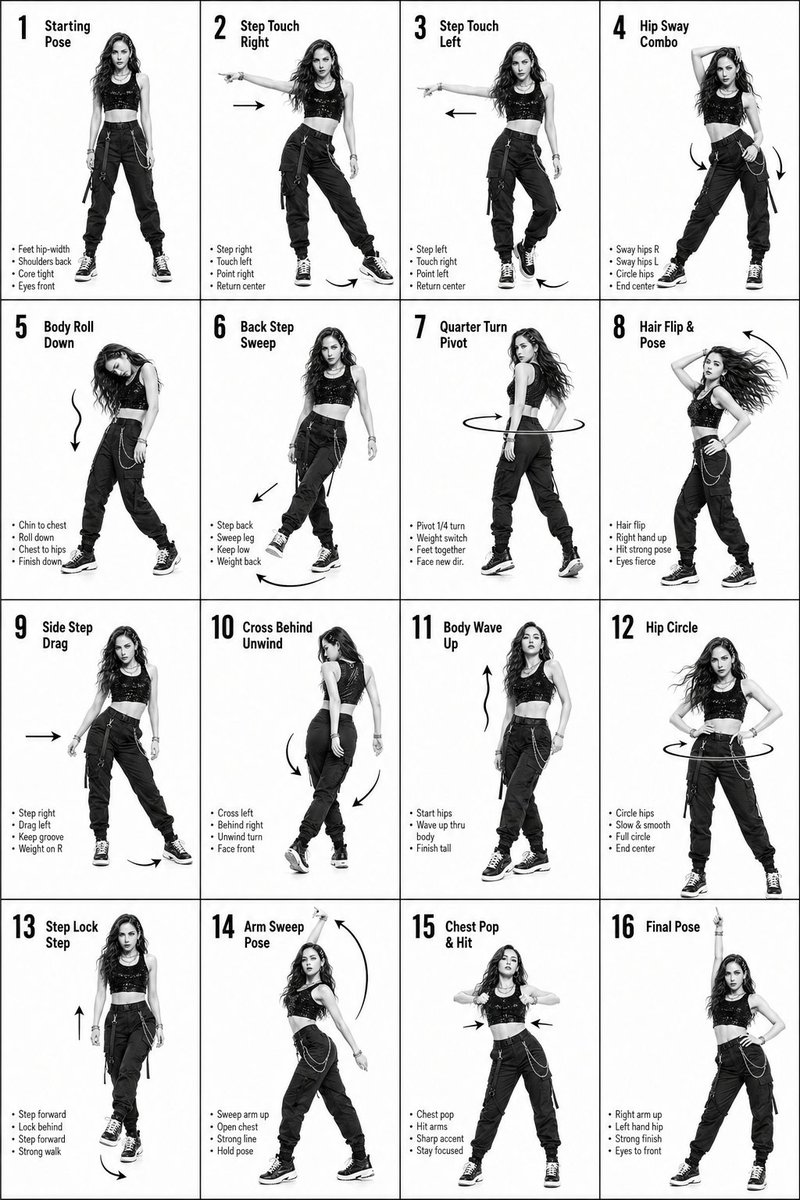
K-Pop-Tanzanleitung mit 16 Schritten
Eine detaillierte Anleitung in Form eines Rasters zur Erstellung einer 4x4-Anleitung, die Tanzschritte mit Bewegungspfeilen und Textbeschriftungen zeigt.
Dies ist ein GPT Image 2 -Prompt für Grafik & Poster . Verwenden Sie den unten stehenden, kopierfertigen Prompt, um ähnliche Grafiken zu erstellen, und überprüfen Sie vor der Wiederverwendung Awesome GPT Image 2 Prompts -Quellenangaben sowie die kommerziellen Nutzungsrechte.
Benötigen Sie den vollständigen Prompt-Satz? Verwenden Sie den Grafik & Poster Weitere verwandte Beispiele finden Sie im Themen-Hub oder öffnen Sie die GPT Image 2 Prompt-Katalog für das vollständige Beispielverzeichnis, wiederverwendbare Strukturen und Quellenangaben.
Free 1K preview
Generate one preview image instantly, no sign-up required.
1921/4000
Eingabeaufforderung
Kopierfertige Eingabeaufforderung
K-Pop Dance 16-Step Instruction Sheet (4×4 Grid)

[VISUAL STYLE]
High-end K-pop choreography guide in monochrome grayscale
Crisp, studio-lit composition with strong contrast
Modern, editorial + performance aesthetic
Clean white background, no distractions

[GRID LAYOUT, STRICT]
4×4 grid (16 equal panels)
Thin black divider lines
Each panel clearly numbered 1–16
Top-left: Step number + short title
Bottom-left: 3–4 short instruction lines
Overlay: arrows + motion guides (curved, straight, circular)

[CHARACTER]
Korean female dancer (K-pop idol look)
Slim, athletic build
Long styled hair (soft waves or straight, dynamic movement)
Confident, expressive K-pop performance energy
Same character across all 16 panels (consistent face and proportions)

[WARDROBE  K-POP STYLE]
Fitted crop top (stylish, performance-ready)
High-waisted loose-fit jeans (street dance vibe)
Sneakers
Outfit should feel trendy, idol-stage inspired
Fabric reacts naturally to motion (subtle folds, movement)

🔢 [16 DANCE STEPS, SEQUENCE FLOW]
Starting Pose
Step Touch Right
Step Touch Left
Hip Sway Combo
Body Roll Down
Back Step Sweep
Quarter Turn Pivot
Hair Flip & Pose
Side Step Drag
Cross Behind Unwind
Body Wave Up
Hip Circle
Step Lock Step
Arm Sweep Pose
Chest Pop & Hit
Final Pose

[PANEL STRUCTURE,  EACH FRAME]
Center: full-body pose (clear choreography position)
Bottom-left: short bullet instructions (clean typography)
Motion arrows showing direction, spins, and flow
Emphasize rhythm, weight shift, and sharp K-pop accents

[MOTION STYLE]
Mix of sharp hits + smooth transitions (K-pop signature)
Clean isolations (hips, chest, arms)
Expressive poses with attitude

[RENDER QUALITY]
Ultra-detailed, high-resolution
Sharp anatomy and pose clarity
Smooth grayscale shading
No blur, no distortion, no clutter

[RESTRICTIONS]
No background elements
No extra characters
No color (strict grayscale)
Maintain clean instructional aesthetic
Best for
- - Grafik & Poster visual exploration
- - Image generation and reference-image edits
- - Reusable briefs that keep source attribution visible
Change these parts
- - Subject, product, character, or scene
- - Aspect ratio, camera, lighting, and background
- - Brand, text, color, and output constraints
Recommended model and settings
- - Model: gpt-image-2
- - Input mode: Text zu Bild
- - Aspect ratio: source
- - Commercial status: review original source
How to use this prompt
- 1. Copy the prompt and preserve its structure for the first test.
- 2. Replace the subject, context, and publishing channel.
- 3. Change one camera, lighting, or style variable per iteration.
- 4. Inspect the output, source, text, and rights before reuse.
Limitations, source, and reuse cautions
- - Generated output is an editable draft, not factual, legal, or rights evidence.
- - Review the linked source, people, brands, logos, text, and third-party media before commercial use.
Importiert von Awesome GPT Image 2 Prompts . Quellenangabe erforderlich. Status der kommerziellen Nutzung: allowed ; Rechte an der Quelle vor kostenpflichtiger Nutzung prüfen.
Weitere Fälle in dieser Kategorie
Priorisiert nach Kategorie, Kompatibilität der Eingabemodi, Qualität und geringerem Risiko.






Hinweise zur Wiederverwendung und Quellenangabe
Verwenden Sie diese Eingabeaufforderung sicher, nachdem Sie den Fall in der Vorschau angezeigt haben.
- 1.Kopieren Sie die Eingabeaufforderung oder öffnen Sie sie direkt in Dovoo mit der Schaltfläche „Generieren“.
- 2.Passen Sie Variablen, Seitenverhältnis und Referenzbilder an Ihren Anwendungsfall an.
- 3.Vor der Veröffentlichung oder kostenpflichtigen Nutzung sollten Sie die Rechte an der Quelle, die Anforderungen an die Namensnennung sowie die Risiken für die Marke oder das Abbild prüfen.