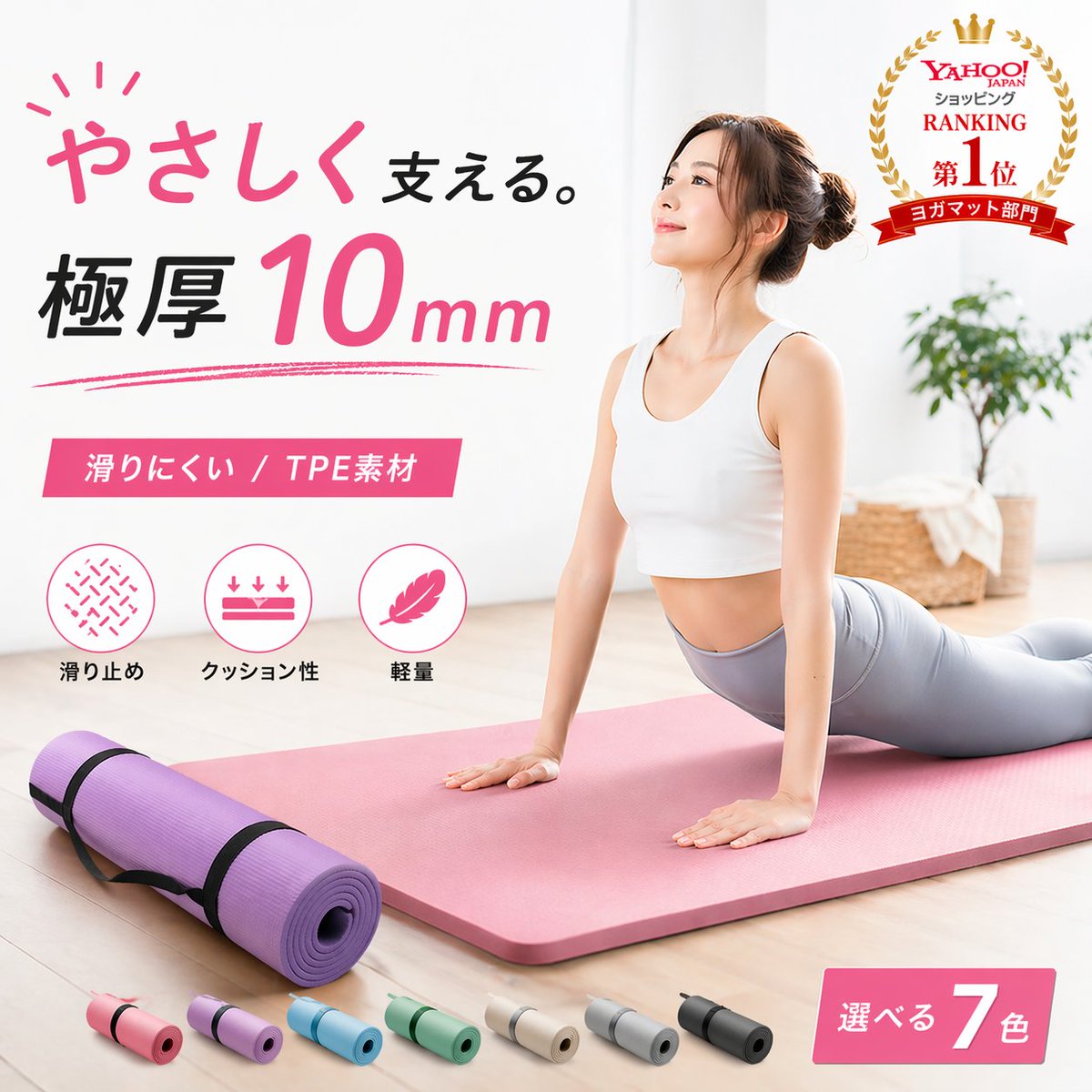
E-Commerce-Anzeige für japanische Yogamatten
Diese Funktion generiert ein professionelles japanisches Hero-Image für einen dicken Yoga-Matte-Shop, ideal für E-Commerce-Angebote, Marktplatzanzeigen und Produktwerbebanner.
Dies ist ein GPT Image 2 -Prompt für Produkt & Vertrieb . Verwenden Sie den unten stehenden, kopierfertigen Prompt, um ähnliche Grafiken zu erstellen, und überprüfen Sie vor der Wiederverwendung Awesome GPT Image 2 Prompts -Quellenangaben sowie die kommerziellen Nutzungsrechte.
Benötigen Sie den vollständigen Prompt-Satz? Verwenden Sie den Produkt & Vertrieb Weitere verwandte Beispiele finden Sie im Themen-Hub oder öffnen Sie die GPT Image 2 Prompt-Katalog für das vollständige Beispielverzeichnis, wiederverwendbare Strukturen und Quellenangaben.
Free 1K preview
Generate one preview image instantly, no sign-up required.
1833/4000
Eingabeaufforderung
Kopierfertige Eingabeaufforderung
Create a clean Japanese e-commerce advertisement image for a premium yoga mat in a bright minimalist home interior. Show every face clearly with natural, detailed facial features, doing an upward-facing dog yoga pose on a thick pastel pink yoga mat placed diagonally across a pale wood floor. She wears a white sports bra and light gray leggings, with her hair in a neat bun. In the left foreground, show 1 rolled purple yoga mat secured with 2 black straps. Along the bottom edge, display exactly 7 small rolled mat color variations in a row: pink, lavender, sky blue, mint green, beige, light gray, and black. Add large Japanese promotional typography on the left in a stylish modern layout: the headline reads "やさしく支える。" with "やさしく" in handwritten pink script and "支える。" in black, followed by a bold large line "極厚 10mm" with "10" oversized in pink and "mm" smaller in pink italic style. Under that, add a pink rectangular banner with white text reading "滑りにくい / TPE素材". Beneath the banner, place exactly 3 circular feature icons with labels in Japanese: 1) a non-slip texture icon labeled "滑り止め", 2) a cushioning icon with downward arrows labeled "クッション性", 3) a feather icon labeled "軽量". In the upper right corner, add a gold laurel award badge with a crown and layered red ribbons, containing the Japanese text "Yahoo! JAPAN ショッピング RANKING 第1位 ヨガマット部門". In the lower right corner, add a pink angled label reading "選べる 7色" with the number 7 large and white. The background should be soft, airy, and high-key with a white wall, natural daylight, and a slightly out-of-focus potted green plant and woven basket on the right side. Use a polished commercial product-photography style, soft shadows, pastel color palette, luxury wellness branding, sharp layout, and realistic materials, suitable for an online marketplace hero image.
Best for
- - Produkt & Vertrieb visual exploration
- - Image generation and reference-image edits
- - Reusable briefs that keep source attribution visible
Change these parts
- - Subject, product, character, or scene
- - Aspect ratio, camera, lighting, and background
- - Brand, text, color, and output constraints
Recommended model and settings
- - Model: gpt-image-2
- - Input mode: Text zu Bild
- - Aspect ratio: source
- - Commercial status: review original source
How to use this prompt
- 1. Copy the prompt and preserve its structure for the first test.
- 2. Replace the subject, context, and publishing channel.
- 3. Change one camera, lighting, or style variable per iteration.
- 4. Inspect the output, source, text, and rights before reuse.
Limitations, source, and reuse cautions
- - Generated output is an editable draft, not factual, legal, or rights evidence.
- - Review the linked source, people, brands, logos, text, and third-party media before commercial use.
Importiert von Awesome GPT Image 2 Prompts . Quellenangabe erforderlich. Status der kommerziellen Nutzung: allowed ; Rechte an der Quelle vor kostenpflichtiger Nutzung prüfen.
Weitere Fälle in dieser Kategorie
Priorisiert nach Kategorie, Kompatibilität der Eingabemodi, Qualität und geringerem Risiko.






Hinweise zur Wiederverwendung und Quellenangabe
Verwenden Sie diese Eingabeaufforderung sicher, nachdem Sie den Fall in der Vorschau angezeigt haben.
- 1.Kopieren Sie die Eingabeaufforderung oder öffnen Sie sie direkt in Dovoo mit der Schaltfläche „Generieren“.
- 2.Passen Sie Variablen, Seitenverhältnis und Referenzbilder an Ihren Anwendungsfall an.
- 3.Vor der Veröffentlichung oder kostenpflichtigen Nutzung sollten Sie die Rechte an der Quelle, die Anforderungen an die Namensnennung sowie die Risiken für die Marke oder das Abbild prüfen.