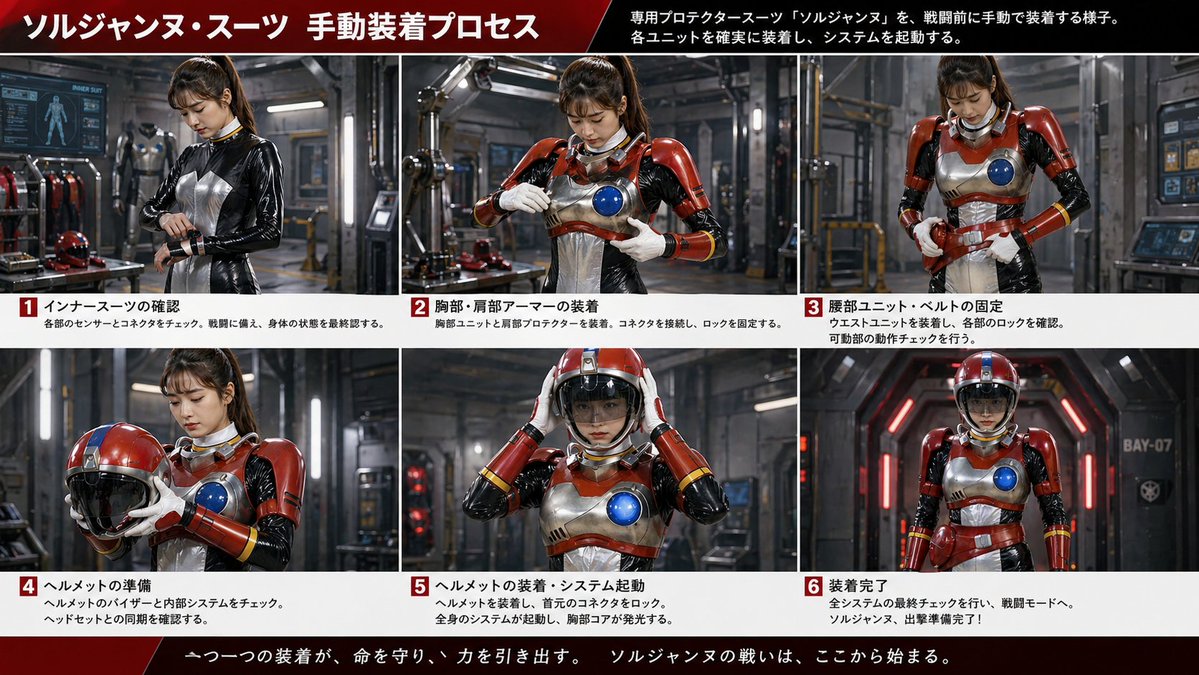
Japanisches Science-Fiction-Anzug-Anziehprozess-Board
Eine filmische, sechsteilige japanische Infografik, die eine weibliche Heldin zeigt, die manuell einen rot-silbernen Kampfanzug anlegt; geeignet für Werbegrafiken im Tokusatsu-Stil oder fiktive Ausrüstungshandbücher.
Dies ist ein GPT Image 2 -Prompt für Grafik & Poster . Verwenden Sie den unten stehenden, kopierfertigen Prompt, um ähnliche Grafiken zu erstellen, und überprüfen Sie vor der Wiederverwendung Awesome GPT Image 2 Prompts -Quellenangaben sowie die kommerziellen Nutzungsrechte.
Benötigen Sie den vollständigen Prompt-Satz? Verwenden Sie den Grafik & Poster Weitere verwandte Beispiele finden Sie im Themen-Hub oder öffnen Sie die GPT Image 2 Prompt-Katalog für das vollständige Beispielverzeichnis, wiederverwendbare Strukturen und Quellenangaben.
Free 1K preview
Generate one preview image instantly, no sign-up required.
4000/4000
Eingabeaufforderung
Kopierfertige Eingabeaufforderung
{
  "composition": "16:9 wide infographic board, six equal photo panels arranged in a 3-by-2 grid, each panel captioned below with a red numbered box from 1 to 6",
  "layout": {
    "footer": {
      "count": 1,
      "design": "dark red cinematic footer strip with centered white Japanese slogan",
      "labels": [
        "一つ一つの装着が、命を守り、力を引き出す。 ソルジャンヌの戦いは、ここから始まる。"
      ]
    },
    "grid": {
      "columns": 3,
      "number_badges": 6,
      "panel_borders": "thin white dividers",
      "panel_count": 6,
      "rows": 2
    },
    "header": {
      "count": 2,
      "design": "wide black-to-red gradient banner across top, large bold white Japanese text, diagonal red accent",
      "labels": [
        "ソルジャンヌ・スーツ 手動装着プロセス",
        "専用プロテクタースーツ『ソルジャンヌ』を、戦闘前に手動で装着する様子。各ユニットを確実に装着し、システムを起動する。"
      ]
    },
    "sections": [
      {
        "count": 1,
        "image": "three-quarter view of the heroine in only the black glossy inner suit, looking down while checking or tightening a wrist connector",
        "labels": [
          "各部のセンサーとコネクタをチェック。戦闘に備え、身体の状態を最終認する。"
        ],
        "position": "top left",
        "title": "1 インナースーツの確認"
      },
      {
        "count": 1,
        "image": "mid shot with chest armor and red shoulder plates installed, heroine fastening the front torso area with both hands",
        "labels": [
          "胸部ユニットと肩部プロテクターを装着。コネクタを接続し、ロックを固定する。"
        ],
        "position": "top-center",
        "title": "2 胸部・肩部アーマーの装着"
      },
      {
        "count": 1,
        "image": "mid shot with torso armor completed, heroine tightening or checking the waist belt and side locks",
        "labels": [
          "ウエストユニットを装着し、各部のロックを確認。可動部の動作チェックを行う。"
        ],
        "position": "top right",
        "title": "3 腰部ユニット・ベルトの固定"
      },
      {
        "count": 1,
        "image": "heroine holding the red helmet in both hands at chest height, showing the glossy black visor",
        "labels": [
          "ヘルメットのバイザーと内部システムをチェック。ヘッドセットとの同期を確認する。"
        ],
        "position": "bottom left",
        "title": "4 ヘルメットの準備"
      },
      {
        "count": 1,
        "image": "heroine placing the helmet onto her head with both hands; blue chest core glowing brightly",
        "labels": [
          "ヘルメットを装着し、直上のコネクタをロック。全身のシステムが起動し、胸部コアが発光する。"
        ],
        "position": "bottom-center",
        "title": "5 ヘルメットの装着・システム起動"
      },
      {
        "count": 1,
        "image": "full-body frontal hero pose in a futuristic corridor, fully suited with helmet on, arms relaxed at sides",
        "labels": [
          "全システムの最終チェックを行い、戦闘モードへ。ソルジャンヌ、出撃準備完了!"
        ],
        "position": "bottom right",
        "title": "6 Wearable device completed"
      }
    ]
  },
  "lighting": "moody workshop lighting with metallic reflections and red accent lights, realistic shadows, cinematic sci-fi atmosphere",
  "style": "cinematic live-action tokusatsu-inspired promotional board, realistic industrial lighting, polished metal surfaces, sharp photographic detail",
  "subject": {
    "character": {
      "age": "young adult",
      "armor": "retro-futuristic protector armor with red shoulder and arm plates, silver breastplate and torso plating, circular blue chest core, red waist unit, white gloves, red forearm guards with yellow stripe accents",
      "gender": "female",
      "hair": "dark brown to black hair tied in a high ponytail with bangs",
      "helmet": "round red-and-silver helmet with black visor",
      "identity": "helmetless heroine during assembly, Show every face clearly with natural, detailed facial features",
      "undersuit": "glossy black skintight inner suit with silver chest panel and white neck ring"
    },
    "environment": {
      "background elements": [
        "metal framework",
        "robotic equipment",
        "tool benches",
        "armor racks",
        "computer monitors",
        "workshop lighting",
        "bay corridor marked BAY-07 in final panel"
      ],
      "location": "high-tech industrial hangar or armor bay"
    }
  },
  "text_rendering": {
    "colors": "white text on black, red, and white info bars; red numbered squares with white numerals",
    "font": "bold sans-serif headline with smaller sans-serif body text",
    "language": "Japanese"
  },
  "theme": "manual pre-battle suit-up sequence for a female hero in a red, silver, black, and blue protector suit",
  "type": "Japanese sci-fi armor dressing-process infographic"
}
Best for
- - Grafik & Poster visual exploration
- - Image generation and reference-image edits
- - Reusable briefs that keep source attribution visible
Change these parts
- - Subject, product, character, or scene
- - Aspect ratio, camera, lighting, and background
- - Brand, text, color, and output constraints
Recommended model and settings
- - Model: gpt-image-2
- - Input mode: Text zu Bild
- - Aspect ratio: source
- - Commercial status: review original source
How to use this prompt
- 1. Copy the prompt and preserve its structure for the first test.
- 2. Replace the subject, context, and publishing channel.
- 3. Change one camera, lighting, or style variable per iteration.
- 4. Inspect the output, source, text, and rights before reuse.
Limitations, source, and reuse cautions
- - Generated output is an editable draft, not factual, legal, or rights evidence.
- - Review the linked source, people, brands, logos, text, and third-party media before commercial use.
Importiert von Awesome GPT Image 2 Prompts . Quellenangabe erforderlich. Status der kommerziellen Nutzung: allowed ; Rechte an der Quelle vor kostenpflichtiger Nutzung prüfen.
Weitere Fälle in dieser Kategorie
Priorisiert nach Kategorie, Kompatibilität der Eingabemodi, Qualität und geringerem Risiko.






Hinweise zur Wiederverwendung und Quellenangabe
Verwenden Sie diese Eingabeaufforderung sicher, nachdem Sie den Fall in der Vorschau angezeigt haben.
- 1.Kopieren Sie die Eingabeaufforderung oder öffnen Sie sie direkt in Dovoo mit der Schaltfläche „Generieren“.
- 2.Passen Sie Variablen, Seitenverhältnis und Referenzbilder an Ihren Anwendungsfall an.
- 3.Vor der Veröffentlichung oder kostenpflichtigen Nutzung sollten Sie die Rechte an der Quelle, die Anforderungen an die Namensnennung sowie die Risiken für die Marke oder das Abbild prüfen.