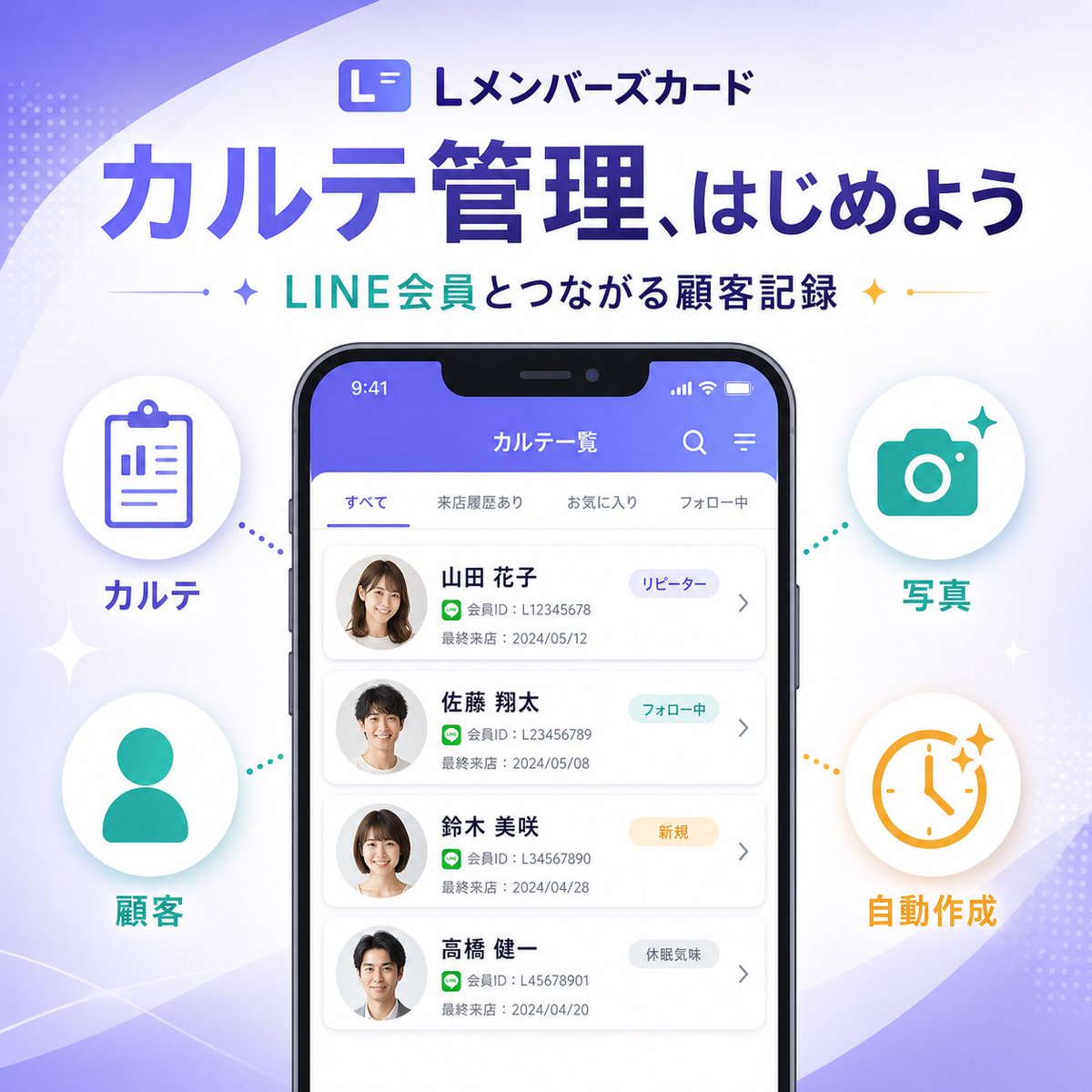
Japanisches SaaS-Feature-Banner
Ein elegantes, quadratisches japanisches SaaS-Marketingbanner mit einem Smartphone-UI-Mockup und vier Infografik-Funktionssymbolen, ideal zur Ankündigung einer neuen Produktfunktion in sozialen Medien oder auf Landingpages.
Dies ist ein GPT Image 2 -Prompt für Grafik & Poster . Verwenden Sie den unten stehenden, kopierfertigen Prompt, um ähnliche Grafiken zu erstellen, und überprüfen Sie vor der Wiederverwendung Awesome GPT Image 2 Prompts -Quellenangaben sowie die kommerziellen Nutzungsrechte.
Free 1K preview
Generate one preview image instantly, no sign-up required.
Eingabeaufforderung
Kopierfertige Eingabeaufforderung
{
  "type": "SaaS feature update promotional infographic banner",
  "style": "clean modern Japanese tech marketing, high-quality infographic, soft gradient background, polished UI mockup, minimal and trustworthy",
  "canvas": {
    "aspect_ratio": "1:1",
    "background": "white base with flowing lavender and pale purple abstract wave shapes in the corners, faint dotted halftone textures, subtle sparkle accents"
  },
  "branding": {
    "top_logo": {
      "icon": "rounded square app icon with a stylized white L on a purple gradient background",
      "text": "Lメンバーズカード"
    },
    "headline": "{argument name=\"headline text\" default=\"カルテ管理、はじめよう\"}",
    "subheadline": "{argument name=\"subheadline text\" default=\"LINE会員とつながる顧客記録\"}",
    "headline_style": "large bold Japanese sans-serif in deep purple",
    "subheadline_style": "medium bold Japanese sans-serif with teal and dark navy emphasis, small star icons and thin divider lines on both sides"
  },
  "layout": {
    "centerpiece": "large front-facing smartphone mockup centered vertically, slightly lower than the headline",
    "sections": [
      {
        "title": "left features",
        "position": "left side of phone",
        "count": 2,
        "labels": [
          "カルテ",
          "Customer"
        ],
        "items": [
          {
            "shape": "white circular badge with soft shadow",
            "icon": "purple clipboard line icon",
            "label": "カルテ",
            "accent": "purple dotted connector pointing toward phone"
          },
          {
            "shape": "white circular badge with soft shadow",
            "icon": "teal person silhouette icon",
            "label": "Customer",
            "accent": "teal dotted connector pointing toward phone"
          }
        ]
      },
      {
        "title": "right features",
        "position": "right side of phone",
        "count": 2,
        "labels": [
          "Photo",
          "Automatically generated"
        ],
        "items": [
          {
            "shape": "white circular badge with soft shadow",
            "icon": "teal camera icon",
            "label": "Photo",
            "accent": "teal dotted connector pointing toward phone"
          },
          {
            "shape": "white circular badge with soft shadow",
            "icon": "orange clock icon with sparkles",
            "label": "Automatically generated",
            "accent": "orange dotted connector pointing toward phone"
          }
        ]
      }
    ],
    "decorations_count": 6
  },
  "app_screen": {
    "screen_title": "カルテ一覧",
    "status_bar": {
      "time": "9:41",
      "battery": true,
      "signal": true
    },
    "top_icons_count": 2,
    "top_icons": [
      "search",
      "menu"
    ],
    "tabs": {
      "count": 4,
      "labels": [
        "すべて",
        "来店履歴あり",
        "お気に入り",
        "フォロー中"
      ],
      "active": "すべて"
    },
    "customer_cards": {
      "count": 4,
      "items": [
        {
          "name": "{argument name=\"customer name 1\" default=\"Yamada Hanako\"}",
          "member_id": "L12345678",
          "last_visit": "2024/05/12",
          "tag": "リピーター",
          "avatar": "blurred female headshot"
        },
        {
          "name": "Sato Shota",
          "member_id": "L123456789",
          "last_visit": "2024/05/08",
          "tag": "フォロー中",
          "avatar": "blurred male headshot"
        },
        {
          "name": "Suzuki Misaki",
          "member_id": "L34567890",
          "last_visit": "2024/04/28",
          "tag": "New User",
          "avatar": "blurred female headshot"
        },
        {
          "name": "Takahashi Kenichi",
          "member_id": "L45678901",
          "last_visit": "2024/04/20",
          "tag": "Inactive User",
          "avatar": "blurred male headshot"
        }
      ]
    },
    "ui_style": "rounded white list cards on a very light gray background, purple app header, subtle shadows, Japanese sans-serif typography"
  },
  "color_palette": {
    "primary": "#5B5CEB to #6C63FF",
    "secondary": "#22C7B8",
    "accent": "#F4B23A",
    "text_dark": "#2B2E5B",
    "white": "#FFFFFF"
  },
  "rendering": "crisp vector-like marketing graphic with realistic smartphone frame, centered balanced composition, premium SaaS launch banner aesthetic"
}
Eingabeaufforderungsvariablen
In der Eingabeaufforderung befinden sich bearbeitbare Argumentplatzhalter mit ihren Standardwerten.
Best for
- - Grafik & Poster visual exploration
- - Image generation and reference-image edits
- - Reusable briefs that keep source attribution visible
Change these parts
- - Subject, product, character, or scene
- - Aspect ratio, camera, lighting, and background
- - Brand, text, color, and output constraints
Recommended model and settings
- - Model: gpt-image-2
- - Input mode: Text zu Bild
- - Aspect ratio: source
- - Commercial status: review original source
How to use this prompt
- 1. Copy the prompt and preserve its structure for the first test.
- 2. Replace the subject, context, and publishing channel.
- 3. Change one camera, lighting, or style variable per iteration.
- 4. Inspect the output, source, text, and rights before reuse.
Limitations, source, and reuse cautions
- - Generated output is an editable draft, not factual, legal, or rights evidence.
- - Review the linked source, people, brands, logos, text, and third-party media before commercial use.
Weitere Fälle in dieser Kategorie
Priorisiert nach Kategorie, Kompatibilität der Eingabemodi, Qualität und geringerem Risiko.






Hinweise zur Wiederverwendung und Quellenangabe
Verwenden Sie diese Eingabeaufforderung sicher, nachdem Sie den Fall in der Vorschau angezeigt haben.
- 1.Kopieren Sie die Eingabeaufforderung oder öffnen Sie sie direkt in Dovoo mit der Schaltfläche „Generieren“.
- 2.Passen Sie Variablen, Seitenverhältnis und Referenzbilder an Ihren Anwendungsfall an.
- 3.Vor der Veröffentlichung oder kostenpflichtigen Nutzung sollten Sie die Rechte an der Quelle, die Anforderungen an die Namensnennung sowie die Risiken für die Marke oder das Abbild prüfen.