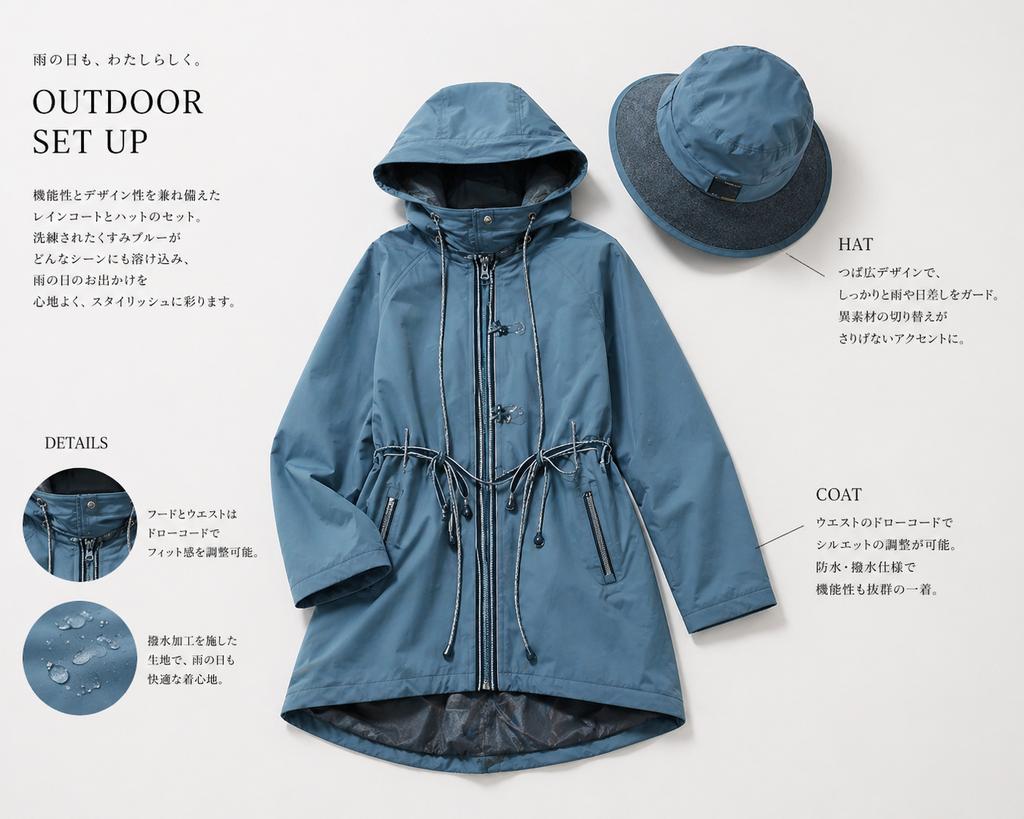
Layout des japanischen Regenbekleidungskatalogs
Diese Funktion generiert ein professionelles japanisches Produktblatt für einen blauen Regenmantel und passenden Hut, ideal für Modekataloge, Marken-Lookbooks oder E-Commerce-Kampagnen.
Dies ist ein GPT Image 2 -Prompt für Mode & Schönheit . Verwenden Sie den unten stehenden, kopierfertigen Prompt, um ähnliche Grafiken zu erstellen, und überprüfen Sie vor der Wiederverwendung Awesome GPT Image 2 Prompts -Quellenangaben sowie die kommerziellen Nutzungsrechte.
Benötigen Sie den vollständigen Prompt-Satz? Verwenden Sie den Mode & Schönheit Weitere verwandte Beispiele finden Sie im Themen-Hub oder öffnen Sie die GPT Image 2 Prompt-Katalog für das vollständige Beispielverzeichnis, wiederverwendbare Strukturen und Quellenangaben.
Free 1K preview
Generate one preview image instantly, no sign-up required.
2038/4000
Eingabeaufforderung
Kopierfertige Eingabeaufforderung
Create a clean, high-end Japanese fashion catalog page on a soft warm light-gray background, featuring a coordinated rainwear set laid flat as a product editorial. The central focus is 1 women's hooded raincoat in a muted dusty blue tone, shown front-facing and neatly arranged with sleeves slightly bent inward. The coat is mid-thigh length with a full front zipper, snap-button storm placket details near the collar, a large structured hood, adjustable drawcords at both the hood and waist, two vertical zip pockets, subtle seam construction, and a slightly longer curved back hem with a darker inner lining visible at the bottom opening. Above and to the right, place 1 matching wide-brim rain hat in the same dusty blue, angled slightly, with a darker contrasting brim underside and a small black tag on the crown. Use soft diffused studio lighting with gentle realistic shadows to give a premium product-photography look.

Add editorial typography and callouts around the products in a minimalist Japanese layout. In the upper left, place a small Japanese tagline reading "雨の日も、わたしらしく。" above a large serif English headline reading "OUTDOOR SET UP". Beneath it, add a short vertical block of Japanese body copy describing the stylish functional raincoat-and-hat set. In the lower left, add a serif subheading "DETAILS" with 2 circular inset detail photos stacked vertically: the top circle shows a close-up of the hood and front fastening area with drawcord hardware; the bottom circle shows water droplets beading on the blue waterproof fabric. To the right of each circle, place short Japanese explanatory text. On the right side of the page, add 2 product callout labels in serif English with thin leader lines: "HAT" near the upper-right hat with a short Japanese description below, and "COAT" near the lower-right side of the coat with a short Japanese description below. Keep the layout airy and balanced, with elegant negative space, refined magazine styling, realistic garment textures, and a modern outdoor-luxury aesthetic.
Best for
- - Mode & Schönheit visual exploration
- - Image generation and reference-image edits
- - Reusable briefs that keep source attribution visible
Change these parts
- - Subject, product, character, or scene
- - Aspect ratio, camera, lighting, and background
- - Brand, text, color, and output constraints
Recommended model and settings
- - Model: gpt-image-2
- - Input mode: Text zu Bild
- - Aspect ratio: source
- - Commercial status: review original source
How to use this prompt
- 1. Copy the prompt and preserve its structure for the first test.
- 2. Replace the subject, context, and publishing channel.
- 3. Change one camera, lighting, or style variable per iteration.
- 4. Inspect the output, source, text, and rights before reuse.
Limitations, source, and reuse cautions
- - Generated output is an editable draft, not factual, legal, or rights evidence.
- - Review the linked source, people, brands, logos, text, and third-party media before commercial use.
Importiert von Awesome GPT Image 2 Prompts . Quellenangabe erforderlich. Status der kommerziellen Nutzung: allowed ; Rechte an der Quelle vor kostenpflichtiger Nutzung prüfen.
Weitere Fälle in dieser Kategorie
Priorisiert nach Kategorie, Kompatibilität der Eingabemodi, Qualität und geringerem Risiko.






Hinweise zur Wiederverwendung und Quellenangabe
Verwenden Sie diese Eingabeaufforderung sicher, nachdem Sie den Fall in der Vorschau angezeigt haben.
- 1.Kopieren Sie die Eingabeaufforderung oder öffnen Sie sie direkt in Dovoo mit der Schaltfläche „Generieren“.
- 2.Passen Sie Variablen, Seitenverhältnis und Referenzbilder an Ihren Anwendungsfall an.
- 3.Vor der Veröffentlichung oder kostenpflichtigen Nutzung sollten Sie die Rechte an der Quelle, die Anforderungen an die Namensnennung sowie die Risiken für die Marke oder das Abbild prüfen.