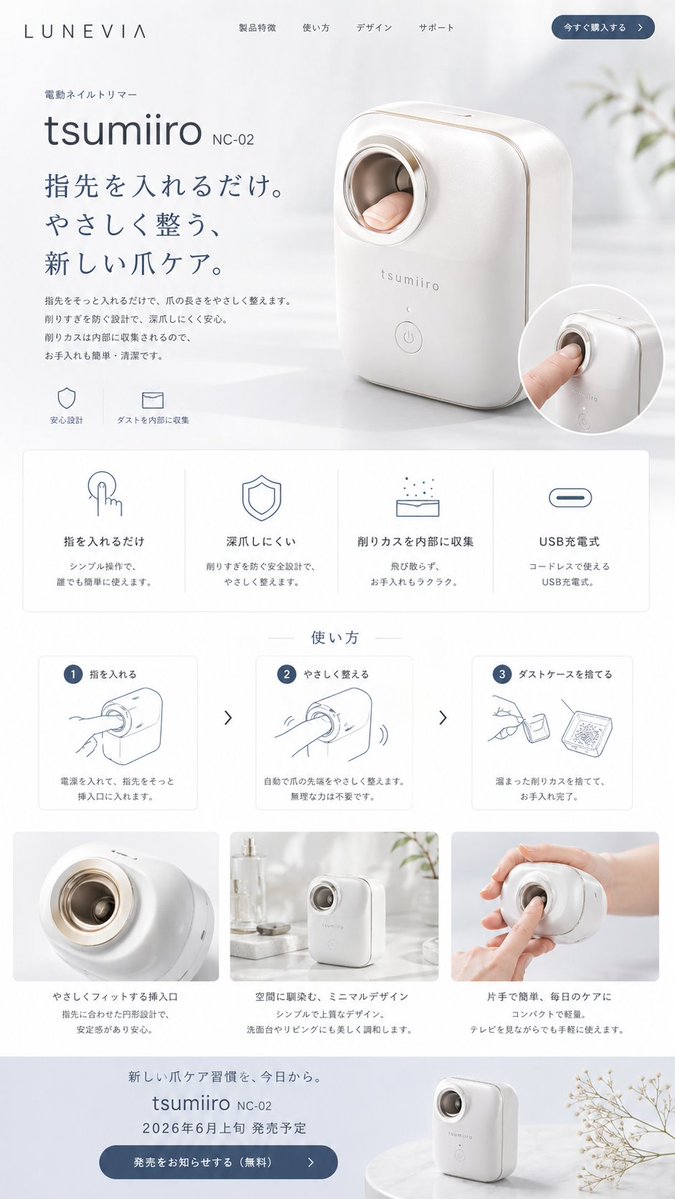
Landingpage für japanische Nageltrimmer
Dadurch wird ein ansprechendes Produktwebseiten-Mockup im japanischen Stil für einen fiktiven automatischen Nageltrimmer generiert, das sich für Konzeptprodukte, Startup-Demos und hochwertige E-Commerce-Präsentationen eignet.
Dies ist ein GPT Image 2 -Prompt für Produkt & Vertrieb . Verwenden Sie den unten stehenden, kopierfertigen Prompt, um ähnliche Grafiken zu erstellen, und überprüfen Sie vor der Wiederverwendung Awesome GPT Image 2 Prompts -Quellenangaben sowie die kommerziellen Nutzungsrechte.
Free 1K preview
Generate one preview image instantly, no sign-up required.
Eingabeaufforderung
Kopierfertige Eingabeaufforderung
{
  "type": "minimal Japanese product landing page mockup",
  "brand": {
    "name": "LUNEVIA"
  },
  "product": {
    "category": "electric nail trimmer",
    "name": "{argument name=\"product name\" default=\"tsumiiro\"}",
    "model": "{argument name=\"model number\" default=\"NC-02\"}",
    "appearance": "compact automatic nail care device with rounded rectangular body, glossy warm white shell, soft champagne-gold trim, circular finger insertion opening with metallic ring, subtle front logo, single round power button near the bottom"
  },
  "style": {
    "overall": "premium, clean, calm, modern Japanese consumer electronics website",
    "palette": "white, soft gray, muted blue-gray, champagne gold accents",
    "lighting": "bright diffused daylight, airy and gentle shadows",
    "background": "minimal interior with sheer white curtains, pale tabletop, faint out-of-focus plant elements"
  },
  "layout": {
    "header": {
      "count": 6,
      "items": [
        "LUNEVIA logo",
        "Product Features",
        "使い方",
        "デザイン",
        "サポート",
        "今すぐ購入する"
      ]
    },
    "hero": {
      "count": 7,
      "items": [
        "small category label 電動ネイルトリマー",
        "large product name {argument name=\"product name\" default=\"tsumiiro\"}",
        "model text {argument name=\"model number\" default=\"NC-02\"}",
        "large Japanese headline {argument name=\"headline text\" default=\"指先を入れるだけ。やさしく整う、新しい爪ケア。\"}",
        "short descriptive paragraph in Japanese",
        "2 small icon captions: 安心設計 and ダストを内部に収集",
        "large three-quarter product photo with a finger inserted plus 1 circular inset close-up image"
      ]
    },
    "feature grid": {
      "title": "none visible",
      "position": "below hero",
      "count": 4,
      "labels": [
        "指を入れるだけ",
        "深爪しにくい",
        "削りカスを内部に収集",
        "USB Rechargeable"
      ],
      "cards": "4 evenly spaced white cards with thin borders, each containing 1 simple line icon, 1 bold heading, and 2 lines of smaller explanatory Japanese text"
    },
    "how to use": {
      "title": "使い方",
      "position": "mid page",
      "count": 3,
      "labels": [
        "1 指を入れる",
        "2 やさしく整える",
        "3 ダストケースを捨てる"
      ],
      "cards": "3 instructional cards with blue numbered circles, simple gray line drawings, and short Japanese descriptions, separated by 2 right-pointing chevrons"
    },
    "lifestyle gallery": {
      "position": "lower middle",
      "count": 3,
      "labels": [
        "close-up insertion opening",
        "device standing on a counter in a bright room",
        "hand holding the device while using it"
      ],
      "captions": [
        "やさしくフィットする挿入口",
        "空間に調和し、ミニマルデザイン",
        "片手で簡単、毎日のケアに"
      ]
    },
    "footer callout": {
      "count": 6,
      "items": [
        "small Japanese tagline about a new nail-care habit",
        "product name and model repeated",
        "release notice in Japanese with date {argument name=\"release date\" default=\"Early June 2026\"}",
        "blue rounded CTA button 発売をお知らせする(無料)",
        "small product photo on a round pedestal",
        "delicate dried flower branch at the right edge"
      ]
    }
  },
  "composition": "tall single-page website screenshot, centered product, generous whitespace, soft rounded panels, subtle shadows, high-end e-commerce presentation"
}
Eingabeaufforderungsvariablen
In der Eingabeaufforderung befinden sich bearbeitbare Argumentplatzhalter mit ihren Standardwerten.
Best for
- - Produkt & Vertrieb visual exploration
- - Image generation and reference-image edits
- - Reusable briefs that keep source attribution visible
Change these parts
- - Subject, product, character, or scene
- - Aspect ratio, camera, lighting, and background
- - Brand, text, color, and output constraints
Recommended model and settings
- - Model: gpt-image-2
- - Input mode: Text zu Bild
- - Aspect ratio: source
- - Commercial status: review original source
How to use this prompt
- 1. Copy the prompt and preserve its structure for the first test.
- 2. Replace the subject, context, and publishing channel.
- 3. Change one camera, lighting, or style variable per iteration.
- 4. Inspect the output, source, text, and rights before reuse.
Limitations, source, and reuse cautions
- - Generated output is an editable draft, not factual, legal, or rights evidence.
- - Review the linked source, people, brands, logos, text, and third-party media before commercial use.
Weitere Fälle in dieser Kategorie
Priorisiert nach Kategorie, Kompatibilität der Eingabemodi, Qualität und geringerem Risiko.






Hinweise zur Wiederverwendung und Quellenangabe
Verwenden Sie diese Eingabeaufforderung sicher, nachdem Sie den Fall in der Vorschau angezeigt haben.
- 1.Kopieren Sie die Eingabeaufforderung oder öffnen Sie sie direkt in Dovoo mit der Schaltfläche „Generieren“.
- 2.Passen Sie Variablen, Seitenverhältnis und Referenzbilder an Ihren Anwendungsfall an.
- 3.Vor der Veröffentlichung oder kostenpflichtigen Nutzung sollten Sie die Rechte an der Quelle, die Anforderungen an die Namensnennung sowie die Risiken für die Marke oder das Abbild prüfen.