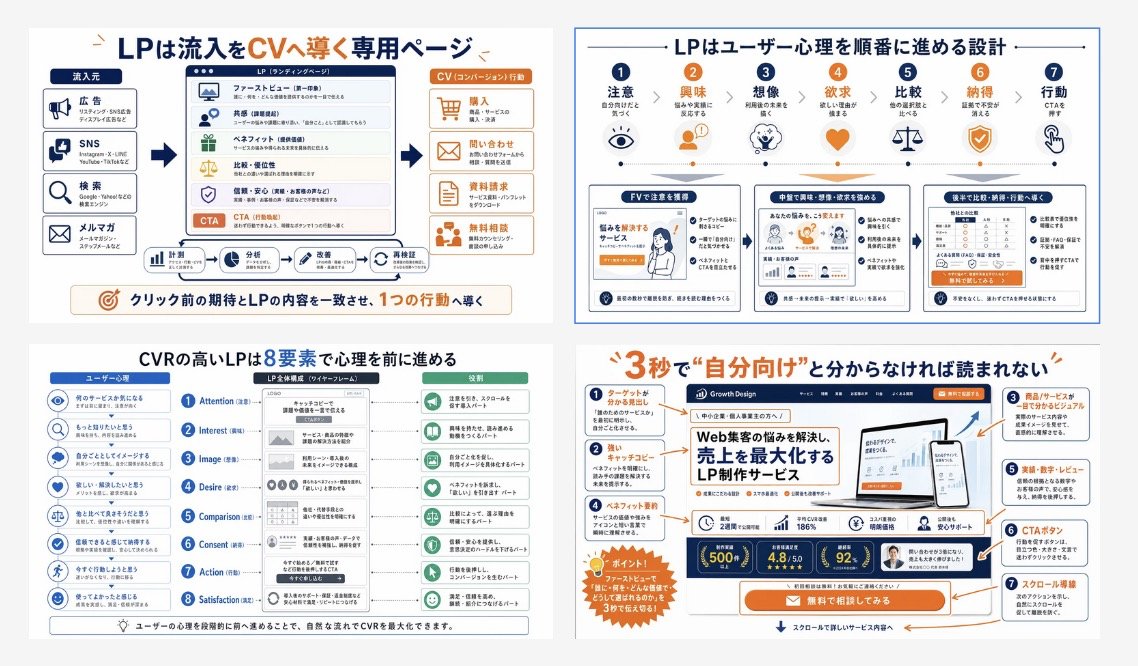
Infografik-Raster zur Umrechnung japanischer LPs
Eine vierteilige japanische Infografik, die die Struktur von Landingpages, die Psychologie der Nutzer und das Conversion-Design für Schulungsmaterialien oder Marketingpräsentationen erklärt.
Dies ist ein GPT Image 2 -Prompt für Grafik & Poster . Verwenden Sie den unten stehenden, kopierfertigen Prompt, um ähnliche Grafiken zu erstellen, und überprüfen Sie vor der Wiederverwendung Awesome GPT Image 2 Prompts -Quellenangaben sowie die kommerziellen Nutzungsrechte.
Free 1K preview
Generate one preview image instantly, no sign-up required.
Eingabeaufforderung
Kopierfertige Eingabeaufforderung
{
  "type": "Japanese landing page education infographic collage",
  "style": "clean corporate training slide, flat vector infographic mixed with UI mockup thumbnails, white background, navy blue and orange accent palette, thin gray dividers, rounded boxes, clear iconography, presentation-ready",
  "language": "Japanese",
  "canvas": {
    "aspect_ratio": "16:9",
    "background": "light gray outer margin with four white infographic panels in a 2x2 grid"
  },
  "layout": {
    "grid": {
      "rows": 2,
      "columns": 2,
      "count": 4
    },
    "sections": [
      {
        "title": "LPは流入をCVへ導く専用ページ",
        "position": "top-left",
        "count": 4,
        "labels": [
          "Traffic source",
          "LP(ランディングページ)",
          "CV(コンバージョン)行動",
          "クリック前の期待とLPの内容を一致させ、1つの行動へ導く"
        ]
      },
      {
        "title": "LPはユーザー心理を順番に進める設計",
        "position": "top-right",
        "count": 7,
        "labels": [
          "Attention",
          "Interest",
          "Imagination",
          "Desire",
          "Comparison",
          "Agreement",
          "Action"
        ]
      },
      {
        "title": "CVRの高いLPは8要素で心理を前に進める",
        "position": "bottom-left",
        "count": 8,
        "labels": [
          "Attention",
          "Interest",
          "Image",
          "Desire",
          "Comparison",
          "Consent",
          "Action",
          "Satisfaction"
        ]
      },
      {
        "title": "3秒で\\\"自分向け\\\"と分からなければ読まれない",
        "position": "bottom-right",
        "count": 7,
        "labels": [
          "ターゲットがわかる見出し",
          "キャッチコピー",
          "商品/サービスが誰でも分かるビジュアル",
          "ベネフィット・実績",
          "実績・数字・レビュー",
          "CTAボタン",
          "スクロール導線"
        ]
      }
    ]
  },
  "panel_details": {
    "top_left": {
      "diagram_type": "conversion funnel explainer",
      "source_count": 4,
      "sources": [
        "Advertisement",
        "SNS",
        "Search",
        "メルマガ"
      ],
      "lp_module_count": 6,
      "lp_modules": [
        "ファーストビュー",
        "Resonance",
        "ベネフィット",
        "比較・優位性",
        "信頼・安心",
        "CTA"
      ],
      "conversion_count": 4,
      "conversions": [
        "Purchase",
        "問い合わせ",
        "Information Request",
        "無料で相談してみる"
      ],
      "footer_flow_count": 5,
      "footer_flows": [
        "Monitoring",
        "Analysis",
        "Improvement Plan",
        "Implementation request",
        "Re-validate"
      ]
    },
    "top_right": {
      "diagram_type": "user psychology progression with icons and three sample LP thumbnails",
      "step_count": 7,
      "steps": [
        {
          "label": "Attention",
          "icon": "eye"
        },
        {
          "label": "Interest",
          "icon": "person"
        },
        {
          "label": "Imagination",
          "icon": "head with spark"
        },
        {
          "label": "Desire",
          "icon": "heart"
        },
        {
          "label": "Comparison",
          "icon": "scales"
        },
        {
          "label": "Agreement",
          "icon": "shield check"
        },
        {
          "label": "Action",
          "icon": "hand clicking"
        }
      ],
      "sample_card_count": 3,
      "sample_cards": [
        "FVで注意を獲得",
        "中盤で興味・想像・欲求を深める",
        "後半で比較・納得・行動へ導線"
      ]
    },
    "bottom_left": {
      "diagram_type": "8-step CVR framework",
      "left_column_count": 8,
      "left_column": "user psychology prompts with blue circular icons",
      "center_column_count": 8,
      "center_column": "LP structure blocks aligned to each stage inside a smartphone-like wireframe",
      "right_column_count": 8,
      "right_column": "green action or reading-state outcomes for each stage",
      "header_labels_count": 3,
      "header_labels": [
        "ユーザー心理",
        "LP全体構成(ワイヤーフレーム)",
        "Role"
      ]
    },
    "bottom_right": {
      "diagram_type": "annotated LP hero critique",
      "headline": "{argument name=\"headline text\" default=\"3秒で\\"自分向け\\"と分からなければ読まれない\"}",
      "annotation_count": 7,
      "annotations": [
        "ターゲットがわかる見出し",
        "キャッチコピー",
        "商品/サービスが誰でも分かるビジュアル",
        "ベネフィット・実績",
        "実績・数字・レビュー",
        "CTAボタン",
        "スクロール導線"
      ],
      "mockup_brand": "{argument name=\"brand name\" default=\"Growth Design\"}",
      "mockup_headline": "{argument name=\"mockup headline\" default=\"Web集客の悩みを解決し、売上を最大化するLP制作サービス\"}",
      "device_count": 2,
      "devices": [
        "desktop monitor",
        "smartphone"
      ],
      "metric_badge_count": 3,
      "metric_badges": [
        "500+",
        "4.8/5.0",
        "92%"
      ],
      "cta_text": "{argument name=\"CTA text\" default=\"無料で相談してみる\"}"
    }
  },
  "visual_notes": {
    "icon_style": "simple line and flat icons in navy, orange, and muted green",
    "typography": "bold Japanese sans-serif headlines, smaller readable body text, emphasis in orange for key words and numbers",
    "composition": "dense but orderly educational poster, each panel framed separately with consistent spacing",
    "quality": "sharp, high-resolution slide suitable for social media post or training manual cover",
    "avoid": "photorealism, messy hand-drawn look, dark background, 3D rendering"
  }
}
Eingabeaufforderungsvariablen
In der Eingabeaufforderung befinden sich bearbeitbare Argumentplatzhalter mit ihren Standardwerten.
Best for
- - Grafik & Poster visual exploration
- - Image generation and reference-image edits
- - Reusable briefs that keep source attribution visible
Change these parts
- - Subject, product, character, or scene
- - Aspect ratio, camera, lighting, and background
- - Brand, text, color, and output constraints
Recommended model and settings
- - Model: gpt-image-2
- - Input mode: Text zu Bild
- - Aspect ratio: source
- - Commercial status: review original source
How to use this prompt
- 1. Copy the prompt and preserve its structure for the first test.
- 2. Replace the subject, context, and publishing channel.
- 3. Change one camera, lighting, or style variable per iteration.
- 4. Inspect the output, source, text, and rights before reuse.
Limitations, source, and reuse cautions
- - Generated output is an editable draft, not factual, legal, or rights evidence.
- - Review the linked source, people, brands, logos, text, and third-party media before commercial use.
Weitere Fälle in dieser Kategorie
Priorisiert nach Kategorie, Kompatibilität der Eingabemodi, Qualität und geringerem Risiko.






Hinweise zur Wiederverwendung und Quellenangabe
Verwenden Sie diese Eingabeaufforderung sicher, nachdem Sie den Fall in der Vorschau angezeigt haben.
- 1.Kopieren Sie die Eingabeaufforderung oder öffnen Sie sie direkt in Dovoo mit der Schaltfläche „Generieren“.
- 2.Passen Sie Variablen, Seitenverhältnis und Referenzbilder an Ihren Anwendungsfall an.
- 3.Vor der Veröffentlichung oder kostenpflichtigen Nutzung sollten Sie die Rechte an der Quelle, die Anforderungen an die Namensnennung sowie die Risiken für die Marke oder das Abbild prüfen.