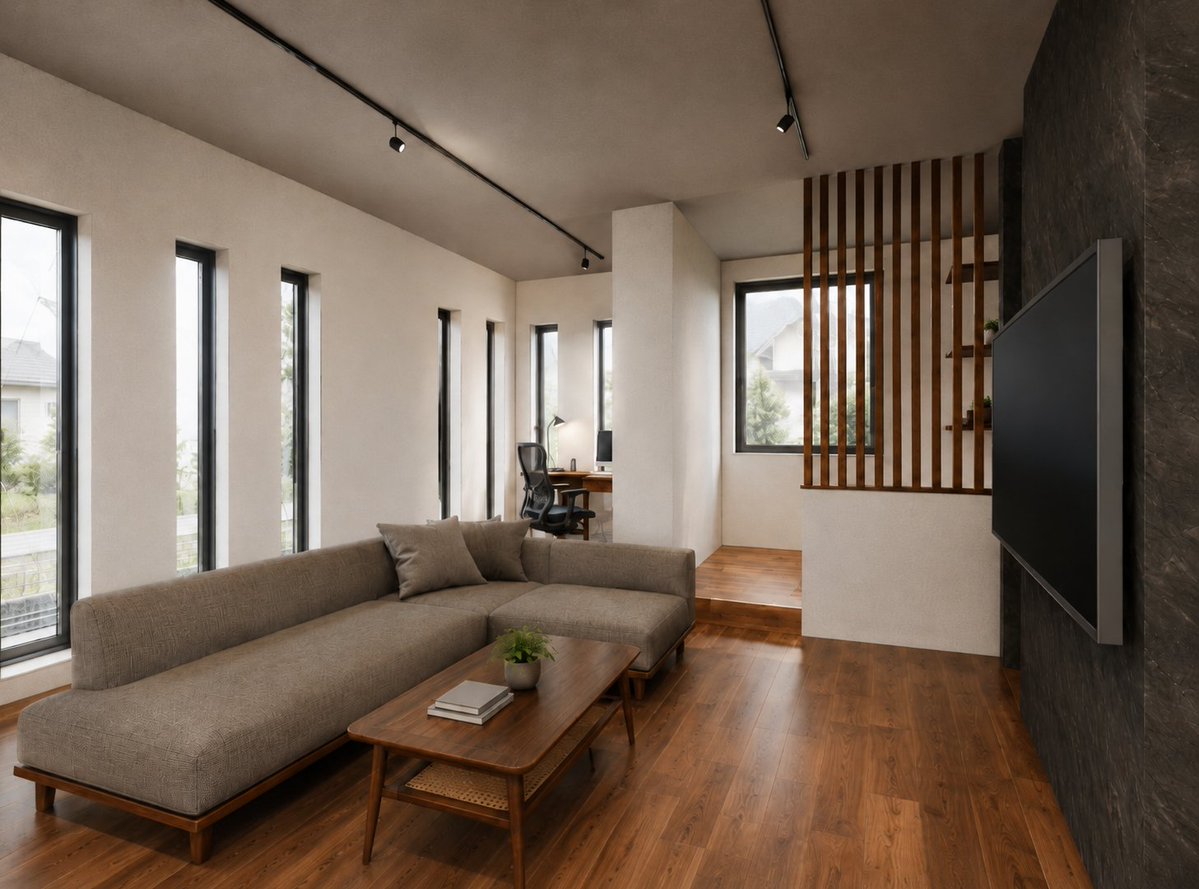
Warm Modern Japanese Living Room Render
A photorealistic prompt for generating a warm minimalist Japanese-style living room with wood floors, slatted partition, sofa, TV wall, and compact work nook.
Dies ist ein GPT Image 2 -Prompt für Innenarchitektur . Verwenden Sie den unten stehenden, kopierfertigen Prompt, um ähnliche Grafiken zu erstellen, und überprüfen Sie vor der Wiederverwendung Awesome GPT Image 2 Prompts -Quellenangaben sowie die kommerziellen Nutzungsrechte.
Benötigen Sie den vollständigen Prompt-Satz? Verwenden Sie den Innenarchitektur Weitere verwandte Beispiele finden Sie im Themen-Hub oder öffnen Sie die GPT Image 2 Prompt-Katalog für das vollständige Beispielverzeichnis, wiederverwendbare Strukturen und Quellenangaben.
Free 1K preview
Generate one preview image instantly, no sign-up required.
2041/4000
Eingabeaufforderung
Kopierfertige Eingabeaufforderung
Create a photorealistic architectural interior rendering of a modern Japanese-inspired living room and small work area, viewed from a fixed wide-angle camera at standing eye level from the front-left corner looking diagonally into the room. The space has warm walnut wood flooring, smooth off-white plaster walls, a muted beige ceiling, and a dark charcoal stone-textured accent wall on the right. Along the left wall place exactly 6 tall narrow vertical windows with black frames, bringing in soft overcast daylight and faint suburban houses and greenery outside. In the foreground place a low, long L-shaped sofa in {argument name="sofa fabric color" default="warm taupe woven fabric"} with wooden legs and exactly 3 visible cushions: one large back cushion section, one chaise seat section, and two loose square throw pillows near the corner. In front of it place a rectangular mid-century wooden coffee table with rounded corners, tapered legs, a lower woven shelf, exactly 2 stacked books, and 1 small potted green plant. On the right accent wall mount 1 large thin flat-screen TV with a dark screen and slim gray side frame. Toward the back center, create a compact raised work nook partially hidden by a white structural wall, with exactly 1 wooden desk, 1 black ergonomic mesh office chair, 1 computer monitor, 1 small desk lamp, and warm wood flooring continuing through the area. At the rear-right, add a decorative partition of exactly 10 vertical wooden slats in front of a large black-framed window, with a small built-in shelf holding exactly 3 tiny decor items or plants. Use black ceiling track lighting with exactly 5 visible spotlights distributed along two tracks, turned on subtly but dominated by natural daylight. Overall style: {argument name="interior style" default="minimal warm modern Japanese with mid-century wood furniture"}, realistic materials, clean uncluttered staging, balanced neutral tones, soft shadows, high-end residential design visualization, no people, no text, no logos, no exaggerated decoration.Eingabeaufforderungsvariablen
In der Eingabeaufforderung befinden sich bearbeitbare Argumentplatzhalter mit ihren Standardwerten.
Variable
sofa fabric color
Standard
warm taupe woven fabric
Variable
interior style
Standard
minimal warm modern Japanese with mid-century wood furniture
Best for
- - Innenarchitektur visual exploration
- - Image generation and reference-image edits
- - Reusable briefs that keep source attribution visible
Change these parts
- - Subject, product, character, or scene
- - Aspect ratio, camera, lighting, and background
- - Brand, text, color, and output constraints
Recommended model and settings
- - Model: gpt-image-2
- - Input mode: Text zu Bild
- - Aspect ratio: source
- - Commercial status: review original source
How to use this prompt
- 1. Copy the prompt and preserve its structure for the first test.
- 2. Replace the subject, context, and publishing channel.
- 3. Change one camera, lighting, or style variable per iteration.
- 4. Inspect the output, source, text, and rights before reuse.
Limitations, source, and reuse cautions
- - Generated output is an editable draft, not factual, legal, or rights evidence.
- - Review the linked source, people, brands, logos, text, and third-party media before commercial use.
Importiert von Awesome GPT Image 2 Prompts . Quellenangabe erforderlich. Status der kommerziellen Nutzung: allowed ; Rechte an der Quelle vor kostenpflichtiger Nutzung prüfen.
Weitere Fälle in dieser Kategorie
Priorisiert nach Kategorie, Kompatibilität der Eingabemodi, Qualität und geringerem Risiko.






Hinweise zur Wiederverwendung und Quellenangabe
Verwenden Sie diese Eingabeaufforderung sicher, nachdem Sie den Fall in der Vorschau angezeigt haben.
- 1.Kopieren Sie die Eingabeaufforderung oder öffnen Sie sie direkt in Dovoo mit der Schaltfläche „Generieren“.
- 2.Passen Sie Variablen, Seitenverhältnis und Referenzbilder an Ihren Anwendungsfall an.
- 3.Vor der Veröffentlichung oder kostenpflichtigen Nutzung sollten Sie die Rechte an der Quelle, die Anforderungen an die Namensnennung sowie die Risiken für die Marke oder das Abbild prüfen.