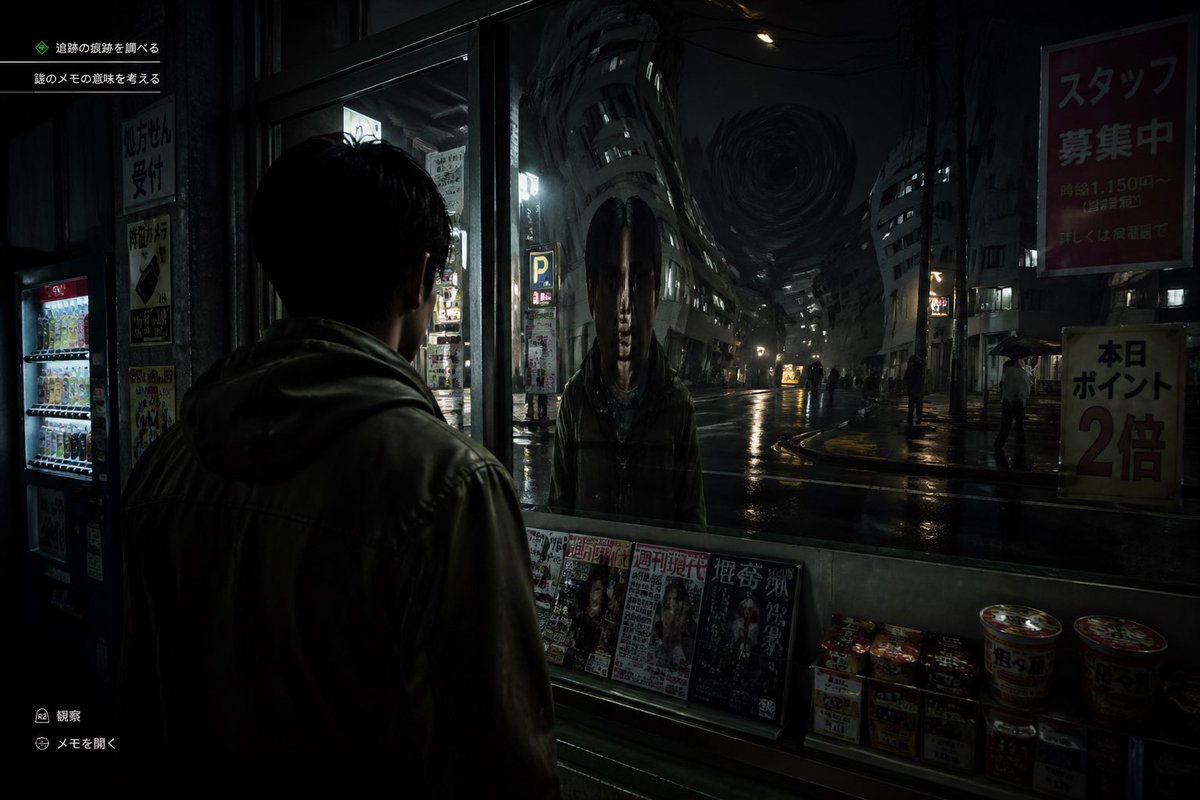
Japanisches Horrorspiel Street Reflection
Diese Eingabeaufforderung erzeugt einen düsteren, ultrarealistischen Screenshot aus einem Survival-Horror-Spiel, der einen Mann zeigt, der in einer regnerischen japanischen Stadtstraße einem verzerrten, geisterhaften Spiegelbild gegenübersteht.
Dies ist ein GPT Image 2 -Prompt für Anime & Spiel . Verwenden Sie den unten stehenden, kopierfertigen Prompt, um ähnliche Grafiken zu erstellen, und überprüfen Sie vor der Wiederverwendung Awesome GPT Image 2 Prompts -Quellenangaben sowie die kommerziellen Nutzungsrechte.
Benötigen Sie den vollständigen Prompt-Satz? Verwenden Sie den Anime & Spiel Weitere verwandte Beispiele finden Sie im Themen-Hub oder öffnen Sie die GPT Image 2 Prompt-Katalog für das vollständige Beispielverzeichnis, wiederverwendbare Strukturen und Quellenangaben.
Free 1K preview
Generate one preview image instantly, no sign-up required.
1623/4000
Eingabeaufforderung
Kopierfertige Eingabeaufforderung
A cinematic Japanese psychological horror game screenshot at night, shown from a third-person over-the-shoulder perspective behind a young man wearing a dark hooded jacket, standing under a convenience store awning and staring into a large front window. In the glass, instead of a normal reflection, there is a terrifying humanoid figure with an unnaturally elongated oval head, long straight black hair hanging down both sides, a pale expressionless face, and a dark coat, standing directly opposite him. Beyond the reflection is a wet urban street in Japan with glossy rain-soaked asphalt, sparse pedestrians holding umbrellas, dim storefronts, vending machines, parking signs, and tall buildings bending inward in a surreal warped perspective toward a dark swirling vortex in the sky at the end of the street. The convenience store window ledge displays exactly 5 visible magazine covers lined up side by side and exactly 8 instant food items or cup noodles stacked on the lower right. Add subtle in-game UI text in Japanese: exactly 2 objective lines in the upper left, and exactly 2 small action prompts in the lower left. Include readable Japanese street posters and shop signs, such as a large red staff recruitment sign on the upper right and a yellow points campaign sign on the lower right. Lighting is extremely dark, moody, and realistic, with reflections, deep shadows, damp textures, and a faint cold glow from interior lights and street lamps. Style: ultra-realistic survival horror video game, unsettling, grounded, detailed, cinematic, high contrast, eerie silence, no exaggerated action, no bright colors.
Best for
- - Anime & Spiel visual exploration
- - Image generation and reference-image edits
- - Reusable briefs that keep source attribution visible
Change these parts
- - Subject, product, character, or scene
- - Aspect ratio, camera, lighting, and background
- - Brand, text, color, and output constraints
Recommended model and settings
- - Model: gpt-image-2
- - Input mode: Text zu Bild
- - Aspect ratio: source
- - Commercial status: review original source
How to use this prompt
- 1. Copy the prompt and preserve its structure for the first test.
- 2. Replace the subject, context, and publishing channel.
- 3. Change one camera, lighting, or style variable per iteration.
- 4. Inspect the output, source, text, and rights before reuse.
Limitations, source, and reuse cautions
- - Generated output is an editable draft, not factual, legal, or rights evidence.
- - Review the linked source, people, brands, logos, text, and third-party media before commercial use.
Importiert von Awesome GPT Image 2 Prompts . Quellenangabe erforderlich. Status der kommerziellen Nutzung: allowed ; Rechte an der Quelle vor kostenpflichtiger Nutzung prüfen.
Weitere Fälle in dieser Kategorie
Priorisiert nach Kategorie, Kompatibilität der Eingabemodi, Qualität und geringerem Risiko.






Hinweise zur Wiederverwendung und Quellenangabe
Verwenden Sie diese Eingabeaufforderung sicher, nachdem Sie den Fall in der Vorschau angezeigt haben.
- 1.Kopieren Sie die Eingabeaufforderung oder öffnen Sie sie direkt in Dovoo mit der Schaltfläche „Generieren“.
- 2.Passen Sie Variablen, Seitenverhältnis und Referenzbilder an Ihren Anwendungsfall an.
- 3.Vor der Veröffentlichung oder kostenpflichtigen Nutzung sollten Sie die Rechte an der Quelle, die Anforderungen an die Namensnennung sowie die Risiken für die Marke oder das Abbild prüfen.